

The product details template is a comprehensive CSV file for bulk uploading products to the Jetpack Product Catalog. This guide covers every field in the template, including required entries for base products and variants, optional attributes like barcodes and packaging, and special configurations for lot tracking, serial numbers, and returns.
Template Overview
The product details template includes two example rows by default: a base product and a 3-variant product. These are provided as formatting reference only. When completing the template:- Use a new row for each base product or variant
- Do not remove any columns, even if you leave them blank
- Keep all column headers exactly as provided
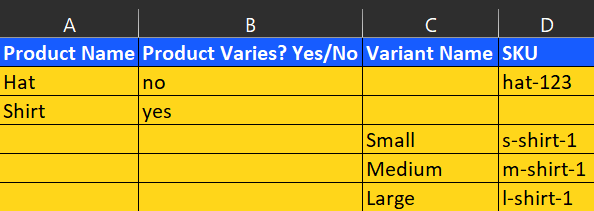
Required Fields
For each product or variant, you must complete the following columns to ensure successful import:The remaining information on the template is optional and can be updated at any time on the SKU’s product details page.
Optional Fields
You can use the optional fields described below when bulk uploading products to the Jetpack Product Catalog.Let’s Dive Deeper
Bulk Updating Product Details
How to use this template
Adding Products
Bulk import workflow
Setting Product Preferences
Understanding product settings
About Barcodes
Barcode formatting best practices
Managing Products
Configure products and SKUs in your catalog
Product Serial Numbers
Track products with unique serial numbers

Questions? Contact Jetpack Care.
If you have any questions or run into issues, you can always contact Jetpack Care for help. Our team is always here to assist via Slack, phone, or email!