

The Managing Your Inventory section provides comprehensive tools for monitoring, organizing, and managing your inventory within the Jetpack dashboard. Track real-time inventory levels, audit adjustments, transfer stock between fulfillment centers, optimize distribution, sync with retailers, and manage inventory disposal.
Accessing Inventory Management Tools
Access all inventory management tools and reports from the Inventory section of your Jetpack dashboard. Click Inventory in the left navigation menu to reveal available options.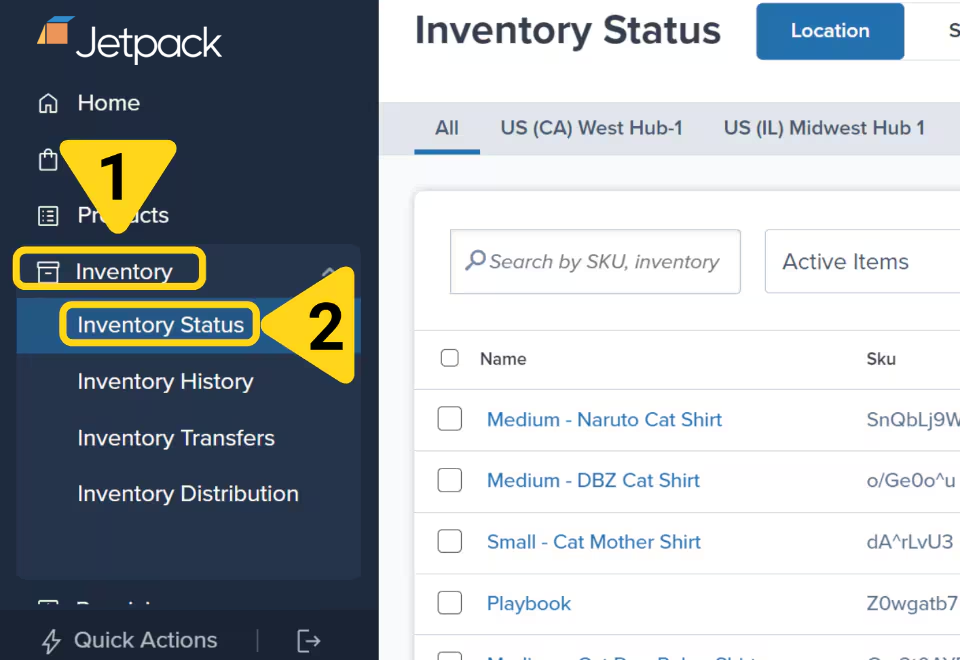
Inventory Management Tools
Inventory Status Page
View real-time inventory data including units On-Hand, Committed, lot numbers, and expiration dates
Inventory History Page
Track and audit all inventory adjustments for your SKUs with detailed records
Inventory Transfers
Transfer inventory between fulfillment centers or to external facilities like Amazon
Inventory Distribution
Analyze customer locations and optimize inventory placement across US fulfillment centers
Inventory Sync by Retailer
Automatically update inventory counts across retailer websites to prevent overselling
Donate + Dispose Inventory
Submit work orders to donate items through GiveNKind or dispose of inventory