

Returns are inevitable in ecommerce, but they don’t have to be complicated. At Jetpack, every returned product follows a path you define—whether it’s a customer return, a package that never reached its destination, or items that need special handling. Our returns system gives you complete control over how returned products are processed, tracked, and restocked, ensuring your inventory investment is protected and your customers receive the service they expect.
Understanding Jetpack Returns
A Return or Return to Sender (RTS) order is a request for Jetpack to process a returned product once it arrives at a fulfillment center, whether it’s returned by the customer or due to a delivery failure. The action Jetpack takes depends on the product’s Return/RTS Preferences. Important: Jetpack does not handle refunds or exchanges; we simply process the inventory according to your Return Preferences.Types of Returns
Jetpack processes two distinct types of returns, each with different workflows and automation:For both return types, you can override default actions by configuring Return and RTS Preferences for each product in your Jetpack dashboard.
Items Not Eligible for Return
The following items are not eligible to be returned to a Jetpack fulfillment center and will be disposed of upon receipt:Navigate the Returns Section
Setting Returns Preferences
Configure how Jetpack processes returned products with customizable return and RTS preferences for restocking, disposal, or quarantine
Creating a Return Order
Submit return orders manually through the dashboard, automatically via integrations, or through the API
Tracking Return Orders
Monitor return order progress through detailed tracking information, status filtering, and advanced search capabilities
Restocking Your Products
Understand how Jetpack inspects and restocks returned products, including special handling for lot-tracked inventory
What Makes Our Returns Different
Jetpack’s returns system is designed to give you control, visibility, and flexibility at every stage of the returns process:We recommend updating your Return and Return to Sender preferences for each product in your Jetpack dashboard, either individually or in bulk. Jetpack is not responsible for products that are returned and disposed of if these preferences are not configured for each product.
The Returns Workflow
Understanding the complete returns workflow helps you set appropriate preferences and track returns efficiently:Key Considerations for Returns Management
When setting up and managing returns, keep these important factors in mind: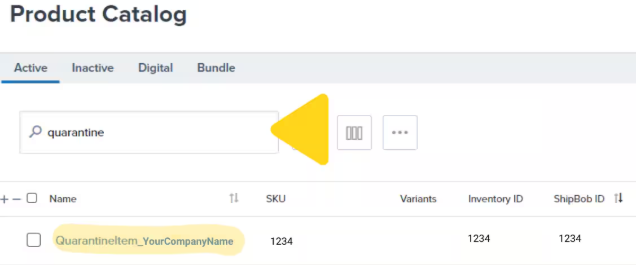
Let’s Dive Deeper
Setting Returns Preferences
Configure return and RTS preferences for each product
Creating a Return Order
Submit return orders manually, via integrations, or API
Tracking Return Orders
Monitor return order progress and status
Restocking Your Products
Understand inspection and restocking for lot-tracked inventory
Setting Product Preferences
Configure all product-level settings including return preferences
Creating + Managing Lot Products
Special considerations for products with expiration dates

Questions? Contact Jetpack Care.
If you have questions about configuring return preferences or need assistance with return orders, contact Jetpack Care via Slack, phone, or email. Our team is always here to help!