> ## Documentation Index
> Fetch the complete documentation index at: https://help.jetpack3pl.com/llms.txt
> Use this file to discover all available pages before exploring further.
# Troubleshooting On-Hold WROs
> Understand UROs (Unidentified Receiving Orders), view on-hold receiving shipments, and link WROs to resolve on-hold inventory.
When a shipment arrives at a Jetpack fulfillment center without proper identification or with discrepancies, it enters on-hold receiving status and generates a URO (Unidentified Receiving Order). Understanding URO scenarios and knowing how to link WROs to resolve these holds ensures your inventory gets processed quickly and avoids additional processing time and fees.
## What Are UROs (Unidentified Receiving Orders)?
UROs are created when shipments can't be immediately matched to an existing WRO in your Jetpack dashboard. When a URO is created, you'll receive an email notification and can view the on-hold shipment details in your dashboard.
**Processing Timeline**: Once you link a WRO to the URO ID, your inventory will be received within 3 business days.
Jetpack will dispose of any un-linked URO automatically after 90 days. Make sure to link your WROs promptly to avoid loss of inventory.
All WROs are marked as complete 28 days after the first box/pallet is delivered to the fulfillment center, even if all boxes/pallets have not arrived. Any box/pallet delivered after this 28-day period will go through the on-hold receiving process.
### URO Pricing
URO processing incurs additional fees. For detailed pricing information, see [Your Pricing](/fulfillment/billing-invoicing/your-pricing).
***
## URO Scenarios: What Creates a URO?
A URO may be created in the following cases:
| Scenario | Details |
| -------------------------------------- | ----------------------------------------------------------------------------------------------------------------------------------------------------------------------------------------------------------------------------------------------------------------------------------------------------------------------------------------------------------------------------------------------- |
| **Missing WRO Information** | Box/pallet arrives with no WRO information or associated tracking number |
| **Excess or Incorrect Inventory** | The quantity of any SKU received is more than 100 units over the expected quantity in the WRO. Jetpack's Operations team will create a URO for the excess inventory. |
| **Return Orders** | - Return orders not properly marked with a tracking ID/Return Merchandise Authorization (RMA)
- Return orders containing items not part of the return order
- **Note**: If fewer than 10 units of the same SKU are not properly marked with the RMA, the return will be disposed of (Jetpack is not liable for returns disposed of due to missing identification)
|
| **Barcode Issues** | Box/pallet arrives with the wrong barcode, or duplicate labels are used on multiple boxes |
| **Unlabeled Items** | Multiple similar SKUs in the same box that are not labeled or barcoded |
| **Digital or Merged Items** | Items marked as digital or merged in the Jetpack dashboard are part of the WRO |
| **Dangerous Goods (DG)/HAZMAT Issues** | A product considered DG/hazmat is included but not configured as DG, or the MSDS sheet is missing from the product details page |
| **WRO Overage** | If a WRO has already been submitted and Jetpack has not received the shipment yet, but you discover that the incoming shipment will contain a greater quantity than expected, you can try [editing the WRO](/fulfillment/sending-inventory/editing-wro) if it qualifies. If unable to edit, create a new WRO and monitor the dashboard/email for the URO. The URO reason will be "WRO Overage." |
| **Duplicate Shipments** | A box with the same label has already been received |
| **Late Shipments** | Boxes/pallets arrive after a WRO is marked as complete (28 days after the first box/pallet is delivered) |
This URO process applies to all fulfillment centers in Europe, the UK, Canada, Australia, and select US locations that do not follow the hub process.
***
## Receiving Overage & URO Process for Hub Locations
For locations that use hubs (in the US), Jetpack's Operations team will create a WRO on your behalf for select scenarios below, instead of creating UROs in your Jetpack dashboard. If Jetpack's Operations team cannot create a WRO on your behalf, UROs will be created for your Jetpack account.
### When Jetpack's Operations Team Will Create a WRO for You
At hub sites, Jetpack's Operations team will create a WRO in your dashboard in these situations:
| Situation | Details |
| ------------------------------------------ | ------------------------------------------------------------------------------------------------------------------------------------------------------------------------------------------------------------------------------------------------------------------------------------------------------------------------------------------------------------------------------------------------------------------------------------------------------------------------------------------------------------------------------------------------------------------------------- |
| **Jetpack Care Manager Approval** | - Jetpack's Operations team received approval from your assigned Jetpack Care Manager so there is no need to include (if you have one)
- For any inbound issues that are complex or fall outside the scenarios included on this list, Jetpack's Operations team will connect with your Jetpack Care Manager
- If you do not have a Jetpack Care Manager, then Jetpack's Operations team will URO the SKU(s)
|
| **WRO Closed by Mistake** | Jetpack's Operations team closed your original WRO by mistake |
| **WRO Overage** | - There was a WRO overage
- If Jetpack's Operations team can identify which SKU the product(s) belong to, they will be checked in with the WRO that the physical units were delivered with
|
| **WRO Status Issues** | The WRO is in the Canceled or Receiving Completed status |
| **Inventory Not on WRO** | Inventory delivered was not on the original WRO |
| **Lot Numbers/Expiration Dates Incorrect** | - Lot numbers/expiration dates are incorrect on the WRO
- Jetpack's Operations team will create a WRO that reflects the lot numbers and expiration dates that are printed on the products received in the WRO
|
| **Incorrect Barcodes** | - There were incorrect barcodes on the products
- In most scenarios, Jetpack's Operations team will URO the product if there are issues with the product's barcode
- Jetpack's Operations team will move forward with the WRO if the products we received from your WRO have a barcode printed on them, but we do not have a barcode recorded for the product in the Jetpack dashboard
- You can update this information in your Jetpack dashboard to ensure barcodes are scanned when Jetpack's Operations team picks the product for orders
|
For more information about receiving overages and UROs, see [Unidentified / On-Hold Shipments (UROs)](/fulfillment/sending-inventory/unidentified-receiving-orders).
***
## Viewing On-Hold Receiving Boxes/Pallets
When one of your boxes/pallets receives an on-hold receiving status, you'll be notified via email. You can view all boxes/pallets that are in on-hold receiving status and their URO ID numbers from the Jetpack dashboard.
In cases where our fulfillment center teams cannot identify the merchant account that the inventory belongs to, the process of linking the box/pallet to the account will take longer and affect processing time and fees applied.
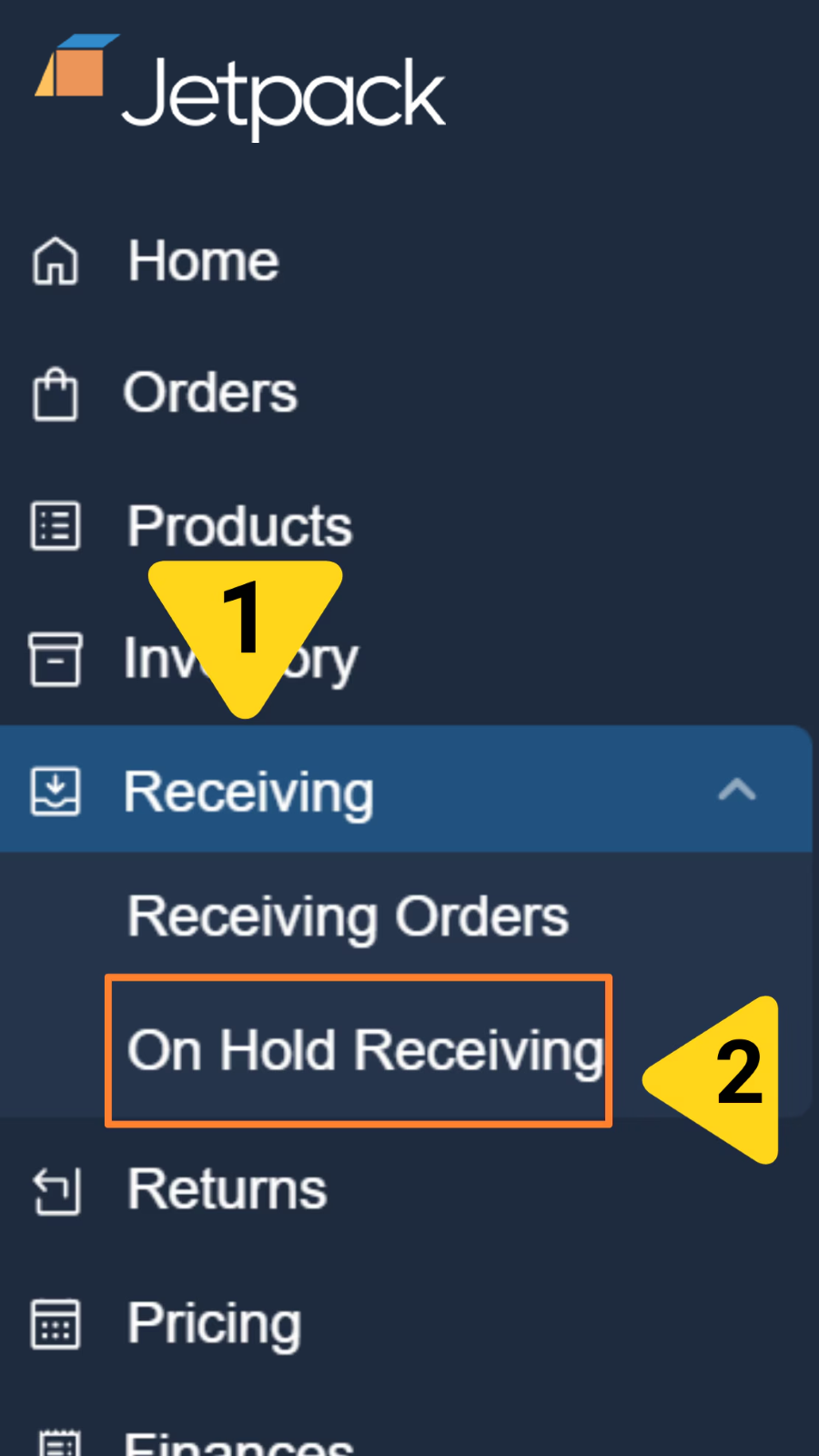
From the Jetpack dashboard:
1. Click **Receiving** in the left-hand navigation
2. Select **On-Hold Receiving** from the additional menu options
 Make sure that the box/pallet belongs to you. Each URO can come with multiple labels and item images that the operations team will update for your review. The images can be reviewed by selecting the highlighted links under each category.
If the items are **not yours**, click on the **Not Me** link under the Action column to un-associate it from your account.
Make sure that the box/pallet belongs to you. Each URO can come with multiple labels and item images that the operations team will update for your review. The images can be reviewed by selecting the highlighted links under each category.
If the items are **not yours**, click on the **Not Me** link under the Action column to un-associate it from your account.
 ***
## Linking a WRO to a URO
To resolve an on-hold receiving box/pallet and process your inventory, you'll need to create a WRO (if one doesn't already exist) and link it to the URO ID.
From the On-Hold Receiving page, locate the URO you want to resolve and click **Link WRO** under the Action column.
Complete the WRO form with your shipment details. **You must include the box number associated with this box/pallet** (this is mandatory).
Only WROs in **Awaiting Arrival** status can be linked to UROs.
Click **Save** to link the WRO to the URO ID. Your inventory will be processed within 3 business days.
Even if the WRO already exists in the Jetpack dashboard but wasn't physically attached to the box/pallet, the box/pallet will move to on-hold receiving status and you will have to link it to the URO ID.
For detailed guidance on creating WROs, see [Creating a Warehouse Receiving Order (WRO)](/fulfillment/sending-inventory/creating-wro).
***
## Let's Dive Deeper
Track and monitor your WROs in the dashboard
Edit WROs when shipment details change
Complete URO prevention and resolution guide
Step-by-step WRO creation process
Seven common mistakes to avoid when creating WROs
Back to the main tools guide
***
## Linking a WRO to a URO
To resolve an on-hold receiving box/pallet and process your inventory, you'll need to create a WRO (if one doesn't already exist) and link it to the URO ID.
From the On-Hold Receiving page, locate the URO you want to resolve and click **Link WRO** under the Action column.
Complete the WRO form with your shipment details. **You must include the box number associated with this box/pallet** (this is mandatory).
Only WROs in **Awaiting Arrival** status can be linked to UROs.
Click **Save** to link the WRO to the URO ID. Your inventory will be processed within 3 business days.
Even if the WRO already exists in the Jetpack dashboard but wasn't physically attached to the box/pallet, the box/pallet will move to on-hold receiving status and you will have to link it to the URO ID.
For detailed guidance on creating WROs, see [Creating a Warehouse Receiving Order (WRO)](/fulfillment/sending-inventory/creating-wro).
***
## Let's Dive Deeper
Track and monitor your WROs in the dashboard
Edit WROs when shipment details change
Complete URO prevention and resolution guide
Step-by-step WRO creation process
Seven common mistakes to avoid when creating WROs
Back to the main tools guide
Questions? Contact Jetpack Care.
If you have any questions or run into issues linking WROs to UROs, you can always contact Jetpack Care for help. Our team is always here to assist via Slack, phone, or email!