> ## Documentation Index
> Fetch the complete documentation index at: https://help.jetpack3pl.com/llms.txt
> Use this file to discover all available pages before exploring further.
# Sending Parcels
> Best practices for shipping parcel inventory to Jetpack fulfillment centers, including box limits, labeling requirements, and tracking guidelines.
Following parcel shipping best practices ensures your shipments arrive on time and are processed efficiently at Jetpack fulfillment centers. This guide covers box limits, labeling requirements, tracking guidelines, and special considerations for smooth receiving.
## Creating Your WRO for Parcels
Before shipping any parcels to Jetpack, you must [create a Warehouse Receiving Order](/fulfillment/sending-inventory/creating-wro). Understanding the WRO process helps ensure smooth shipment creation.
### WRO Process Steps
The WRO creation process consists of 6 steps, and you must complete each step to move forward. However, you can edit details at any time during the process, though changes may affect subsequent steps. Incomplete WROs are automatically saved as drafts on your WRO management page.
WRO drafts allow you to prepare shipments in advance. You can return to edit drafts at any time before final submission, making it easy to stage multiple shipments.
***
## Parcel Shipment Requirements
When shipping parcels to Jetpack, keep these essential requirements in mind to avoid delays or receiving issues:
### Box Quantity Limits
**Maximum 50 boxes per WRO**: Limit your parcel shipments to 50 boxes per [Warehouse Receiving Order (WRO)](/fulfillment/sending-inventory/creating-wro). If you need to send more than 50 boxes, create multiple WROs to accommodate the additional shipments.
This limit helps our receiving teams manage capacity and ensures faster processing for all merchants. Breaking large shipments into multiple WROs also gives you better tracking visibility for each batch.
### Weight Restrictions
**Products Over 50 lbs**: Jetpack can store and ship products weighing more than 50 lbs, but only with written approval in advance. Contact Jetpack Care before sending heavy products to ensure your fulfillment center can accommodate them.
### New Product Variants
**Identical SKUs with Different Variants**: If you're sending a new SKU that's a variant of an existing product (same item, different size/color/configuration), contact Jetpack Care in advance. Providing the Inventory IDs of the existing products may help reduce inbound receiving fees.
***
## Labeling Best Practices
Proper labeling is critical for smooth receiving at fulfillment centers. Follow these guidelines to ensure your shipments are processed correctly:
| Requirement | Details |
| ------------------------------- | ---------------------------------------------------------------------------------------------------------------------------------------------------------------------------------------------------------------------------------------- |
| **WRO Label Placement** | - Secure WRO label on a flat side of each box
- Ensure barcode is visible and scannable
- Avoid placing labels over box seams or edges
|
| **Shipping Label Requirements** | - Include "ATTN: Jetpack" on your shipping label or Bill of Lading
- **Do not add shipper's insurance** to WRO labels (can cause receiving delays)
- Use carrier labels appropriate for your shipping method
|
Clear, scannable labels are essential for efficient receiving. If warehouse teams cannot scan your WRO barcode, your shipment may be moved to [Unidentified Receiving Orders (UROs)](/fulfillment/sending-inventory/unidentified-receiving-orders) for manual processing.
***
## Tracking Number Requirements
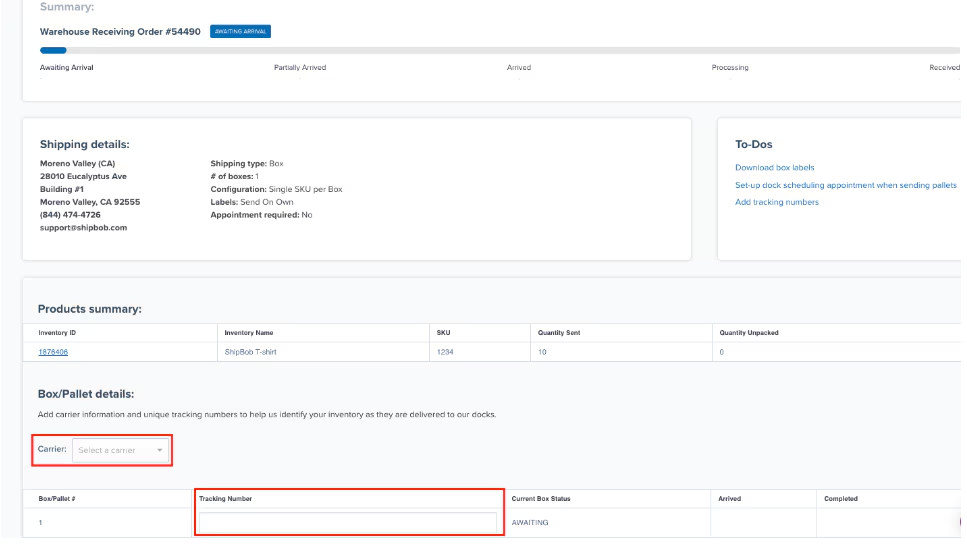
Enter tracking numbers for all parcels as soon as they're available. Accurate tracking information helps Jetpack plan receiving capacity and speeds up processing when your shipment arrives.
### Tracking Number Formats
Different carriers use specific tracking number formats. Make sure you're entering the correct format for your carrier:
| Carrier | Format | Example |
| --------- | --------------------------------------------------------------------------- | ------------------------------------- |
| **USPS** | - 20 digits (no letters)
- 13 alphanumeric characters
| 12345678901234567890 or 1234567890ABC |
| **UPS** | - 18 characters total
- Starts with "1Z", "9", or "T"
| 1Z999AA10123456784 |
| **DHL** | | JD0123456789012345 |
| **FedEx** | | 123456789012 |
Enter **individual tracking numbers** for each box, not master tracking numbers. Master tracking numbers (used for grouped shipments) won't properly update your WRO when individual boxes arrive.
### When to Enter Tracking
Enter tracking numbers **as soon as possible** after creating your shipment labels. Early tracking entry allows Jetpack to:
* Plan receiving capacity based on expected arrival times
* Alert you to potential delays before inventory is needed
* Prioritize processing for urgent shipments
To add tracking numbers to your WRO, see [Managing Warehouse Receiving Orders](/fulfillment/sending-inventory/managing-wro#adding-tracking-numbers-to-your-wro).
 ***
## General Best Practices
Follow these additional best practices to ensure smooth parcel receiving:
| Best Practice | Why It Matters |
| ------------------------------ | ------------------------------------------------- |
| **Label Flat Surfaces** | Barcodes must be scannable without rotating boxes |
| **Include ATTN: Jetpack** | Helps receiving docks route shipments correctly |
| **No Insurance on WRO Labels** | Insurance markings can delay receiving processing |
| **Track All Shipments** | Enables capacity planning and faster receiving |
Jetpack aims to receive and process parcel shipments within 3 business days of arrival at the fulfillment center. Accurate labeling and tracking help us meet this SLA consistently.
***
## Special Considerations
### Dangerous Goods / HAZMAT
If your shipment contains dangerous goods or hazardous materials, you must configure them with a Safety Data Sheet (SDS) **before the shipment arrives**. Learn more about [Dangerous Goods requirements](/fulfillment/goods-policies/dangerous-goods-hazmat).
***
## General Best Practices
Follow these additional best practices to ensure smooth parcel receiving:
| Best Practice | Why It Matters |
| ------------------------------ | ------------------------------------------------- |
| **Label Flat Surfaces** | Barcodes must be scannable without rotating boxes |
| **Include ATTN: Jetpack** | Helps receiving docks route shipments correctly |
| **No Insurance on WRO Labels** | Insurance markings can delay receiving processing |
| **Track All Shipments** | Enables capacity planning and faster receiving |
Jetpack aims to receive and process parcel shipments within 3 business days of arrival at the fulfillment center. Accurate labeling and tracking help us meet this SLA consistently.
***
## Special Considerations
### Dangerous Goods / HAZMAT
If your shipment contains dangerous goods or hazardous materials, you must configure them with a Safety Data Sheet (SDS) **before the shipment arrives**. Learn more about [Dangerous Goods requirements](/fulfillment/goods-policies/dangerous-goods-hazmat).
 ### International Shipments
International parcel shipments require specific customs and shipping documentation to avoid delays:
| Requirement | Details |
| ------------------------ | ------------------------------------------------------------------------------------------------------------------------------------------------------------ |
| **Shipping Terms** |
### International Shipments
International parcel shipments require specific customs and shipping documentation to avoid delays:
| Requirement | Details |
| ------------------------ | ------------------------------------------------------------------------------------------------------------------------------------------------------------ |
| **Shipping Terms** | - Must use **DDP (Delivered Duty Paid)**, not DDU
- Never select "bill receiver" for duties and taxes
|
| **Importer of Record** | - Your company must be listed as the Importer of Record
- Jetpack is the delivery location only, never the importer
|
| **Shipping Labels** | - Purchase shipping labels separately for insurance purposes
- Do not rely on carrier-provided insurance alone
|
| **UK Inbound Shipments** | - CDS (Customs Declaration Service) forms required for merchants not based in the UK
- Ensure proper customs documentation is included
|
If Jetpack receives a carrier invoice for duties, taxes, or shipping fees because of incorrect documentation, the full amount plus a 15% administrative fee will be billed back to your account.
See [Sending Inventory Across Borders](/fulfillment/sending-inventory/best-practices/sending-inventory-across-borders) for complete international shipping requirements.
***
## Let's Dive Deeper
Back to the main guide on our receiving process
Create a Warehouse Receiving Order for parcel shipments
Track your parcel shipments with real-time updates
Prevent receiving issues with proper labeling
Barcode requirements and best practices for inventory
International parcel shipping requirements and customs
***
If you have any questions or run into issues, you can always contact Jetpack Care for help. Our team is always here to assist via Slack, phone, or email!