> ## Documentation Index
> Fetch the complete documentation index at: https://help.jetpack3pl.com/llms.txt
> Use this file to discover all available pages before exploring further.
# Our Approach to Returns
> Learn how Jetpack processes customer returns and RTS shipments with flexible preferences, streamlined workflows, and comprehensive tracking.
Returns are inevitable in ecommerce, but they don't have to be complicated. At Jetpack, every returned product follows a path you define—whether it's a customer return, a package that never reached its destination, or items that need special handling. Our returns system gives you complete control over how returned products are processed, tracked, and restocked, ensuring your inventory investment is protected and your customers receive the service they expect.
## Understanding Jetpack Returns
A Return or Return to Sender (RTS) order is a request for Jetpack to process a returned product once it arrives at a fulfillment center, whether it's returned by the customer or due to a delivery failure. The action Jetpack takes depends on the product's Return/RTS Preferences.
**Important**: Jetpack does not handle refunds or exchanges; we simply process the inventory according to your Return Preferences.
***
## Types of Returns
Jetpack processes two distinct types of returns, each with different workflows and automation:
| Return Type | What It Is | How It's Created | Default Action |
| ----------------------------- | ----------------------------------------------- | ---------------------------------------------------------------------------------------------------------------------------------------------------------------------------------------------------------------------------------------------------------------------------------------------------------------- | ------------------------------------------------------------------------------------------- |
| **Return to Sender (RTS)** | Returns resulting from carrier delivery failure | Automatically created in the Jetpack dashboard once the original order is physically received back at a fulfillment center and an RTS scan appears on the carrier tracking page. If received without an RTS scan, a return with Return Type of Regular is automatically created (if one does not already exist). | Restock unless a different RTS Return Action (e.g., Dispose or Quarantine) has been defined |
| **Customer-Initiated Return** | Returns initiated by your customers | Created manually through the Jetpack dashboard, automatically via a supported integration (such as AfterShip or Loop), or programmatically via the Jetpack API. The return order must be created before the customer sends the product back. | Restock unless a different Return Action is set |
For both return types, you can override default actions by configuring Return and RTS Preferences for each product in your Jetpack dashboard.
***
## Items Not Eligible for Return
The following items are not eligible to be returned to a Jetpack fulfillment center and will be disposed of upon receipt:
| Ineligible Item | Examples |
| ---------------------------------------------- | ------------------------------------------------- |
| **Hazardous materials** | Fertilizers, aerosols, batteries |
| **Food products** | Any consumable food items |
| **Intimate apparel or intimacy-related goods** | Intimate apparel, toys, or intimacy-related goods |
| **Syringes or medical supplies** | Testing/sample kits, collection devices |
| **Medical supplies for fluid collection** | Any products used for collecting bodily fluids |
| **Medicine** | Vitamins and supplements |
Ineligible items received at a Jetpack fulfillment center will be automatically disposed of. Jetpack is not responsible for these items or any associated losses.
***
## Navigate the Returns Section
Configure how Jetpack processes returned products with customizable return and RTS preferences for restocking, disposal, or quarantine
Submit return orders manually through the dashboard, automatically via integrations, or through the API
Monitor return order progress through detailed tracking information, status filtering, and advanced search capabilities
Understand how Jetpack inspects and restocks returned products, including special handling for lot-tracked inventory
***
## What Makes Our Returns Different
Jetpack's returns system is designed to give you control, visibility, and flexibility at every stage of the returns process:
| Feature | How It Benefits You |
| ----------------------------- | ---------------------------------------------------------------------------------------------------------------------- |
| **Flexible Return Actions** | Choose Restock, Dispose, or Quarantine for each product based on your business needs |
| **Custom Inspection Steps** | Define up to 3 inspection steps for returned products to ensure quality standards |
| **Backup Actions** | Automatically handle products that fail inspection or have unclear instructions with your configured backup preference |
| **Multiple Creation Methods** | Create returns manually through the dashboard, automatically via integrations, or programmatically via API |
| **Comprehensive Tracking** | Monitor returns from arrival through processing and completion with detailed status updates |
| **Lot Product Support** | Verification of lot numbers and expiration dates with photo documentation uploaded to Return Details |
| **Quarantine Storage** | Store returned items separately for later sorting, inspection, or removal with full visibility |
| **Label Purchase Options** | Purchase ShipBob Optimized labels, carrier-specific labels, or use prepaid labels from your own carriers |
We recommend updating your Return and Return to Sender preferences for each product in your Jetpack dashboard, either individually or in bulk. Jetpack is not responsible for products that are returned and disposed of if these preferences are not configured for each product.
***
## The Returns Workflow
Understanding the complete returns workflow helps you set appropriate preferences and track returns efficiently:
| Stage | What Happens | Your Actions |
| ---------------------- | ------------------------------------------------------------------------------------- | ------------------------------------------------------------------------------------------------- |
| **1. Configuration** | Set Return Actions (Restock, Dispose, Quarantine) and Backup Actions for each product | Configure return preferences individually or in bulk before returns arrive |
| **2. Return Creation** | Create return order through dashboard, integration, or API | Provide unique Reference ID/RMA (minimum 8 characters) and ensure it's written on outer packaging |
| **3. Shipping** | Customer or carrier ships product back to fulfillment center | Track shipment using carrier tracking number; update tracking in dashboard for prepaid labels |
| **4. Arrival** | Product arrives at fulfillment center and return order status updates to "Arrived" | Monitor Returns page for status updates; return details cannot be edited after arrival |
| **5. Processing** | Operations team inspects product according to your configured steps | Review Return Details page for progress; photo of lot information uploaded for lot products |
| **6. Final Action** | Product is restocked, disposed, or quarantined based on inspection results | Check Invoice section for processing fees; verify restocked inventory appears in Product Catalog |
The RMA must be written on the return order's outer packaging. If missing, the return order may be disposed of, and Jetpack is not liable for such losses. For prepaid labels, provide the tracking number on the return order details page before the order arrives at the fulfillment center.
***
## Key Considerations for Returns Management
When setting up and managing returns, keep these important factors in mind:
| Consideration | What You Need to Know |
| -------------------------------- | --------------------------------------------------------------------------------------------------------------------------------------------------------------------------------------------------------- |
| **Inspection Limitations** | Jetpack cannot plug in electronic devices, disassemble products, re-kit un-kitted items, scan serial numbers, log data in external documents, sort by lot numbers, or take standard product photos |
| **Lot Product Restocking** | Jetpack verifies lot numbers and expiration dates but does not support restocking based on lot numbers. For customer-returned lot products, consider Quarantine or Dispose as the Return Action. |
| **Minimum Shelf Life** | Expired products or those within your configured Minimum Shelf Life settings will not be restocked and will follow your RTS Backup Action |
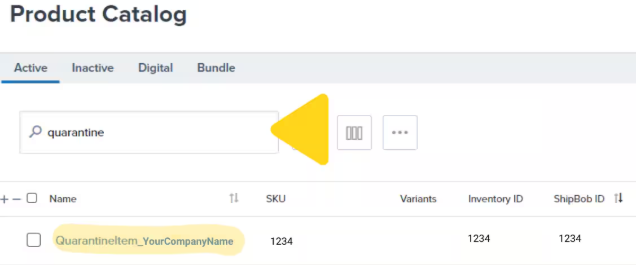
| **Quarantine Responsibility** | You are responsible for removal of quarantined inventory using B2C/B2B orders or disposal work orders; storage fees apply. Search "quarantine" in the Product Catalog to locate quarantined product info. |
| **Kitted Products** | If kitted products are likely to be returned un-kitted, use Dispose or Quarantine as the Return Action since Jetpack cannot re-kit products during returns processing |
| **Ship in Own Container (SIOC)** | Shipping labels on SIOC products are not removed by Jetpack. Set Return/RTS Preferences to Dispose or Quarantine as appropriate |
| **Country Restrictions** | Labels purchased through Jetpack can only be used for return orders within the same country; quarantined units cannot be shipped outside the country of the FC where they are stored |
| **One Return per Package** | Create one return order per package (each box, bubble mailer, or poly mailer) being returned |
| **DG/Hazmat Products** | Purchasing return labels for DG/hazmat products is not supported. Use the Prepaid Label option. |
 ***
## Let's Dive Deeper
Configure return and RTS preferences for each product
Submit return orders manually, via integrations, or API
Monitor return order progress and status
Understand inspection and restocking for lot-tracked inventory
Configure all product-level settings including return preferences
Special considerations for products with expiration dates
***
## Let's Dive Deeper
Configure return and RTS preferences for each product
Submit return orders manually, via integrations, or API
Monitor return order progress and status
Understand inspection and restocking for lot-tracked inventory
Configure all product-level settings including return preferences
Special considerations for products with expiration dates

Questions? Contact Jetpack Care.
If you have questions about configuring return preferences or need assistance with return orders, contact Jetpack Care via Slack, phone, or email. Our team is always here to help!