> ## Documentation Index
> Fetch the complete documentation index at: https://help.jetpack3pl.com/llms.txt
> Use this file to discover all available pages before exploring further.
# Inventory Overview
> Monitor, organize, and manage your inventory with comprehensive tools for tracking status, history, transfers, distribution, and disposal.
The Managing Your Inventory section provides comprehensive tools for monitoring, organizing, and managing your inventory within the Jetpack dashboard. Track real-time inventory levels, audit adjustments, transfer stock between fulfillment centers, optimize distribution, sync with retailers, and manage inventory disposal.
## Accessing Inventory Management Tools
Access all inventory management tools and reports from the Inventory section of your Jetpack dashboard. Click **Inventory** in the left navigation menu to reveal available options.
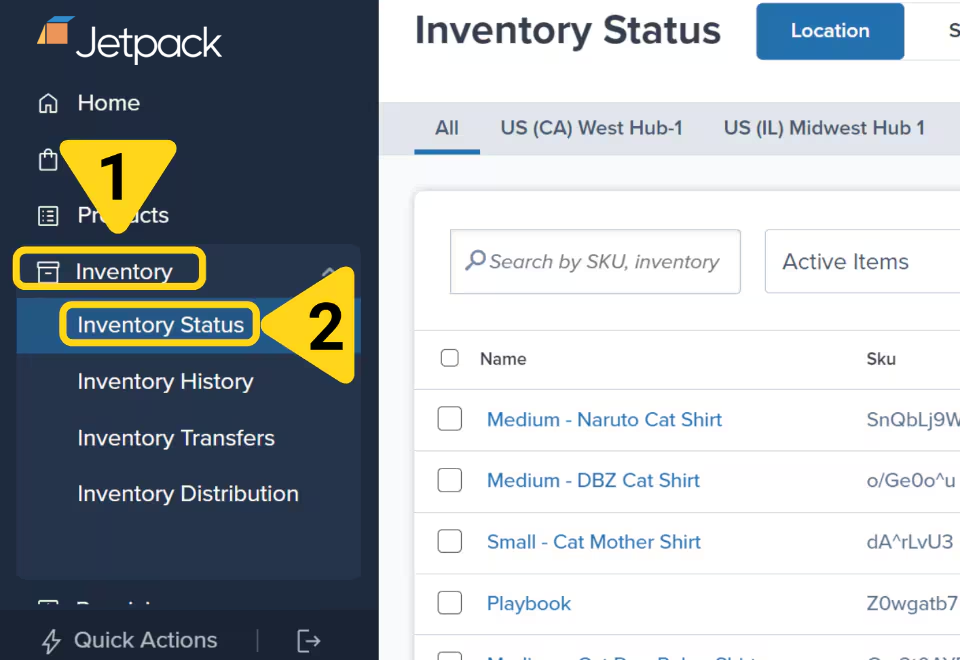 ## Inventory Management Tools
View real-time inventory data including units On-Hand, Committed, lot numbers, and expiration dates
Track and audit all inventory adjustments for your SKUs with detailed records
Transfer inventory between fulfillment centers or to external facilities like Amazon
Analyze customer locations and optimize inventory placement across US fulfillment centers
Automatically update inventory counts across retailer websites to prevent overselling
Submit work orders to donate items through GiveNKind or dispose of inventory
***
## How Inventory Management Works
Jetpack's inventory management system provides real-time visibility into your stock levels across all fulfillment centers. Your inventory data updates automatically as orders are processed, shipments are received, and adjustments are made.
**Inventory Status** - View current inventory levels by location or status, with detailed breakdowns of On-Hand, Committed, Fulfillable, and Sellable quantities
**Inventory History** - Audit trail of every inventory adjustment, including receiving, order fulfillment, transfers, and manual adjustments
**Inventory Distribution** - Data-driven recommendations for optimal inventory placement based on customer order locations and estimated cost savings
**Inventory Transfers** - Move inventory between fulfillment centers to optimize distribution and reduce shipping costs
All inventory data can be filtered, customized, and exported for analysis and reporting.
## Inventory Management Tools
View real-time inventory data including units On-Hand, Committed, lot numbers, and expiration dates
Track and audit all inventory adjustments for your SKUs with detailed records
Transfer inventory between fulfillment centers or to external facilities like Amazon
Analyze customer locations and optimize inventory placement across US fulfillment centers
Automatically update inventory counts across retailer websites to prevent overselling
Submit work orders to donate items through GiveNKind or dispose of inventory
***
## How Inventory Management Works
Jetpack's inventory management system provides real-time visibility into your stock levels across all fulfillment centers. Your inventory data updates automatically as orders are processed, shipments are received, and adjustments are made.
**Inventory Status** - View current inventory levels by location or status, with detailed breakdowns of On-Hand, Committed, Fulfillable, and Sellable quantities
**Inventory History** - Audit trail of every inventory adjustment, including receiving, order fulfillment, transfers, and manual adjustments
**Inventory Distribution** - Data-driven recommendations for optimal inventory placement based on customer order locations and estimated cost savings
**Inventory Transfers** - Move inventory between fulfillment centers to optimize distribution and reduce shipping costs
All inventory data can be filtered, customized, and exported for analysis and reporting.