> ## Documentation Index
> Fetch the complete documentation index at: https://help.jetpack3pl.com/llms.txt
> Use this file to discover all available pages before exploring further.
# Gift Notes (Standard + Premium)
> Add Standard or Premium gift notes to customer orders with customizable images and messages for a personalized unboxing experience.
Transform your customer experience with gift notes that add a personal touch to every order. Jetpack offers two gift note options: Standard (monochrome thermal labels) and Premium (full-color printed cards). Choose the option that best fits your brand and budget.
This feature is exclusively available to merchants who meet certain eligibility criteria. To learn more about pricing and enablement, please reach out to your Jetpack Care Manager.
***
## Gift Note Options
Jetpack offers two mutually exclusive gift note options. Select the one that aligns with your brand and customer experience goals.
## Standard Gift Notes
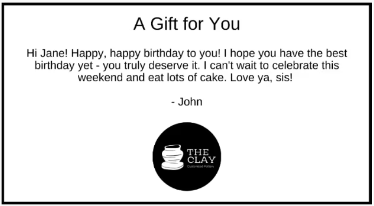 Standard gift notes are economical monochrome cards printed on direct thermal label stock. They're available at all Jetpack fulfillment centers and provide a cost-effective way to include personalized messages with orders.
### Standard Gift Note Specifications
| Specification | Details |
| ------------------- | -------------------------------------------------------------------------------------------------------------------------- |
| **Availability** | All Jetpack fulfillment centers |
| **Printed on** | Direct thermal label stock |
| **Size** | 4 x 6 inches (10 x 15 centimeters) |
| **Color** | Monochrome, black and white |
| **Font** | Zebra Font 0 (font and ink color cannot be changed) |
| **Ink color** | Black |
| **Character limit** | 450 max characters and a maximum of 10 lines per message |
| **Text formatting** |
Standard gift notes are economical monochrome cards printed on direct thermal label stock. They're available at all Jetpack fulfillment centers and provide a cost-effective way to include personalized messages with orders.
### Standard Gift Note Specifications
| Specification | Details |
| ------------------- | -------------------------------------------------------------------------------------------------------------------------- |
| **Availability** | All Jetpack fulfillment centers |
| **Printed on** | Direct thermal label stock |
| **Size** | 4 x 6 inches (10 x 15 centimeters) |
| **Color** | Monochrome, black and white |
| **Font** | Zebra Font 0 (font and ink color cannot be changed) |
| **Ink color** | Black |
| **Character limit** | 450 max characters and a maximum of 10 lines per message |
| **Text formatting** | - Text will auto-wrap if needed
- You can use line breaks
- Emojis are not currently supported
|
| **Logo** | You can add a single 100 x 100 pixel (1 x 1 inches or 2.54 x 2.54 centimeters) black and white monochrome image |
| **Logo location** | Bottom center |
## Premium Gift Notes
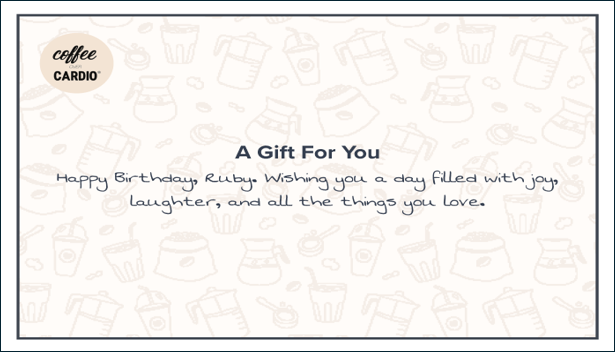 Premium gift notes are full-color printed cards on high-quality postcard stock. They support custom background images and are available at US Jetpack fulfillment centers for a premium unboxing experience.
### Premium Gift Note Specifications
| Specification | Details |
| -------------------- | ------------------------------------------------------------------------------------------------------------------------------------------------------------------------------------------------------------------------------------------------------------------------------------------------------------------------------------------------------------------------------------------------------------------------------------------------------------------------------------------------------------ |
| **Availability** | US Jetpack fulfillment centers |
| **Printed on** | 65# Cover Rolland Opaque postcard style paper |
| **Size** | 4.1 x 6 inches (10 x 15 centimeters) |
| **Color** | Printed in full color |
| **Font** | Premium Ultra 10 font |
| **Font size** | 14pt |
| **Line spacing** | 19pt vertical spacing |
| **Ink color** | Navy (#000080) |
| **Character limit** | 450 max characters and 10 lines max per message |
| **Text formatting** |
Premium gift notes are full-color printed cards on high-quality postcard stock. They support custom background images and are available at US Jetpack fulfillment centers for a premium unboxing experience.
### Premium Gift Note Specifications
| Specification | Details |
| -------------------- | ------------------------------------------------------------------------------------------------------------------------------------------------------------------------------------------------------------------------------------------------------------------------------------------------------------------------------------------------------------------------------------------------------------------------------------------------------------------------------------------------------------ |
| **Availability** | US Jetpack fulfillment centers |
| **Printed on** | 65# Cover Rolland Opaque postcard style paper |
| **Size** | 4.1 x 6 inches (10 x 15 centimeters) |
| **Color** | Printed in full color |
| **Font** | Premium Ultra 10 font |
| **Font size** | 14pt |
| **Line spacing** | 19pt vertical spacing |
| **Ink color** | Navy (#000080) |
| **Character limit** | 450 max characters and 10 lines max per message |
| **Text formatting** | - Text will auto-wrap if needed
- You can use line breaks
- Emojis are not currently supported
|
| **Background image** | - You can add a full background image (over which the gift message will be printed)
- **Portrait oriented:** Image must have pixel dimensions of 1230 x 1800 pixels with 300 dots per image (4.1 x 6 inches or 10 x 15 centimeters)
- **Landscape oriented:** Image must have pixel dimensions of 1800 x 1230 pixels with 300 dots per image (6 x 4.1 inches or 15 x 10 centimeters)
- There must be a 0.25-inch (0.635-centimeter) white border on all sides of the image
|
| **Templates** | - [Download portrait orientation gift note template](#)
- [Download landscape orientation gift note template](#)
|
Gift notes are not supported for products configured to Ship in Own Container (SIOC), and you will not receive fees if a gift note is included on the order details page.
***
## Gift Note Pricing
| Gift Note Type | Per Gift Note Printed |
| ---------------------- | ---------------------------------------- |
| **Standard Gift Note** | USD \$0.50 |
| **Premium Gift Note** | Please use Slack or email to learn more. |
You are subject to a 3% credit card processing fee if you meet certain criteria outlined in your pricing agreement.
***
## Enabling Gift Notes
You can enable either Standard or Premium gift notes in your Jetpack dashboard. Only one option can be enabled at a time.
From the Customize Order Documents page, click **Manage Gift Notes** (hyperlinked).
You will be redirected to the Gift Notes page.
Click **Standard Gift Notes** or **Premium Gift Notes**. The selected section will expand.
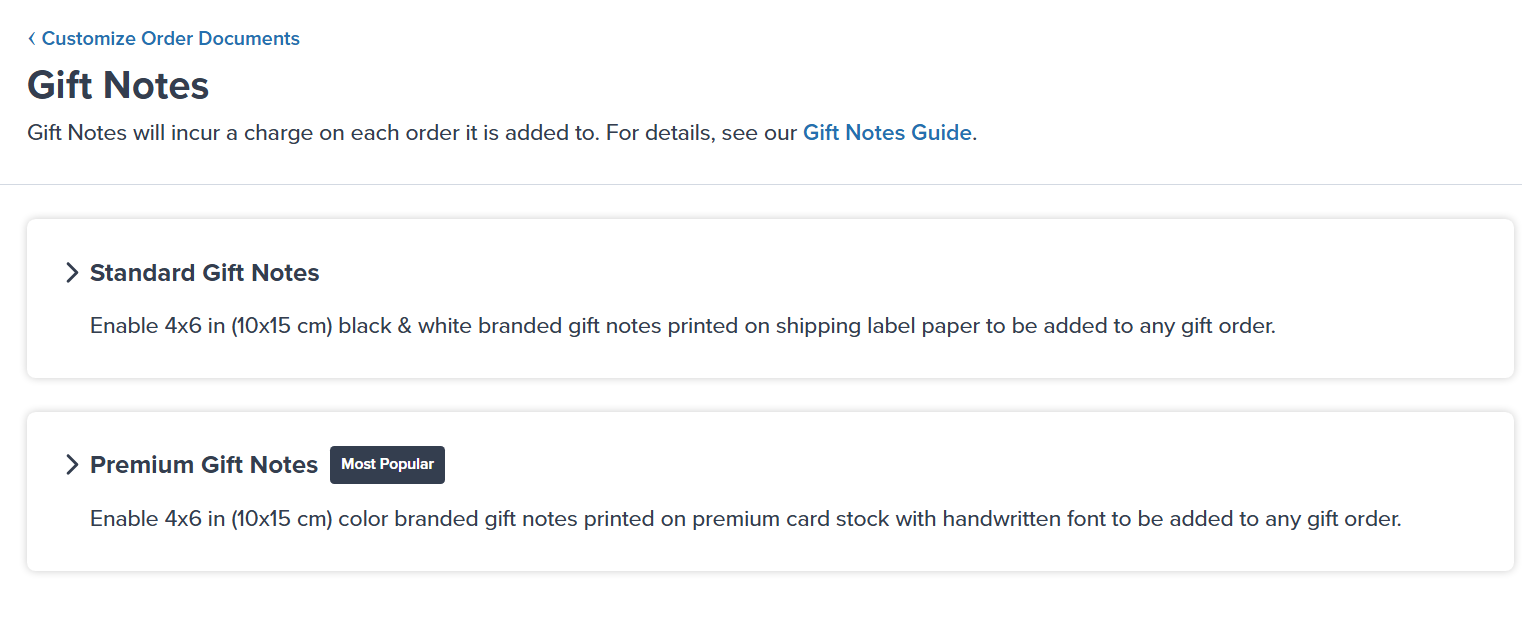 Continue with the section below based on the type of gift note you want to offer to your customers.
You can only have one option enabled at once.
### Enabling Standard Gift Notes
## Steps to Enable Standard Gift Notes
Standard gift notes do not require a logo. If you choose to add one, upload a 100 x 100 pixel (1 x 1 inches or 2.54 x 2.54 centimeters) black and white monochrome image.
The logo will appear at the bottom center of the gift note.
Click the toggle icon next to **Disabled** to enable Standard gift notes.
You will receive a success message confirming the feature is enabled.
You can now add gift messages to individual orders through your Jetpack dashboard or integrated e-commerce platform.
## Steps to Enable Premium Gift Notes
Premium gift notes require a full background image. Upload an image that meets the specifications:
* **Portrait:** 1230 x 1800 pixels (4.1 x 6 inches or 10 x 15 centimeters)
* **Landscape:** 1800 x 1230 pixels (6 x 4.1 inches or 15 x 10 centimeters)
* 300 dots per image
* 0.25-inch (0.635-centimeter) white border on all sides
Download the appropriate template to ensure your design meets requirements.
Click the toggle icon next to **Disabled** to enable Premium gift notes.
You will receive a success message confirming the feature is enabled.
You can now add gift messages to individual orders through your Jetpack dashboard or integrated e-commerce platform.
***
## Adding Gift Notes to Orders
Once gift notes are enabled, you can add personalized messages to customer orders.
### Steps to Add Gift Notes to Orders
Gift notes can be added through your integrated e-commerce platform or directly in the Jetpack dashboard when creating or editing orders. The gift message will be included in the order details and printed when the order is fulfilled.
Your enabled gift note type (Standard or Premium) will automatically apply to all orders that include a gift message.
***
## Disabling Gift Notes
You can disable Standard or Premium gift notes at any time in your Jetpack dashboard.
Once disabled, all orders for which Jetpack has not started the fulfillment process (i.e., are not yet picked) will not receive a gift note.
From the Customize Order Documents page, click **Manage Gift Notes** (hyperlinked).
You will be redirected to the Gift Notes page.
Select **Standard Gift Notes** or **Premium Gift Notes** (depending on the gift note you have enabled).
Continue with the section below based on the type of gift note you want to offer to your customers.
You can only have one option enabled at once.
### Enabling Standard Gift Notes
## Steps to Enable Standard Gift Notes
Standard gift notes do not require a logo. If you choose to add one, upload a 100 x 100 pixel (1 x 1 inches or 2.54 x 2.54 centimeters) black and white monochrome image.
The logo will appear at the bottom center of the gift note.
Click the toggle icon next to **Disabled** to enable Standard gift notes.
You will receive a success message confirming the feature is enabled.
You can now add gift messages to individual orders through your Jetpack dashboard or integrated e-commerce platform.
## Steps to Enable Premium Gift Notes
Premium gift notes require a full background image. Upload an image that meets the specifications:
* **Portrait:** 1230 x 1800 pixels (4.1 x 6 inches or 10 x 15 centimeters)
* **Landscape:** 1800 x 1230 pixels (6 x 4.1 inches or 15 x 10 centimeters)
* 300 dots per image
* 0.25-inch (0.635-centimeter) white border on all sides
Download the appropriate template to ensure your design meets requirements.
Click the toggle icon next to **Disabled** to enable Premium gift notes.
You will receive a success message confirming the feature is enabled.
You can now add gift messages to individual orders through your Jetpack dashboard or integrated e-commerce platform.
***
## Adding Gift Notes to Orders
Once gift notes are enabled, you can add personalized messages to customer orders.
### Steps to Add Gift Notes to Orders
Gift notes can be added through your integrated e-commerce platform or directly in the Jetpack dashboard when creating or editing orders. The gift message will be included in the order details and printed when the order is fulfilled.
Your enabled gift note type (Standard or Premium) will automatically apply to all orders that include a gift message.
***
## Disabling Gift Notes
You can disable Standard or Premium gift notes at any time in your Jetpack dashboard.
Once disabled, all orders for which Jetpack has not started the fulfillment process (i.e., are not yet picked) will not receive a gift note.
From the Customize Order Documents page, click **Manage Gift Notes** (hyperlinked).
You will be redirected to the Gift Notes page.
Select **Standard Gift Notes** or **Premium Gift Notes** (depending on the gift note you have enabled).
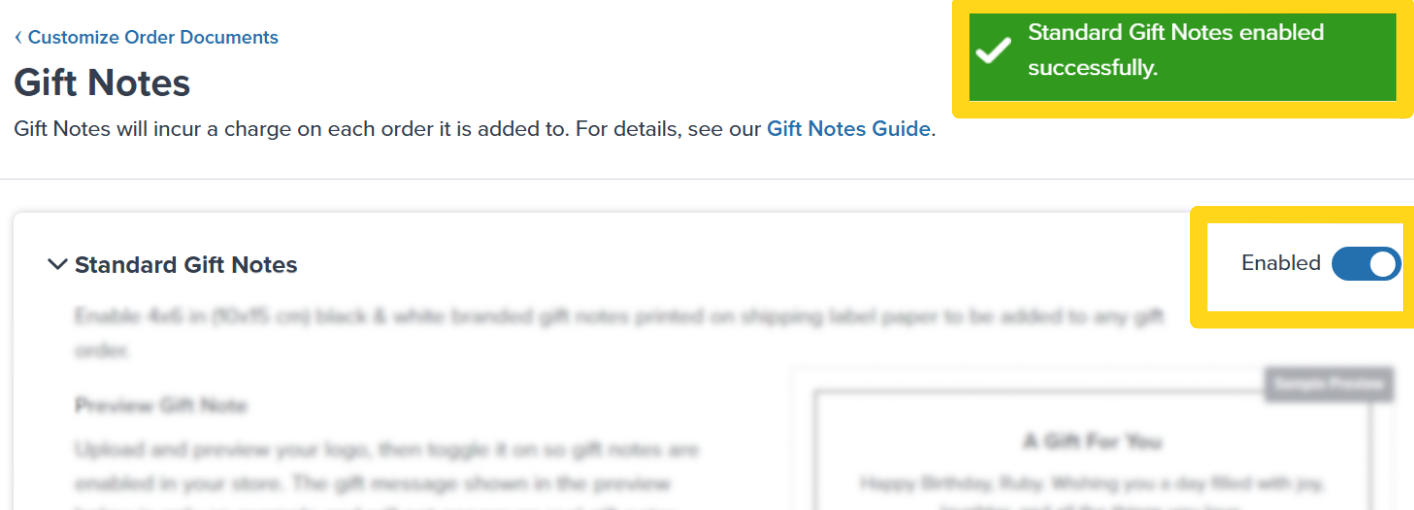 Click the toggle icon next to **Enabled**.
You will receive a success message, and the toggle icon will turn gray and update to **Disabled**. Your previous gift note settings will remain configured if you choose to enable the feature later.
Click the toggle icon next to **Enabled**.
You will receive a success message, and the toggle icon will turn gray and update to **Disabled**. Your previous gift note settings will remain configured if you choose to enable the feature later.
 ***
## Deleting Gift Note Images
You can delete and replace the logo (Standard) or background image (Premium) associated with your gift notes.
From the Customize Order Documents page, click **Manage Gift Notes** (hyperlinked).
You will be redirected to the Gift Notes page.
Select **Standard Gift Notes** or **Premium Gift Notes** (depending on the gift note you have enabled).
* **Standard gift notes:** You are not required to have an image. If you do not provide a new image, your Standard gift notes will print without a logo.
* **Premium gift notes:** You are required to have an image. Removing the image will disable the feature, and you must re-enable it once you have provided a new background image.
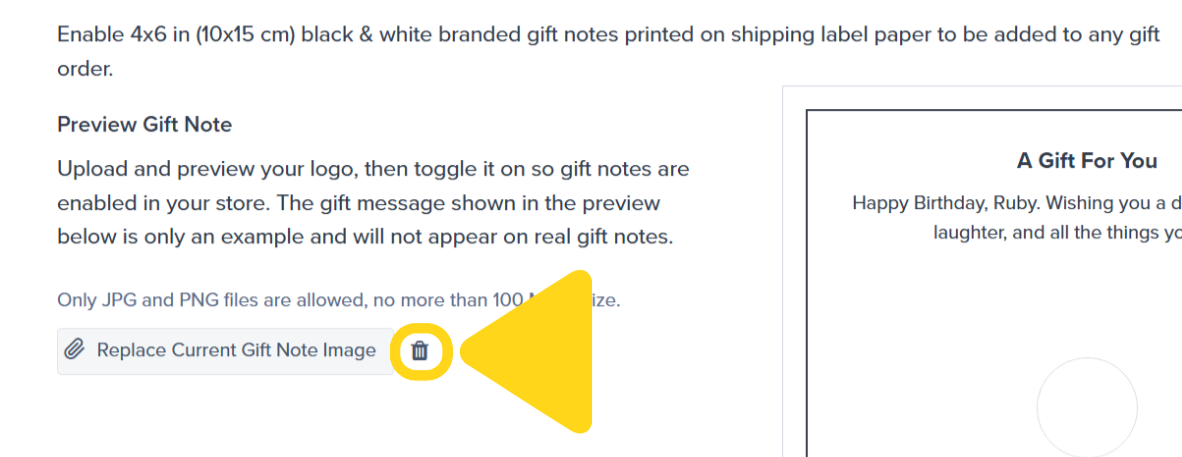
Click the trash can/bin icon next to **Replace Current Gift Note Image**.
***
## Deleting Gift Note Images
You can delete and replace the logo (Standard) or background image (Premium) associated with your gift notes.
From the Customize Order Documents page, click **Manage Gift Notes** (hyperlinked).
You will be redirected to the Gift Notes page.
Select **Standard Gift Notes** or **Premium Gift Notes** (depending on the gift note you have enabled).
* **Standard gift notes:** You are not required to have an image. If you do not provide a new image, your Standard gift notes will print without a logo.
* **Premium gift notes:** You are required to have an image. Removing the image will disable the feature, and you must re-enable it once you have provided a new background image.
Click the trash can/bin icon next to **Replace Current Gift Note Image**.
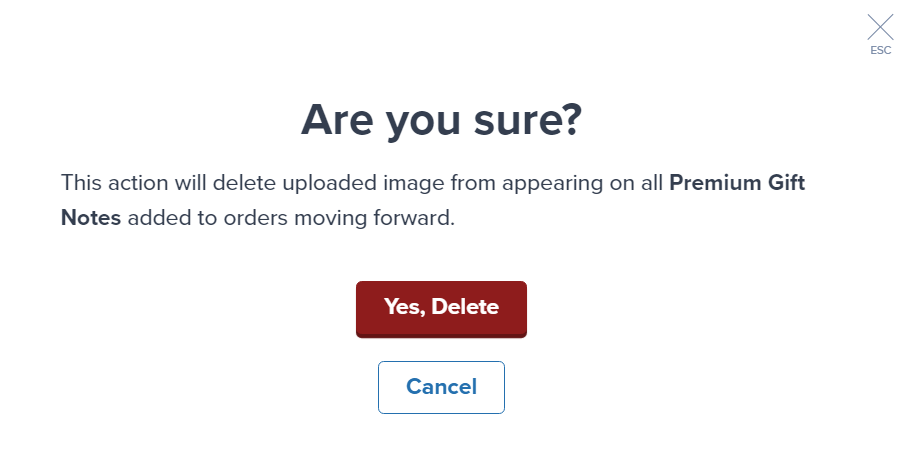
 A confirmation dialog will appear. Review the on-screen message and click **Yes, Delete**.
 You will receive a confirmation message indicating the changes were saved successfully.
 ***
## Let's Dive Deeper
Overview of all document customization options
Print on-demand promotional materials
Personalize sender information on shipping labels
Back to the main labels and packaging guide
Configure standard, SIOC, and custom packaging options
Send custom packaging materials to fulfillment centers
***
## Let's Dive Deeper
Overview of all document customization options
Print on-demand promotional materials
Personalize sender information on shipping labels
Back to the main labels and packaging guide
Configure standard, SIOC, and custom packaging options
Send custom packaging materials to fulfillment centers
Questions? Contact Jetpack Care.
If you have any questions about gift notes or need assistance with image requirements, contact Jetpack Care for help. Our team is always here to assist via Slack, phone, or email!