
Questions? Contact Jetpack Care.
If you have any questions or run into issues, you can always contact Jetpack Care for help. Our team is always here to assist via Slack, phone, or email!
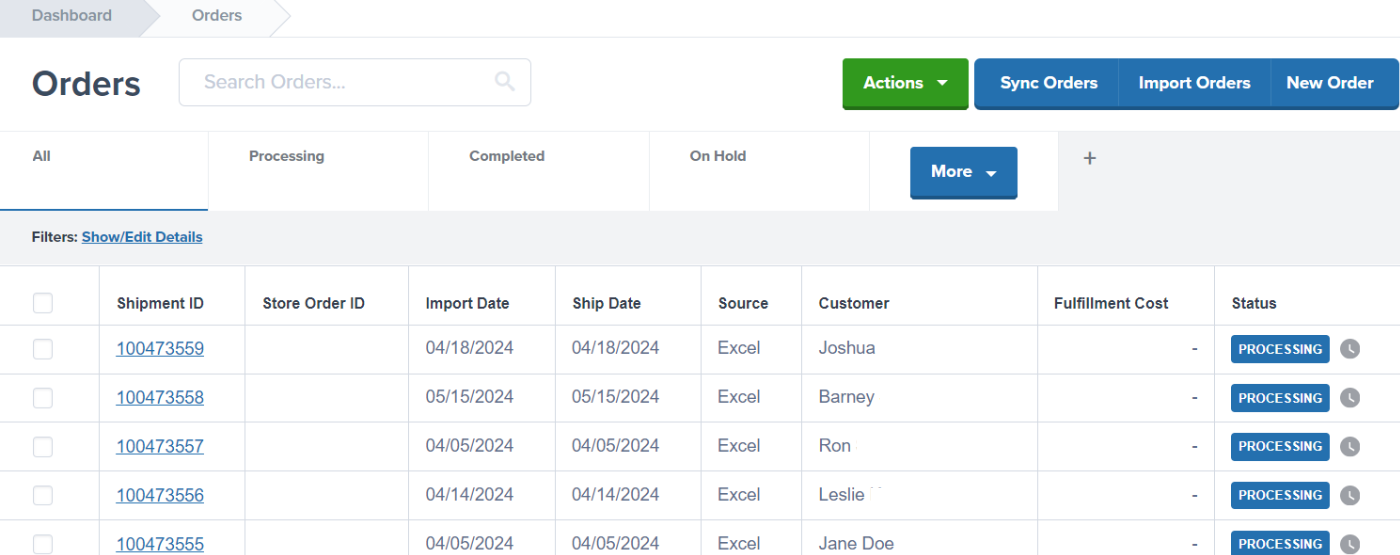 Each main status may include sub-statuses that provide additional detail about where the order is in the fulfillment process.
***
## Order Statuses and Sub-Statuses
The following table explains each status and sub-status you'll encounter in your Jetpack dashboard:
| Status | Sub-Status | What It Means |
| ------------------- | ---------------------- | ------------------------------------------------------------------------------------------------------------------------------------------------------------------------------------------------------------------------------------------------------------------------------------------------------------------------------------------------------------------------------------------------------------------------------ |
| **Processing** | *(general)* | The order has been received and is being prepared for carrier pickup. |
| | **Pick in Process** | Jetpack is picking the required SKU(s) for the order. |
| | **Picked** | The picking process is complete, and packing will begin following your packaging preferences and Jetpack's box selection process. |
| | **Labeled** | The order is packed, labeled, and is awaiting pickup by the carrier. |
| **Shipped** | *(general)* | The order has been handed over to the carrier. |
| | **Processing** | The order is with the carrier but has not yet received its initial tracking scan. Note that initial scans may take longer since carriers do not scan every order at pickup. |
| | **In Transit** | The carrier has scanned the label, and further tracking updates will be available as the order moves towards its destination. |
| | **Out for Delivery** | The order is currently out for delivery. |
| | **Delivered** | The order has been delivered. |
| | **Delivery Exception** | The carrier encountered an issue delivering the order (e.g., no access to the delivery location). In such cases, check the carrier tracking page for further details as the carrier may attempt redelivery, require customer pickup, or return the order to sender. |
| **Action Required** | *(various)* | Orders with this status (previously known as On-Hold or Exception statuses) cannot be fulfilled until the issues are resolved. For more details on resolving Action Required reasons, see [Orders With Action Required](/fulfillment/d2c/orders-action-required). |
| **Cancelled** | *(none)* | This status is set by your company to prevent the order from being reimported or fulfilled by Jetpack. Use this option if the order has already been fulfilled or is no longer needed. Learn how to [cancel an order](/fulfillment/tools-techniques/copy-cancel-clean-sweep) in the Jetpack dashboard. |
| **Clean Sweep** | *(none)* | This status allows you to remove the order from the Jetpack dashboard without canceling it, so you can reimport the same order later (for instance, after updating ship option mapping). The Clean Sweep Orders action is available for any order as long as the fulfillment process has not yet started. Learn how to [clean sweep an order](/fulfillment/tools-techniques/copy-cancel-clean-sweep) in the Jetpack dashboard. |
| **Import Review** | *(none)* | This status indicates that the dashboard is verifying whether you have sufficient inventory to fulfill the order and determining the appropriate fulfillment center. This status should resolve within a few minutes. If orders remain in this status for longer than 5-10 minutes, please contact Jetpack Care via Slack or email. |
Each main status may include sub-statuses that provide additional detail about where the order is in the fulfillment process.
***
## Order Statuses and Sub-Statuses
The following table explains each status and sub-status you'll encounter in your Jetpack dashboard:
| Status | Sub-Status | What It Means |
| ------------------- | ---------------------- | ------------------------------------------------------------------------------------------------------------------------------------------------------------------------------------------------------------------------------------------------------------------------------------------------------------------------------------------------------------------------------------------------------------------------------ |
| **Processing** | *(general)* | The order has been received and is being prepared for carrier pickup. |
| | **Pick in Process** | Jetpack is picking the required SKU(s) for the order. |
| | **Picked** | The picking process is complete, and packing will begin following your packaging preferences and Jetpack's box selection process. |
| | **Labeled** | The order is packed, labeled, and is awaiting pickup by the carrier. |
| **Shipped** | *(general)* | The order has been handed over to the carrier. |
| | **Processing** | The order is with the carrier but has not yet received its initial tracking scan. Note that initial scans may take longer since carriers do not scan every order at pickup. |
| | **In Transit** | The carrier has scanned the label, and further tracking updates will be available as the order moves towards its destination. |
| | **Out for Delivery** | The order is currently out for delivery. |
| | **Delivered** | The order has been delivered. |
| | **Delivery Exception** | The carrier encountered an issue delivering the order (e.g., no access to the delivery location). In such cases, check the carrier tracking page for further details as the carrier may attempt redelivery, require customer pickup, or return the order to sender. |
| **Action Required** | *(various)* | Orders with this status (previously known as On-Hold or Exception statuses) cannot be fulfilled until the issues are resolved. For more details on resolving Action Required reasons, see [Orders With Action Required](/fulfillment/d2c/orders-action-required). |
| **Cancelled** | *(none)* | This status is set by your company to prevent the order from being reimported or fulfilled by Jetpack. Use this option if the order has already been fulfilled or is no longer needed. Learn how to [cancel an order](/fulfillment/tools-techniques/copy-cancel-clean-sweep) in the Jetpack dashboard. |
| **Clean Sweep** | *(none)* | This status allows you to remove the order from the Jetpack dashboard without canceling it, so you can reimport the same order later (for instance, after updating ship option mapping). The Clean Sweep Orders action is available for any order as long as the fulfillment process has not yet started. Learn how to [clean sweep an order](/fulfillment/tools-techniques/copy-cancel-clean-sweep) in the Jetpack dashboard. |
| **Import Review** | *(none)* | This status indicates that the dashboard is verifying whether you have sufficient inventory to fulfill the order and determining the appropriate fulfillment center. This status should resolve within a few minutes. If orders remain in this status for longer than 5-10 minutes, please contact Jetpack Care via Slack or email. |
If you have any questions or run into issues, you can always contact Jetpack Care for help. Our team is always here to assist via Slack, phone, or email!