> ## Documentation Index
> Fetch the complete documentation index at: https://help.jetpack3pl.com/llms.txt
> Use this file to discover all available pages before exploring further.
# Custom Packaging
> Set up branded boxes, custom mailers, and specialized packaging materials for your orders
Jetpack provides standard, non-branded packaging materials for all orders—but if you want to ship in branded boxes, custom mailers, or specialized packaging that better fits your products, you can supply your own materials. This guide explains how to create custom packaging products, configure your catalog, and ensure your orders use the right materials.
## Understanding Custom Packaging Options
Jetpack offers standard packaging materials including boxes, bubble mailers, poly mailers, poster tubes, and book folds. When these don't meet your needs, you can provide custom packaging materials such as:
* Custom boxes (branded or sized for specific products)
* Custom poly mailers
* Custom bubble mailers
* Custom dunnage (protective materials)
* Marketing inserts
* Prop 65 labels
* Specialized packing solutions
Each custom packaging type must be created as its own product in your catalog and sent to fulfillment centers via [WRO](/fulfillment/sending-inventory/creating-wro).
***
## Custom Packaging Requirements and Limitations
Before using custom packaging, review these requirements to ensure your materials meet operational standards:
| Category | Requirement | Details |
| ------------------------- | ---------------------- | -------------------------------------------------------------------------------------------------------------------------------------------------------------------------------------------------------------------------------------------------------------------------------------------------------------------------------------------------- |
| **Size Restrictions** | Label space required | All custom packaging (boxes and mailers) must have at least one flat side with a minimum space of 6 inches by 4 inches for the shipping label |
| | Mailer size limits | Custom mailers larger than 18 inches in length or wider than 14 inches are not accepted due to expensive carrier surcharges |
| **Material Limitations** | Custom tape | Custom tape is not accepted as part of the packing process |
| | Hazmat markings | Custom boxes may only display hazardous material markings if prior written approval from Jetpack is provided |
| | Marketing insert folds | Marketing inserts requiring more than eight folds must be processed through an approved [kitting order request](/fulfillment/kitting-and-work-orders/) |
| | Crinkle paper | Crinkle paper is not accepted due to difficulties in standardizing pick quantities |
| **Order Handling** | Order splitting | - If your products are too large for [standard packaging](/fulfillment/d2c/standard-packaging) and custom packaging isn't provided, the Jetpack Operations team will try to split your order to fit available materials
- If splitting is not possible, products cannot be shipped until proper custom packaging is provided
|
| | Out of stock handling | If custom packaging or materials are out of stock, orders will move into Action Required status. You can edit order details to remove the custom packaging items, moving orders into Processing. Jetpack will ship orders using standard packaging until custom materials are replenished |
| **Fulfillment & Storage** | Fulfillment costs | Fulfillment costs for orders using custom packaging are based on the outer dimensions of the box (rounded up to the nearest inch as determined by Jetpack's Cubiscan machines). When purchasing custom packaging from an external vendor, verify the external dimensions rather than internal ones, which may differ by up to 0.5 inches |
| | Storage fees | Custom packaging requires its own storage location and will incur storage fees. Each size or variation must be managed as a separate SKU |
***
## Creating Custom Packaging Products
Each custom packaging material needs its own product in your catalog.
**Example**: A 6 x 5 x 4 inch black branded box would be its own SKU, separate from a 6 x 5 x 4 inch white branded box.
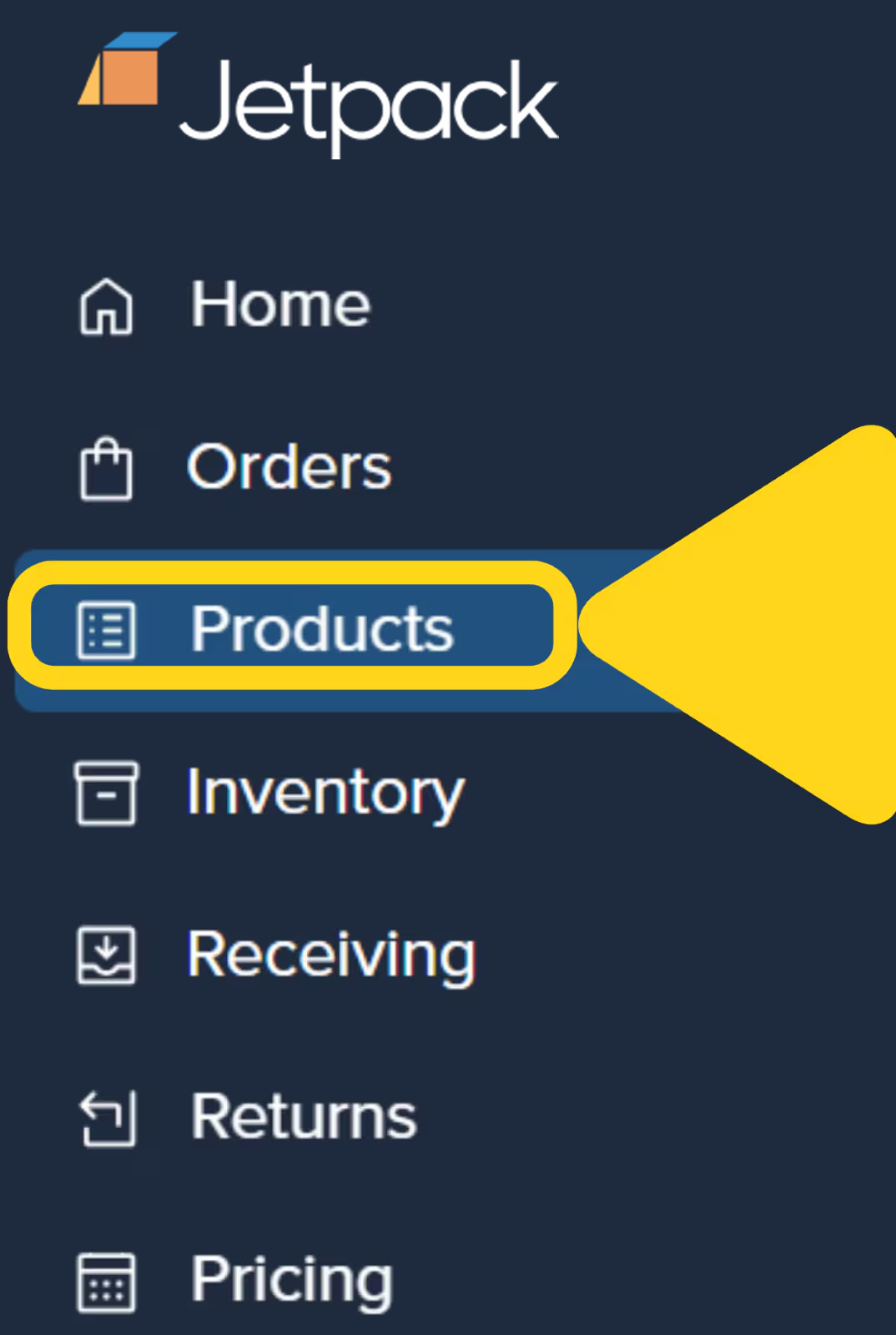
From the Jetpack dashboard, click **Products** on the left-hand navigation bar to access your product catalog.
 Using a descriptive name that identifies the packaging type and size (e.g., "Custom Black Box 6x5x4").
 Learn more about [manually adding products](/fulfillment/managing-products/adding-products) to your catalog.
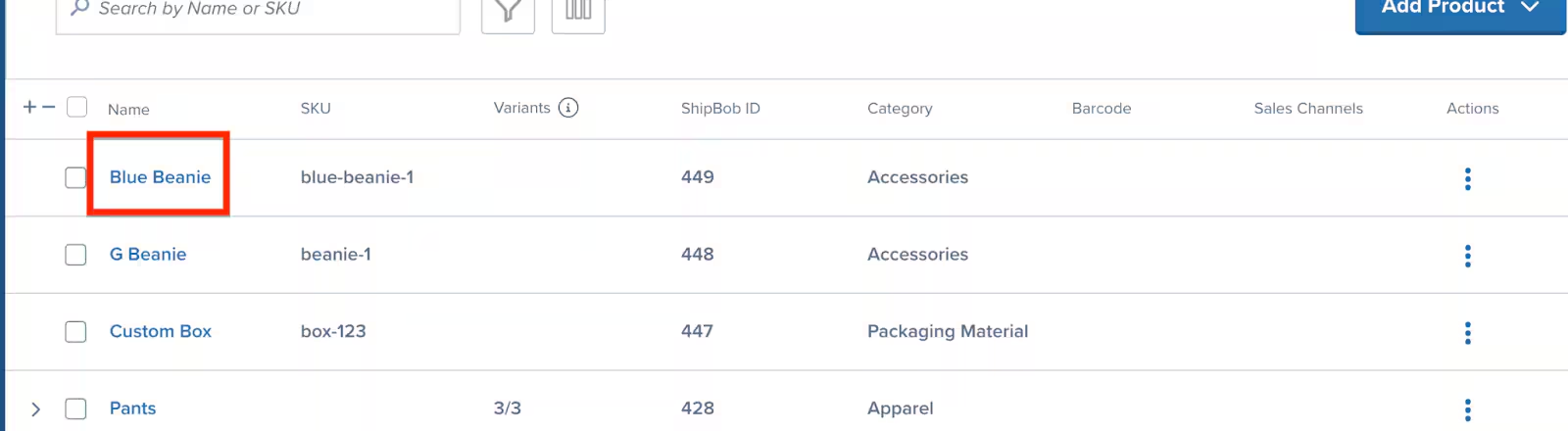
After creating the product, designate it as custom packaging. From the Product Catalog page, locate your custom packaging product and click the product's **Name** (hyperlinked) to open the product details page.
Learn more about [manually adding products](/fulfillment/managing-products/adding-products) to your catalog.
After creating the product, designate it as custom packaging. From the Product Catalog page, locate your custom packaging product and click the product's **Name** (hyperlinked) to open the product details page.
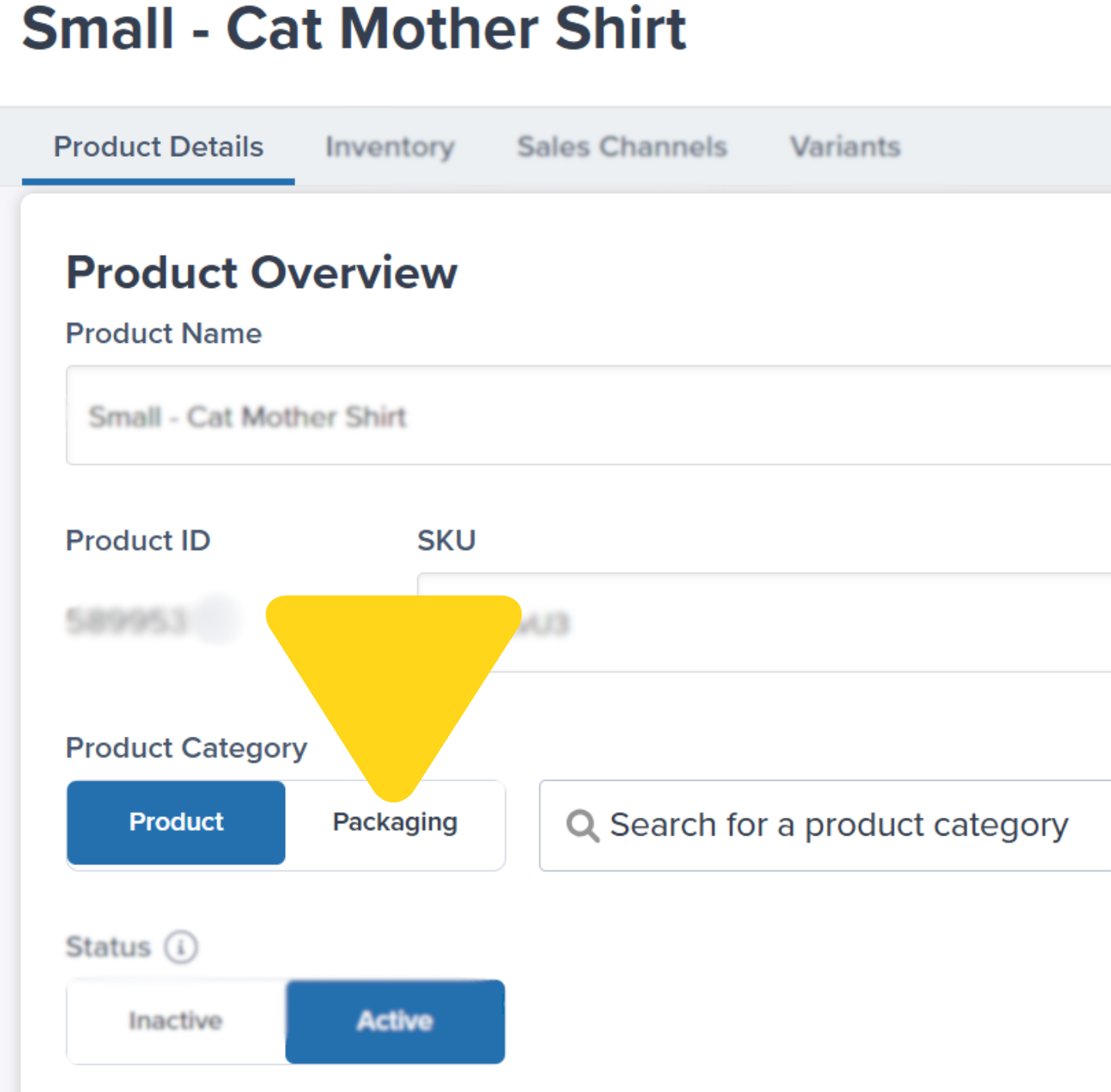 Click the **Packaging for Product Category** section under the Product Details tab. From the dropdown, select the appropriate category:
* **Custom Box**
* **Custom Bubble Mailer**
* **Custom Poly Mailer**
* **Custom Dunnage**
* **Marketing Insert**
* **Prop 65 Label**
Click **Save** to confirm your selection.
***
## Adding Custom Packaging to Your Products
Once you've created custom packaging products, configure which products should be shipped in those materials.
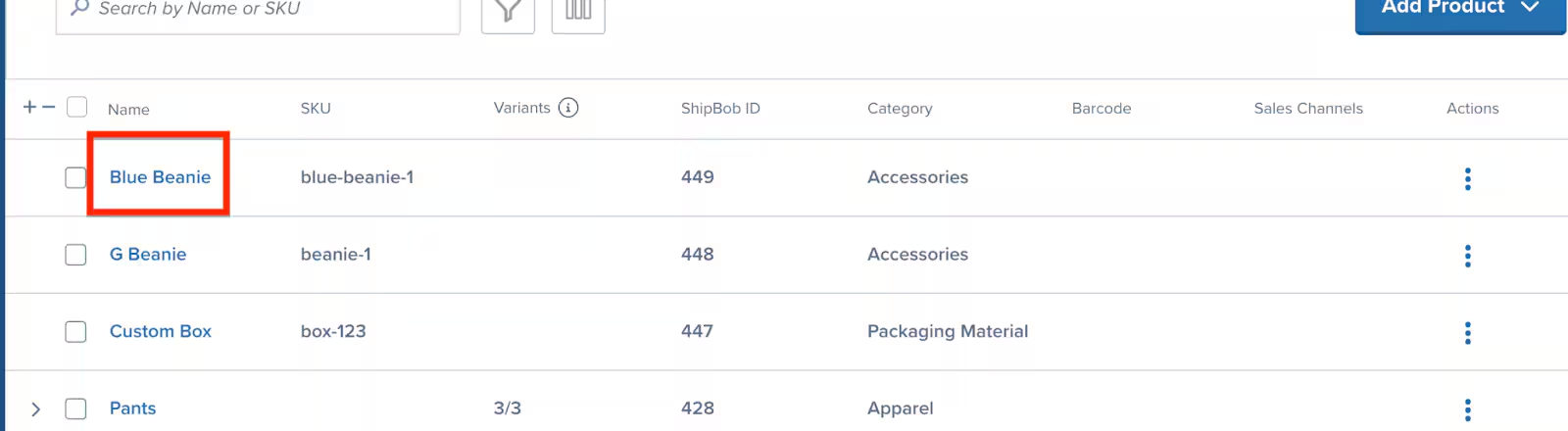
From the Jetpack dashboard, click **Products** on the left-hand navigation bar. Locate and click the product's **Name** (hyperlinked) that should be shipped in custom packaging.
Click the **Packaging for Product Category** section under the Product Details tab. From the dropdown, select the appropriate category:
* **Custom Box**
* **Custom Bubble Mailer**
* **Custom Poly Mailer**
* **Custom Dunnage**
* **Marketing Insert**
* **Prop 65 Label**
Click **Save** to confirm your selection.
***
## Adding Custom Packaging to Your Products
Once you've created custom packaging products, configure which products should be shipped in those materials.
From the Jetpack dashboard, click **Products** on the left-hand navigation bar. Locate and click the product's **Name** (hyperlinked) that should be shipped in custom packaging.
 Click into the **Product Details** tab to edit the packaging requirements. Specify whether the product should be shipped in custom packaging using the second dropdown menu under **Packaging Requirements**.
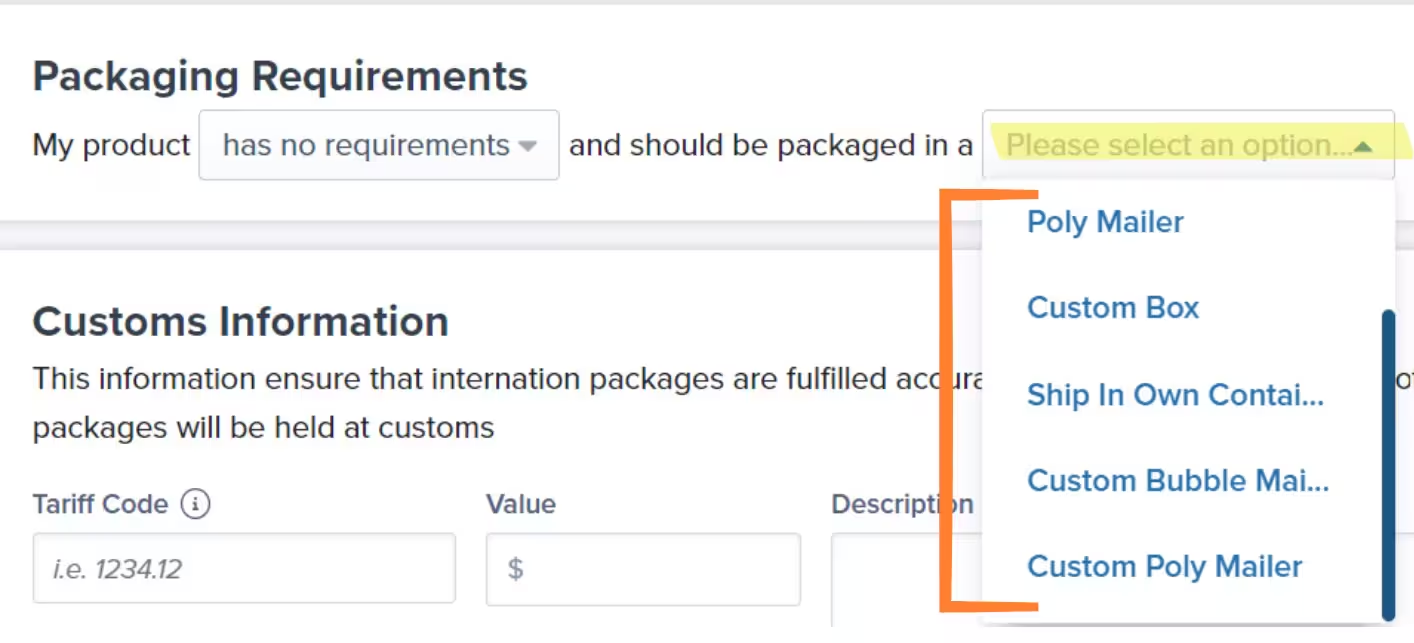 Click **Save** to apply the changes.
***
## Sending Custom Packaging to Fulfillment Centers
After configuring your products, send your custom packaging materials to Jetpack:
1. **Create a WRO** for your custom packaging materials
* Each packaging type is its own product, so include all sizes and variations you've created
* Learn how to [create a WRO](/fulfillment/sending-inventory/creating-wro)
2. **Set up automation** to add custom packaging to orders
* Use bundles or request a Jetpack rule to automatically add the custom packaging SKUs to appropriate orders
* Contact Jetpack Care for help setting up automation rules
If custom packaging or materials are out of stock, orders will move into Action Required status. You can edit the order to remove the custom packaging items, which moves the order into Processing. Jetpack will ship the order using standard packaging until your custom materials are replenished.
***
## Custom Packaging FAQs
No, custom tape is not accepted as part of the packing process. Jetpack uses standard sealing tape on all shipments.
Custom boxes may only display hazardous material markings if prior written approval from Jetpack is provided. Contact Jetpack Care before sending any boxes with hazmat markings.
Custom mailers larger than 18 inches in length or wider than 14 inches are not accepted due to expensive carrier surcharges. These dimensions trigger additional handling fees that significantly increase shipping costs.
If your products are too large for standard packaging and custom packaging isn't provided, the Jetpack Operations team will attempt to split your order to fit available materials. If splitting is not possible, your products cannot be shipped until proper custom packaging is provided.
Yes, custom packaging requires its own storage location and will incur storage fees. Each size or variation must be managed as a separate SKU.
No, crinkle paper is not accepted due to difficulties in standardizing pick quantities. Choose alternative protective materials that can be consistently measured and used.
Marketing inserts requiring more than eight folds must be processed through an approved kitting order request. Simple inserts with eight or fewer folds can be configured as custom packaging products.
***
## Let's Dive Deeper
Back to the main D2C guide
Learn about Jetpack's standard packaging materials
Manage your product catalog and settings
Send custom packaging to fulfillment centers
Set up complex packaging workflows
Add promotional materials to shipments
Click **Save** to apply the changes.
***
## Sending Custom Packaging to Fulfillment Centers
After configuring your products, send your custom packaging materials to Jetpack:
1. **Create a WRO** for your custom packaging materials
* Each packaging type is its own product, so include all sizes and variations you've created
* Learn how to [create a WRO](/fulfillment/sending-inventory/creating-wro)
2. **Set up automation** to add custom packaging to orders
* Use bundles or request a Jetpack rule to automatically add the custom packaging SKUs to appropriate orders
* Contact Jetpack Care for help setting up automation rules
If custom packaging or materials are out of stock, orders will move into Action Required status. You can edit the order to remove the custom packaging items, which moves the order into Processing. Jetpack will ship the order using standard packaging until your custom materials are replenished.
***
## Custom Packaging FAQs
No, custom tape is not accepted as part of the packing process. Jetpack uses standard sealing tape on all shipments.
Custom boxes may only display hazardous material markings if prior written approval from Jetpack is provided. Contact Jetpack Care before sending any boxes with hazmat markings.
Custom mailers larger than 18 inches in length or wider than 14 inches are not accepted due to expensive carrier surcharges. These dimensions trigger additional handling fees that significantly increase shipping costs.
If your products are too large for standard packaging and custom packaging isn't provided, the Jetpack Operations team will attempt to split your order to fit available materials. If splitting is not possible, your products cannot be shipped until proper custom packaging is provided.
Yes, custom packaging requires its own storage location and will incur storage fees. Each size or variation must be managed as a separate SKU.
No, crinkle paper is not accepted due to difficulties in standardizing pick quantities. Choose alternative protective materials that can be consistently measured and used.
Marketing inserts requiring more than eight folds must be processed through an approved kitting order request. Simple inserts with eight or fewer folds can be configured as custom packaging products.
***
## Let's Dive Deeper
Back to the main D2C guide
Learn about Jetpack's standard packaging materials
Manage your product catalog and settings
Send custom packaging to fulfillment centers
Set up complex packaging workflows
Add promotional materials to shipments

Questions? Contact Jetpack Care.
If you have any questions or run into issues, you can always contact Jetpack Care for help. Our team is always here to assist via Slack, phone, or email!