> ## Documentation Index
> Fetch the complete documentation index at: https://help.jetpack3pl.com/llms.txt
> Use this file to discover all available pages before exploring further.
# Carrier Transit Times by Country
> Understand ship option mapping, carrier selection, and average transit times for domestic and international orders by country of origin.
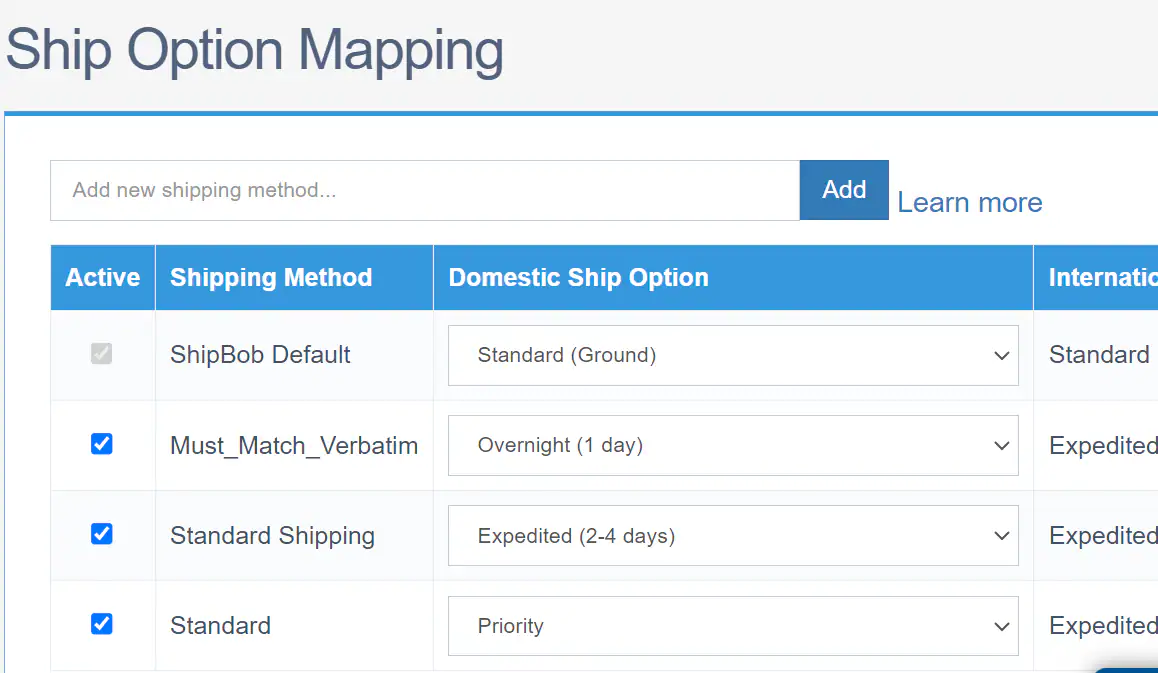
When you configure ship option mapping in your Jetpack dashboard, you're connecting your ecommerce store's shipping methods (like "Standard Shipping" or "2-Day Express") to Jetpack's ship options. This ensures that every order is fulfilled with the right carrier service, at the right speed, and at the best possible rate. This guide explains how ship option mapping works, how carriers are selected, and provides detailed transit times by country of origin.
## How Ship Option Mapping Works
Your ecommerce store offers shipping methods like standard/economy shipping and 2-day expedited shipping to your customers. In the Jetpack dashboard, you map each of these methods to their corresponding ship options. This mapping tells the fulfillment system exactly which carrier service to use when processing orders.
To configure ship option mapping, navigate to your store integration settings in the Jetpack dashboard. Learn more about [setting up ship option mapping for your store integration](/fulfillment/account-setup/shipping-preferences/choosing-default-carriers/).
 ### Aggregated Ship Options
When a shipping method is mapped to an aggregated option—such as Standard/Economy (Ground), Expedited, ShipBob 2-Day Express, or Overnight—Jetpack automatically selects the cheapest carrier and service available at the time of label generation. This dynamic selection ensures you get the best rate without having to manually choose carriers for every order.
If an order is mapped to a specific carrier and that option isn't available at the time of fulfillment, the system will automatically override your selection and update the ship option to Standard (Ground) to avoid delays or cancellations.
***
## International Considerations
When configuring ship option mapping for orders shipping from the US to international destinations, or for orders originating outside the US, the International Ship Option column reviews your domestic ship option setting to determine the appropriate carrier and service available in the origin country.
### Commercial Invoices for Cross-Border Orders
For orders shipping from outside the destination country, a commercial invoice is required for customs clearance:
* **B2C Orders:** The Jetpack dashboard automatically generates and attaches the commercial invoice to the shipment
* **Manual B2B Shipments:** You must manually attach the commercial invoice in the dashboard before the order ships
Learn more about [customs and commercial invoices](/fulfillment/account-setup/shipping-preferences/customs-commercial-invoices).
***
## Available Ship Options by Country of Origin
The following sections detail the ship options and average carrier transit times available based on where your inventory is stored and where orders are being shipped. Transit times are listed from slowest to fastest.
### United States (US)
**Domestic Settings:** Choose between low-rate options and faster delivery options.
* **Lowest-Rate Option:** Set shipping to Standard (Ground) without specifying a carrier; the system automatically selects the lowest available rate
* **Faster Option:** ShipBob 2-Day Express is recommended for quicker delivery, targeting 2-day service at lower rates than traditional air shipping
| Ship Option | Transit Time |
| ------------------------- | ----------------- |
| **Economy (Ground)** | 3–7 business days |
| **Standard (Ground)** | 3–7 business days |
| **Expedited** | 2–3 business days |
| **USPS Priority** | 2–5 business days |
| **ShipBob 2-Day Express** | 2 business days |
**Cross-Border Settings:** Standard or Expedited. Shipments are delivered duty unpaid (DDU) with an option to enable delivery duty paid (DDP). Overnight delivery is not available for international orders.
| Ship Option | Transit Time |
| ------------- | ------------------ |
| **Standard** | 7–30 business days |
| **Expedited** | 1–6 business days |
***
### Canada
**Domestic Ship Option Settings:** Standard and Expedited
| Ship Option | Transit Time |
| ------------- | ----------------- |
| **Standard** | 2–7 business days |
| **Expedited** | 1–3 business days |
**Cross-Border Settings:** Standard or Expedited. All shipments are delivered DDU.
| Ship Option | Transit Time |
| ------------- | ----------------- |
| **Standard** | 5–7 business days |
| **Expedited** | 2–5 business days |
***
### Australia
**Domestic Ship Option Settings:** Standard or Expedited (Expedited is quicker; Standard is more cost-effective)
| Ship Option | Transit Time |
| ------------- | ----------------- |
| **Standard** | 1–7 business days |
| **Expedited** | 1–3 business days |
**Cross-Border Ship Option Settings:** Standard or Expedited. All shipments are delivered duty unpaid (DDU).
| Ship Option | Transit Time |
| ------------- | ------------------ |
| **Standard** | 8–25 business days |
| **Expedited** | 4–18 business days |
***
### European Union (EU)
**EU (Netherlands) Domestic Ship Option Settings:** Standard
| Ship Option | Transit Time |
| ------------- | ----------------- |
| **Standard** | 3–5 business days |
| **Expedited** | 1–3 business days |
**Cross-Border Ship Option Settings (outside the EU):** Standard or Expedited. Shipments are DDU with an option to enable Delivery Duty Paid (DDP).
| Ship Option | Transit Time |
| ------------- | ------------------ |
| **Standard** | 4–14 business days |
| **Expedited** | 2–5 business days |
***
### United Kingdom (UK)
**Domestic Settings:** Standard and Expedited
| Ship Option | Transit Time |
| ------------- | ----------------- |
| **Standard** | 1–3 business days |
| **Expedited** | 1–2 business days |
For bubble mailers or poly mailers within specific dimensions, a Larger Letter Shipping option may be available as an economical alternative.
**Cross-Border Settings:** Standard or Expedited. Shipments are DDU with an option to enable DDP.
| Ship Option | Transit Time |
| ------------- | ----------------- |
| **Standard** | 5–7 business days |
| **Expedited** | 2–5 business days |
***
## Important Transit Time Considerations
Carriers do not guarantee delivery dates for standard shipments. Actual delivery times may vary based on several factors.
**Factors That May Impact Transit Times:**
* Address issues or incomplete information
* Customer unavailability to receive packages
* Peak shipping times (e.g., Thanksgiving through Christmas)
* Weather events or carrier delays
* International customs clearance processes
The carriers and carrier services for each ship option are continuously reviewed and updated to ensure reliability and cost-effectiveness. For the latest information or to explore quicker transit time options for your specific needs, contact your Jetpack Success Manager or Jetpack Care team.
***
## Let's Dive Deeper
Back to the main D2C guide
Set up ship option mapping for your store
How orders are assigned to fulfillment centers
Understand processing and fulfillment timelines
Monitor shipments after they leave the fulfillment center
Explore Jetpack's global fulfillment centers
### Aggregated Ship Options
When a shipping method is mapped to an aggregated option—such as Standard/Economy (Ground), Expedited, ShipBob 2-Day Express, or Overnight—Jetpack automatically selects the cheapest carrier and service available at the time of label generation. This dynamic selection ensures you get the best rate without having to manually choose carriers for every order.
If an order is mapped to a specific carrier and that option isn't available at the time of fulfillment, the system will automatically override your selection and update the ship option to Standard (Ground) to avoid delays or cancellations.
***
## International Considerations
When configuring ship option mapping for orders shipping from the US to international destinations, or for orders originating outside the US, the International Ship Option column reviews your domestic ship option setting to determine the appropriate carrier and service available in the origin country.
### Commercial Invoices for Cross-Border Orders
For orders shipping from outside the destination country, a commercial invoice is required for customs clearance:
* **B2C Orders:** The Jetpack dashboard automatically generates and attaches the commercial invoice to the shipment
* **Manual B2B Shipments:** You must manually attach the commercial invoice in the dashboard before the order ships
Learn more about [customs and commercial invoices](/fulfillment/account-setup/shipping-preferences/customs-commercial-invoices).
***
## Available Ship Options by Country of Origin
The following sections detail the ship options and average carrier transit times available based on where your inventory is stored and where orders are being shipped. Transit times are listed from slowest to fastest.
### United States (US)
**Domestic Settings:** Choose between low-rate options and faster delivery options.
* **Lowest-Rate Option:** Set shipping to Standard (Ground) without specifying a carrier; the system automatically selects the lowest available rate
* **Faster Option:** ShipBob 2-Day Express is recommended for quicker delivery, targeting 2-day service at lower rates than traditional air shipping
| Ship Option | Transit Time |
| ------------------------- | ----------------- |
| **Economy (Ground)** | 3–7 business days |
| **Standard (Ground)** | 3–7 business days |
| **Expedited** | 2–3 business days |
| **USPS Priority** | 2–5 business days |
| **ShipBob 2-Day Express** | 2 business days |
**Cross-Border Settings:** Standard or Expedited. Shipments are delivered duty unpaid (DDU) with an option to enable delivery duty paid (DDP). Overnight delivery is not available for international orders.
| Ship Option | Transit Time |
| ------------- | ------------------ |
| **Standard** | 7–30 business days |
| **Expedited** | 1–6 business days |
***
### Canada
**Domestic Ship Option Settings:** Standard and Expedited
| Ship Option | Transit Time |
| ------------- | ----------------- |
| **Standard** | 2–7 business days |
| **Expedited** | 1–3 business days |
**Cross-Border Settings:** Standard or Expedited. All shipments are delivered DDU.
| Ship Option | Transit Time |
| ------------- | ----------------- |
| **Standard** | 5–7 business days |
| **Expedited** | 2–5 business days |
***
### Australia
**Domestic Ship Option Settings:** Standard or Expedited (Expedited is quicker; Standard is more cost-effective)
| Ship Option | Transit Time |
| ------------- | ----------------- |
| **Standard** | 1–7 business days |
| **Expedited** | 1–3 business days |
**Cross-Border Ship Option Settings:** Standard or Expedited. All shipments are delivered duty unpaid (DDU).
| Ship Option | Transit Time |
| ------------- | ------------------ |
| **Standard** | 8–25 business days |
| **Expedited** | 4–18 business days |
***
### European Union (EU)
**EU (Netherlands) Domestic Ship Option Settings:** Standard
| Ship Option | Transit Time |
| ------------- | ----------------- |
| **Standard** | 3–5 business days |
| **Expedited** | 1–3 business days |
**Cross-Border Ship Option Settings (outside the EU):** Standard or Expedited. Shipments are DDU with an option to enable Delivery Duty Paid (DDP).
| Ship Option | Transit Time |
| ------------- | ------------------ |
| **Standard** | 4–14 business days |
| **Expedited** | 2–5 business days |
***
### United Kingdom (UK)
**Domestic Settings:** Standard and Expedited
| Ship Option | Transit Time |
| ------------- | ----------------- |
| **Standard** | 1–3 business days |
| **Expedited** | 1–2 business days |
For bubble mailers or poly mailers within specific dimensions, a Larger Letter Shipping option may be available as an economical alternative.
**Cross-Border Settings:** Standard or Expedited. Shipments are DDU with an option to enable DDP.
| Ship Option | Transit Time |
| ------------- | ----------------- |
| **Standard** | 5–7 business days |
| **Expedited** | 2–5 business days |
***
## Important Transit Time Considerations
Carriers do not guarantee delivery dates for standard shipments. Actual delivery times may vary based on several factors.
**Factors That May Impact Transit Times:**
* Address issues or incomplete information
* Customer unavailability to receive packages
* Peak shipping times (e.g., Thanksgiving through Christmas)
* Weather events or carrier delays
* International customs clearance processes
The carriers and carrier services for each ship option are continuously reviewed and updated to ensure reliability and cost-effectiveness. For the latest information or to explore quicker transit time options for your specific needs, contact your Jetpack Success Manager or Jetpack Care team.
***
## Let's Dive Deeper
Back to the main D2C guide
Set up ship option mapping for your store
How orders are assigned to fulfillment centers
Understand processing and fulfillment timelines
Monitor shipments after they leave the fulfillment center
Explore Jetpack's global fulfillment centers

Questions? Contact Jetpack Care.
If you have any questions or run into issues, you can always contact Jetpack Care for help. Our team is always here to assist via Slack, phone, or email!