> ## Documentation Index
> Fetch the complete documentation index at: https://help.jetpack3pl.com/llms.txt
> Use this file to discover all available pages before exploring further.
# Adding Insurance to Orders
> Protect your shipments with parcel and freight insurance options, with flexible coverage limits and transparent pricing.
When shipping valuable inventory, insurance provides protection against loss or damage during transit. Jetpack offers insurance for both parcel and freight shipments, with clear pricing structures and coverage limits. Understanding how insurance applies to your orders—including when orders split into multiple packages—helps you make informed decisions about protecting your shipments.
## Insurance Options by Shipment Type
Jetpack provides insurance coverage for both parcel and freight shipments, with different pricing structures and coverage limits based on the type of shipment.
## Parcel Insurance Overview
Jetpack offers insurance for parcel shipments through a policy issued by Cabrella Parcel Insurance. The cost is calculated at **1.875%** of your total chosen insured value plus the shipment's fulfillment cost, which is reflected in the total shipment invoice.
The information and services offered to you are subject to Jetpack's Terms of Service which are incorporated herein by reference. For the avoidance of doubt, Jetpack is not an insurance company or a licensed insurance agent and does not assume any liability or risk associated with the purchase or sale of insurance. Upon request, Jetpack may provide you with the opportunity to protect your eligible shipments of goods under an insurance policy that is issued to Jetpack's warehouse partners (the "Policy") by Cabrella Parcel Insurance.
**Note**: A 3% credit card processing fee may apply if specific criteria are met. [Click here for more information](/fulfillment/billing-invoicing/credit-card-fees).
### Coverage Limits and Requirements
Understanding the coverage limits and requirements for parcel insurance ensures you properly protect your shipments.
| Coverage Detail | Requirements |
| ------------------------------- | ---------------------------------------------------------------------------------------------------------------------- |
| **Maximum Coverage per Parcel** | \$5,000 USD per parcel |
| **Insured Value Basis** | Must not exceed the actual value of the goods |
| **Split Order Coverage** | If an order is split into multiple parcels, maximum coverage is \$5,000 per parcel |
| **Currency** | Insurance value is always in USD |
| **Signature Requirement** | If insurance value is \$300 USD or more, signature upon delivery is automatically required (pricing varies by carrier) |
If you insure an order for \$20,000 that splits into 4 parcels, each parcel will be insured for up to \$5,000.
### Over-Insurance Policy
Jetpack reserves the right to adjust or deny coverage if the declared insured value exceeds either the actual value of the goods or the \$5,000 USD per parcel limit.
### Prepaid Shipments
Insurance cannot be procured for prepaid parcel shipments. Any insurance values added to these orders will be considered void.
### Courtesy Insurance
Purchasing additional insurance for D2C/B2C orders voids Jetpack's courtesy insurance. This means you will pay insurance on the entire shipment amount rather than only on the amount exceeding the initial retail value covered (USD \$100).
***
## Adding Insurance to B2C Orders
Follow these steps to add insurance to a direct-to-consumer (B2C) order:
Navigate to the **Order Details** page for the order you want to insure
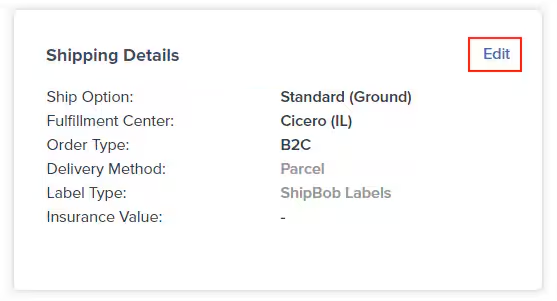
Scroll down to the **ShipBob Shipping Details** tile and click **Edit**
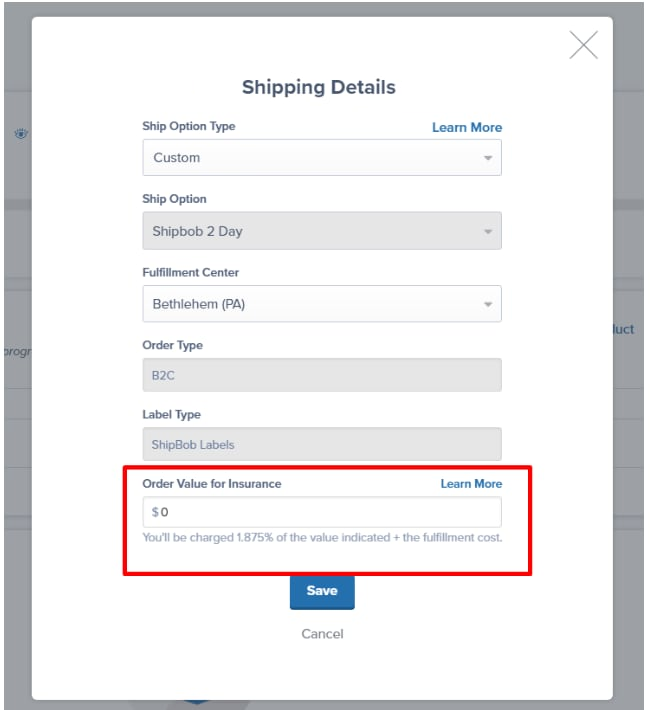
In the pop-up window, input the dollar amount you wish to insure under **Order Value for Insurance**
Click **Save**
The new insurance value will be displayed next to **Insurance Value**.
If a B2C order is split into multiple packages within the fulfillment center, the total insurance amount applies to all packages.
**Example**: If you insure an order for \$5,000 and it is split into 4 packages, the entire \$5,000 of coverage applies across all packages if a claim is necessary.
## Freight Insurance Overview
Freight shipment insurance costs vary between **1% and 2%** of the insured value, plus the shipment's fulfillment cost, as shown in the total shipment invoice.
### Coverage Limits and Requirements
Understanding freight insurance parameters helps you protect high-value pallet shipments.
| Coverage Detail | Requirements |
| ------------------------------- | ---------------------------------------------------------------------------------- |
| **Maximum Coverage per Pallet** | Must not exceed the actual value of the goods |
| **Currency** | Insurance value is always in USD |
| **Cross-Border Support** | ShipBob-arranged freight supports cross-border shipments between the US and Canada |
| **Canada Origination** | Orders originating from Canada require you to have your own customs broker |
### Over-Insurance Policy
In cases of over-insurance, Jetpack may adjust or deny coverage to ensure the insured value does not exceed the actual value of the goods.
### Courtesy Insurance
Like with parcel shipments, purchasing insurance for freight orders voids Jetpack's courtesy insurance. This requires you to pay insurance on the entire shipment amount beyond the initial manufacturing value covered (USD \$500).
### Getting a Freight Insurance Quote
For advice on finding a freight insurance quote or even get connected with a licensed insurance provider, contact your Jetpack Care Manager to discuss options.
***
## Adding Insurance to B2B Orders
Follow these steps to add insurance to a business-to-business (B2B) order:
Navigate to the **Order Details** page for the B2B order you want to insure
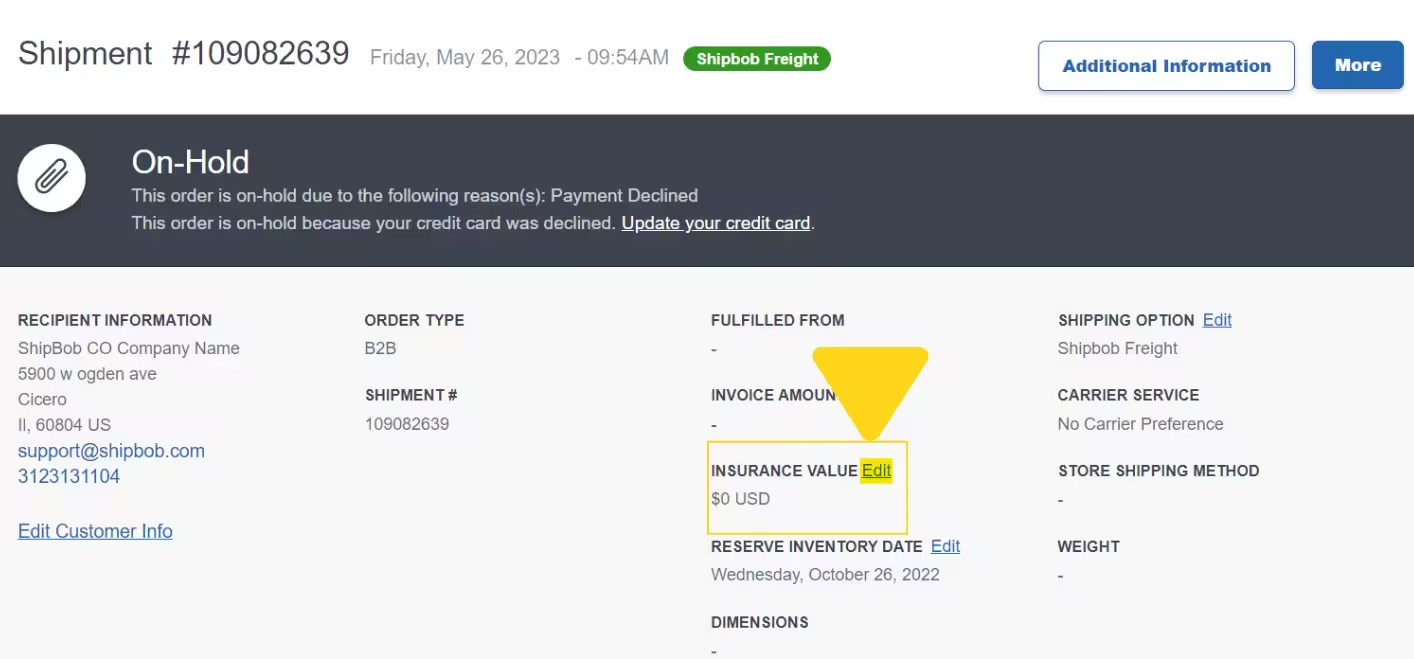
Click **Edit** (hyperlinked) next to **Insurance Value**
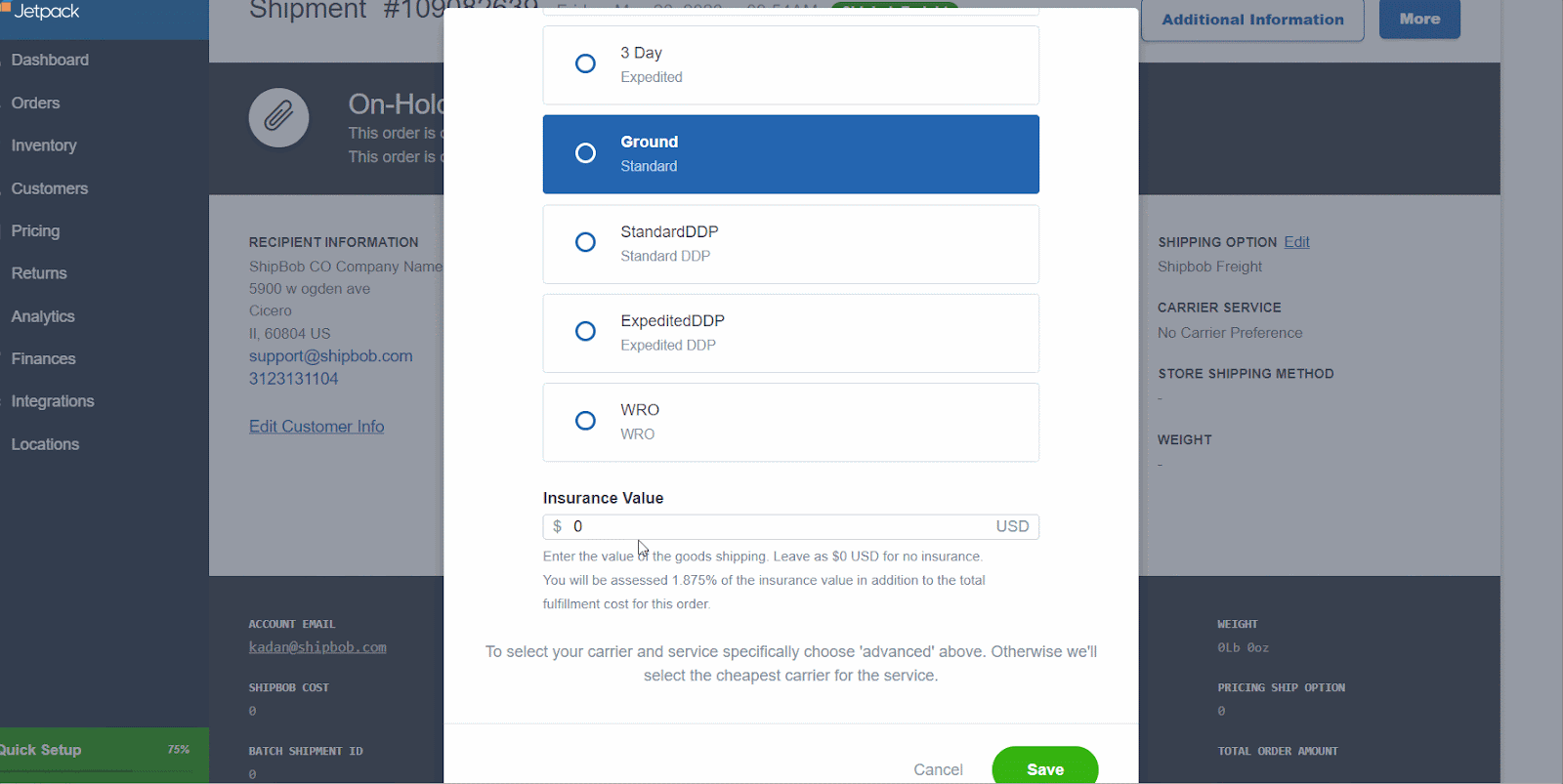
In the pop-up window, input the dollar amount you wish to insure under **Order Value for Insurance**
Click **Save**
Insert the dollar amount you want to insure the order for in the textbox under **Insurance Value**.
As with B2C orders, if a B2B order is split into multiple shipments, the total insured amount will cover all packages comprising the order.
***
## Adding Insurance Automatically to Imported Orders
Rather than insuring each order by hand, you can have Jetpack automatically add shipping insurance to orders imported from your ecommerce platform by enabling the **Pull Insurance Amount** feature on your account.
### How Pull Insurance Amount Works
Once enabled, the feature applies these rules:
* All orders containing the `total_price` JSON data will automatically receive shipping insurance.
* The shipping insurance amount will match the amount in the `total_price` JSON field.
* You can set a **total order value threshold**, above or below which insurance is applied, so only orders in the range you choose are automatically insured. Let your Jetpack Care Manager know the threshold you want when you request the feature.
* If the `total_price` JSON field is `0` or `null` for any reason (for example, due to discounts or \$0 items), the insurance amount will also be \$0.
* Manually created orders do not receive JSON data, so Pull Insurance Amount will **not** apply to them automatically. You'll need to add insurance to manual orders yourself using the [steps for adding insurance to B2C orders](#adding-insurance-to-b2c-orders) above.
Automatic insurance is calculated **only** from the total order value your store passes to Jetpack (the `total_price` JSON field). If an order is comped or free, that value is \$0, so **no insurance is applied**, regardless of the actual value of the goods. To insure a comped or free order, create it as a [manual order](#adding-insurance-to-b2c-orders) and add insurance yourself.
Turning this feature on means every qualifying imported order is insured and billed accordingly. Parcel insurance costs **1.875%** of the insured value plus the shipment's fulfillment cost; freight insurance runs **1–2%** of the insured value plus the fulfillment cost. These charges appear on your total shipment invoice, so factor the recurring cost into your decision before enabling automation across all orders.
Pull Insurance Amount is enabled on request. To turn it on for your account, contact your **Jetpack Care Manager** and let them know you'd like to enable automatic insurance for orders imported from your ecommerce platform, along with the total order value threshold (if any) you'd like applied.
***
## Key Considerations
When adding insurance to your orders, keep these important factors in mind:
* **Currency** - All insurance values are in USD regardless of order currency
* **Split orders** - Total insurance coverage applies across all packages when orders split
* **Courtesy insurance** - Purchasing additional insurance voids Jetpack's courtesy coverage
* **Prepaid shipments** - Parcel insurance is not available for prepaid shipments
* **Signature requirements** - Parcel insurance of \$300 USD or more automatically requires signature on delivery
***
## FAQs
Yes. Shipping insurance applies to all splits associated with the parent order, whether the insurance amount was added manually or automatically. Since insurance appears only on the parent/primary order, review the parent shipment to determine the insurance value.
**Important:** The insured value for any parcel must not exceed the actual value of the goods or \$5,000 USD per parcel. If an order is split into multiple parcels, the maximum insured value per parcel is capped at \$5,000.
Insurance fees vary based on the shipment configuration:
* **Parcel:** 1.875% of the total insured value (or the `total_price` in the JSON data), plus the shipment's fulfillment cost. This total is reflected in the final shipment invoice.
* **Freight:** 1% to 2% of the insured value, plus the shipment's fulfillment cost, as shown on the total shipment invoice.
No. Carrier selection does not affect how shipping insurance is calculated.
No. An order's end destination country does not impact the insurance amount.
No. When insurance is added automatically, the amount is determined by the `total_price` field in the JSON data and cannot be overridden manually.
Because automatic insurance is determined by the `total_price` JSON data, start by reviewing that field. If it shows \$0 or `null` for any reason (for example, due to discounts or \$0 items), the insurance amount will also be \$0.
You can review JSON data in your Jetpack dashboard by clicking the **Actions** button on the order details page, then selecting **View Store Data** from the drop-down menu.
If you still can't determine the issue after confirming the order was imported from your ecommerce platform and the `total_price` JSON field is not \$0 or `null`, contact Jetpack Care via Slack or email.
***
## Let's Dive Deeper
Understanding the complete claims and insurance process
Detailed coverage policies and limitations for parcels
Quick guide to the claims submission process
Freight claim policies and documentation requirements
Protect your merchandise while in storage
Understanding fulfillment SLAs and processing times
Questions? Contact Jetpack Care.
If you have any questions about adding insurance to your orders or understanding coverage limits, you can always contact Jetpack Care for help. Our team is always here to assist via Slack, phone, or email!