> ## Documentation Index
> Fetch the complete documentation index at: https://help.jetpack3pl.com/llms.txt
> Use this file to discover all available pages before exploring further.
# Automated FBA Prep FAQs
> Common questions about Jetpack's automated Amazon FBA prep process, including integration troubleshooting, product search, serial scans, and order editing.
This page answers frequently asked questions about Jetpack's automated Amazon FBA prep process. Whether you're troubleshooting integration issues, searching for products, or understanding order editing limitations, you'll find helpful answers to guide you through the automated FBA workflow.
## Frequently Asked Questions
If you haven't shipped an Amazon order via the integration in a while, please verify your authentication with Amazon.
Your Amazon Seller Central authentication may have expired or been disconnected. To resolve this:
In your Jetpack dashboard, navigate to **Settings**.
Select **Integrations** or **Apps**.
Find your Amazon integration in the list.
Click **Re-authenticate** or **Reconnect**.
Follow the prompts to sign in to Amazon Seller Central and grant the required permissions.
Once re-authenticated, you should be able to submit FBA shipments through the integration again.
Amazon integrations require periodic re-authentication for security purposes. If you experience issues submitting FBA shipments, always check your integration connection status first.
Ensure that you have synced your products from your Amazon Seller Central before attempting to create an FBA order.
**Search by Product Name or SKU:**
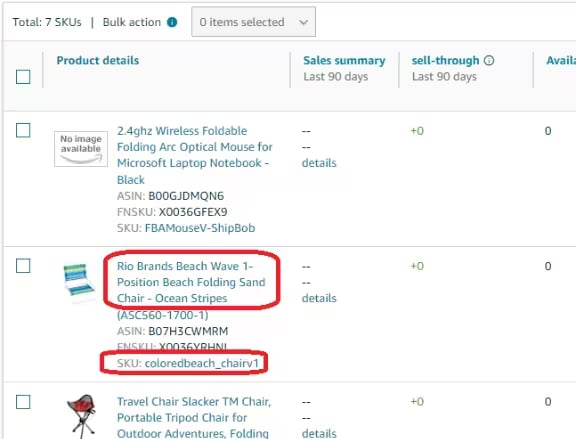
When searching for products, select the exact Amazon product as it appears in Seller Central. You can search by:
* **Product name** as listed on Amazon
* **SKU** to easily locate the imported product(s)
**Handling Merged Products or Variants:**
If the product is merged or has variants (products with similar properties), multiple options will be displayed. Please ensure you select the correct product that matches your intended FBA shipment.
 **Multiple Amazon Integrations:**
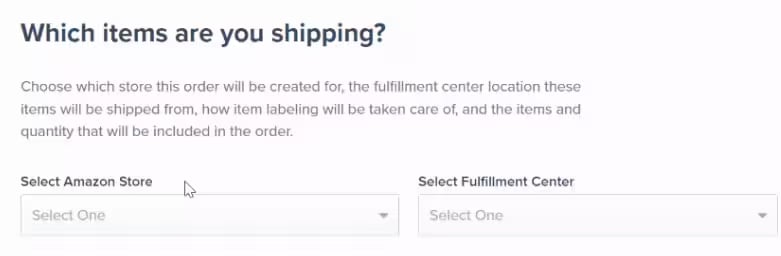
If you have multiple Amazon integrations connected to Jetpack, ensure you select the correct Amazon store from the **Select Amazon Store** drop-down menu before searching for products.
**Multiple Amazon Integrations:**
If you have multiple Amazon integrations connected to Jetpack, ensure you select the correct Amazon store from the **Select Amazon Store** drop-down menu before searching for products.
 Products must be synced from Amazon Seller Central to Jetpack before they can be selected for FBA orders. If you don't see your product in the search results, verify it has been synced from your Amazon integration.
Serial numbers will not be scanned on orders going through this automated FBA prep flow.
The automated FBA prep process does not currently support serial number scanning during packing. If your products require serial number tracking for Amazon FBA shipments, please contact Jetpack Care to discuss alternative workflows or manual FBA prep options.
Unfortunately, no. Once an FBA order has been created, the option to edit the order will no longer be available in the Jetpack dashboard.
**Why You Can't Edit FBA Shipments:**
Updating the order on Amazon Seller Central will prevent Jetpack from being able to generate a shipping label for the order. A banner indicating this limitation will appear on the Order Details page for submitted FBA shipments.
**How to Make Changes to an FBA Shipment:**
If you need to make changes to an FBA order after submission, follow these steps:
Navigate to the order in your Jetpack dashboard and cancel it.
Log in to Amazon Seller Central and cancel the corresponding FBA shipment.
After both orders have been canceled, re-submit the order following the steps in [Creating Automated FBA Shipments](/fulfillment/b2b/amazon-fba/creating-automated-fba-shipments).
If Amazon Seller Central asks you to convert the order to "Send to Amazon," you should select **"Keep as API shipment"** to prevent fulfillment issues. Converting to "Send to Amazon" will break the integration with Jetpack.
For more information about creating FBA shipments correctly, see [Creating Automated FBA Shipments](/fulfillment/b2b/amazon-fba/creating-automated-fba-shipments).
***
## Related Resources
Learn more about Amazon FBA prep and troubleshooting:
* [Creating Automated FBA Shipments](/fulfillment/b2b/amazon-fba/creating-automated-fba-shipments) - Step-by-step guide to creating automated FBA shipments
* [Troubleshooting Amazon FBA Errors](/fulfillment/b2b/amazon-fba/troubleshooting-fba-errors) - Resolve common FBA integration and shipment errors
* [Manual FBA Prep](/fulfillment/b2b/amazon-fba/manual-fba-prep) - Alternative manual FBA prep workflow
* [Amazon FBA Overview](/fulfillment/b2b/amazon-fba) - Learn about Jetpack's FBA prep services
Products must be synced from Amazon Seller Central to Jetpack before they can be selected for FBA orders. If you don't see your product in the search results, verify it has been synced from your Amazon integration.
Serial numbers will not be scanned on orders going through this automated FBA prep flow.
The automated FBA prep process does not currently support serial number scanning during packing. If your products require serial number tracking for Amazon FBA shipments, please contact Jetpack Care to discuss alternative workflows or manual FBA prep options.
Unfortunately, no. Once an FBA order has been created, the option to edit the order will no longer be available in the Jetpack dashboard.
**Why You Can't Edit FBA Shipments:**
Updating the order on Amazon Seller Central will prevent Jetpack from being able to generate a shipping label for the order. A banner indicating this limitation will appear on the Order Details page for submitted FBA shipments.
**How to Make Changes to an FBA Shipment:**
If you need to make changes to an FBA order after submission, follow these steps:
Navigate to the order in your Jetpack dashboard and cancel it.
Log in to Amazon Seller Central and cancel the corresponding FBA shipment.
After both orders have been canceled, re-submit the order following the steps in [Creating Automated FBA Shipments](/fulfillment/b2b/amazon-fba/creating-automated-fba-shipments).
If Amazon Seller Central asks you to convert the order to "Send to Amazon," you should select **"Keep as API shipment"** to prevent fulfillment issues. Converting to "Send to Amazon" will break the integration with Jetpack.
For more information about creating FBA shipments correctly, see [Creating Automated FBA Shipments](/fulfillment/b2b/amazon-fba/creating-automated-fba-shipments).
***
## Related Resources
Learn more about Amazon FBA prep and troubleshooting:
* [Creating Automated FBA Shipments](/fulfillment/b2b/amazon-fba/creating-automated-fba-shipments) - Step-by-step guide to creating automated FBA shipments
* [Troubleshooting Amazon FBA Errors](/fulfillment/b2b/amazon-fba/troubleshooting-fba-errors) - Resolve common FBA integration and shipment errors
* [Manual FBA Prep](/fulfillment/b2b/amazon-fba/manual-fba-prep) - Alternative manual FBA prep workflow
* [Amazon FBA Overview](/fulfillment/b2b/amazon-fba) - Learn about Jetpack's FBA prep services

Questions? Contact Jetpack Care.
If you have any questions or run into issues with automated FBA prep, you can always contact Jetpack Care for help. Our team is always here to assist via Slack, phone, or email!