> ## Documentation Index
> Fetch the complete documentation index at: https://help.jetpack3pl.com/llms.txt
> Use this file to discover all available pages before exploring further.
# Inventory Replenishment Report
> Track SKU forecasts, replenishment recommendations, and inventory depletion timelines to optimize your MultiHub IQ distribution and prevent stockouts.
The Inventory Replenishment Report gives you forward-looking insights to prevent stockouts across your fulfillment network. This report integrates with [MultiHub IQ (MIQ)](/fulfillment/multi-hub-iq) to help you make informed decisions about when and how much inventory to replenish, based on demand forecasting, current fulfillable inventory, and incoming shipments.
While the SKU forecasts and replenishment recommendations provided in this report can help you make informed decisions, it's important to consider them as only one of many factors in your decision-making process. Relying solely on the forecasts and recommendations can be risky due to limitations or unexpected changes in demand and supply chain conditions.
## What the Inventory Replenishment Report Shows
The Inventory Replenishment Report provides visibility into several key areas to help you optimize your inventory distribution:
* **Report Refresh Schedule**: The date and time the report was last refreshed (displayed in UTC). The main report refreshes once daily in the mornings (UTC), while the replenishment breakdown, replenishment date recommendations, and SKU forecasts refresh weekly on Monday mornings (UTC).
* **Replenishment Breakdown**: See which products require inventory replenishment, along with suggested replenishment dates based on Jetpack SKU forecasts, fulfillable inventory (as shown on the [Inventory Status page](/fulfillment/managing-inventory/inventory-status-page)), incoming inventory via [inbound WROs](/fulfillment/sending-inventory/creating-wro), and the order-to-hub lead time (the time it takes for inventory to travel from its origin to the Jetpack hub).
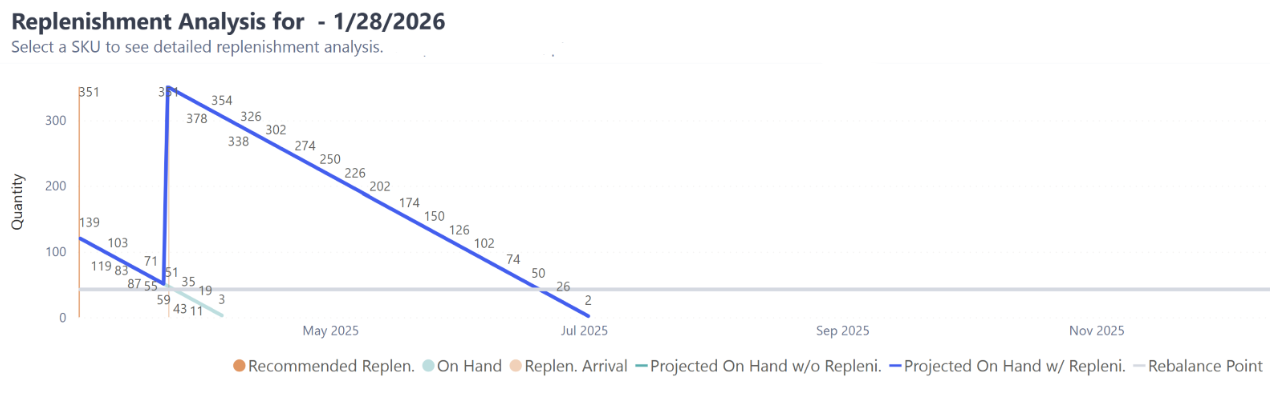
* **Inventory Depletion Scenarios**: View how your inventory levels will deplete over the next 12 months in two scenarios—if you replenish by the recommended date, and if you don't replenish at all.

 ***
## Available Sub-Reports
The Inventory Replenishment Report page includes three distinct sub-reports, each offering different insights into your inventory needs.
| Sub-Report | Purpose | Key Features |
| ---------------------------------------------- | ------------------------------------------------------------------------------------------------------------------------------ | ----------------------------------------------------------------------------------------------------------------------------------------------------------------------------------------------------------------------------------------- |
| **D2C Inventory Replenishment Recommendation** | Review total D2C (also called B2C) units forecasted by Jetpack's forecasting models based on historical orders and seasonality |
***
## Available Sub-Reports
The Inventory Replenishment Report page includes three distinct sub-reports, each offering different insights into your inventory needs.
| Sub-Report | Purpose | Key Features |
| ---------------------------------------------- | ------------------------------------------------------------------------------------------------------------------------------ | ----------------------------------------------------------------------------------------------------------------------------------------------------------------------------------------------------------------------------------------- |
| **D2C Inventory Replenishment Recommendation** | Review total D2C (also called B2C) units forecasted by Jetpack's forecasting models based on historical orders and seasonality | - Forecast updates weekly on Monday morning (UTC)
- Provides insight into the next 12 months
- Includes demand forecast, rebalance point, incoming inventory, and recommended replenishment amounts and dates
|
| **Replenishment Analysis** | Understand how quickly inventory levels deplete when you do and do not replenish over time, compared to the Rebalance Point | - Visual graphic showing depletion timelines
- Grey horizontal line indicates Rebalance Point threshold
- Shows risk of running out when inventory falls below Rebalance Point
|
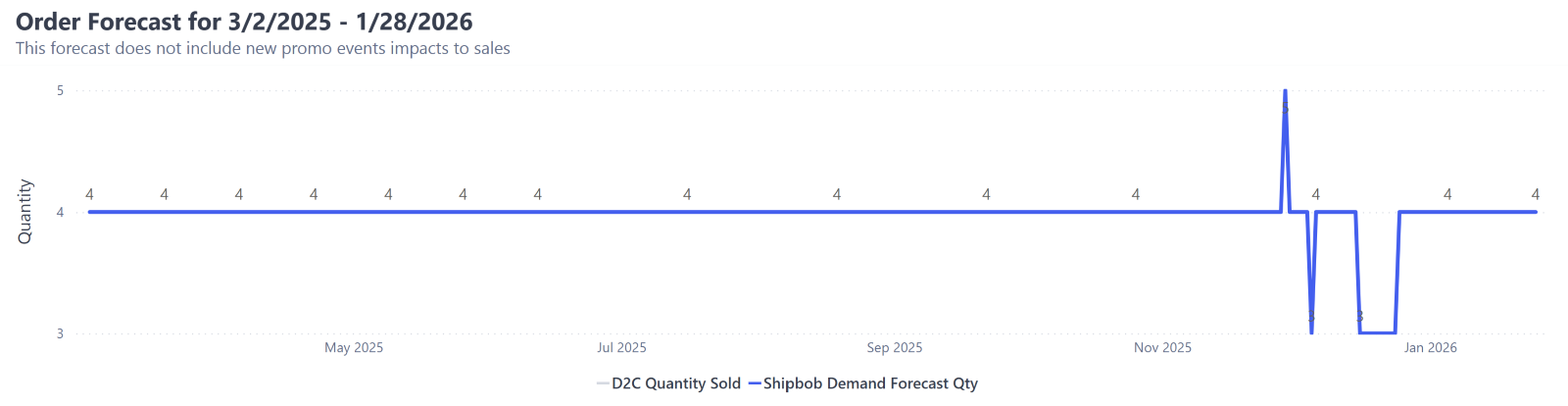
| **Order Forecast** | Review the total number of units forecasted to be sold across all orders each day for a selected date range | - Based on historical orders and seasonality trends (holidays, peak spikes)
- May be impacted by factors like historical out-of-stock events, lack of sales data for new products, or one-time promotional events
|
***
## D2C Inventory Replenishment Recommendation Columns
The D2C Inventory Replenishment Recommendation sub-report contains several columns that help you make replenishment decisions.
| Column | What It Shows |
| ------------------------------------ | -------------------------------------------------------------------------------------------------------------------------------------------------------------------------------------------------------------------------------------------------------------------------------------------------------------------------------------------------------------------------------------------------------------------------------------------------------------------------- |
| **Product** | Product name |
| **SKU** | Stock Keeping Unit identifier |
| **InventoryID** | Internal inventory identifier |
| **Jetpack Demand Forecast Quantity** | Total D2C units forecasted by Jetpack's forecasting models for the next 12 months |
| **Rebalance Point** | Recommended total units to have on-hand for orders, as calculated by Jetpack's MultiHub IQ algorithm or overridden based on your input (if applicable). Used to help determine the Recommended Replenishment Qty. Learn more about [MultiHub IQ and rebalancing](/fulfillment/multi-hub-iq/using-multihub-iq). |
| **Incoming** | Total number of units in transit to a Jetpack fulfillment center. Includes units from WROs in transit to Jetpack hubs and inventory transfers between Jetpack fulfillment centers. |
| **Recommended Replenishment Qty** | Total number of units you would need to have stored with Jetpack to meet a product's Rebalance Point for 3 months. Calculated by taking the product's Fulfillable inventory, subtracting Incoming inventory, and adding 3 months of Jetpack's projected demand forecast.
**Note**: To configure a different timeframe for this column, provide this information via a Pendo notification or by contacting your Jetpack Care Manager directly. |
| **Recommended Replenishment Date** | Date you should order inventory to decrease the chance that you will stock out of that product. Calculated as the date when Fulfillable inventory and Incoming inventory are less than the Rebalance Point, after having subtracted the order-to-hub lead time (which is 21 days by default).
**Note**: To configure a different order-to-hub lead time, provide this information via a Pendo notification or by contacting your Jetpack Care Manager directly. |
***
## Filtering Reports
You can filter all sub-reports on the Inventory Replenishment page using the following options:
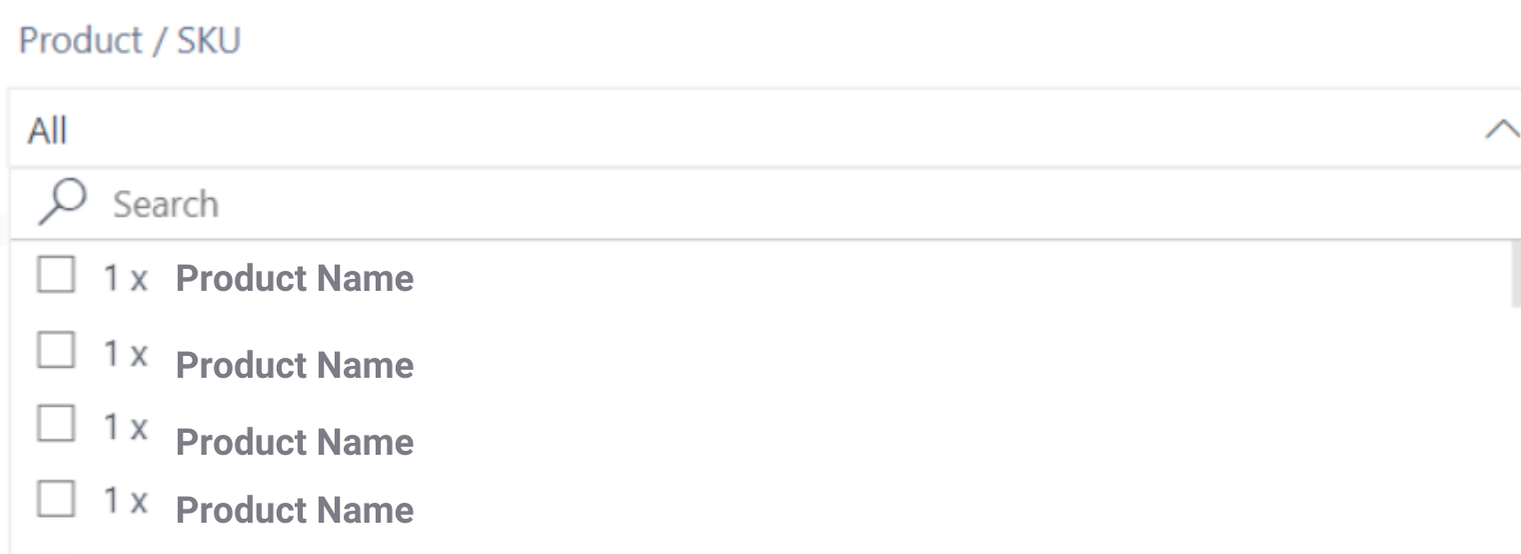
Use the drop-down option to refine which products are included in the sub-reports on the page.
* By default, all products are included
* Locate products by using the search bar or scrolling through the options
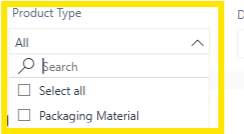
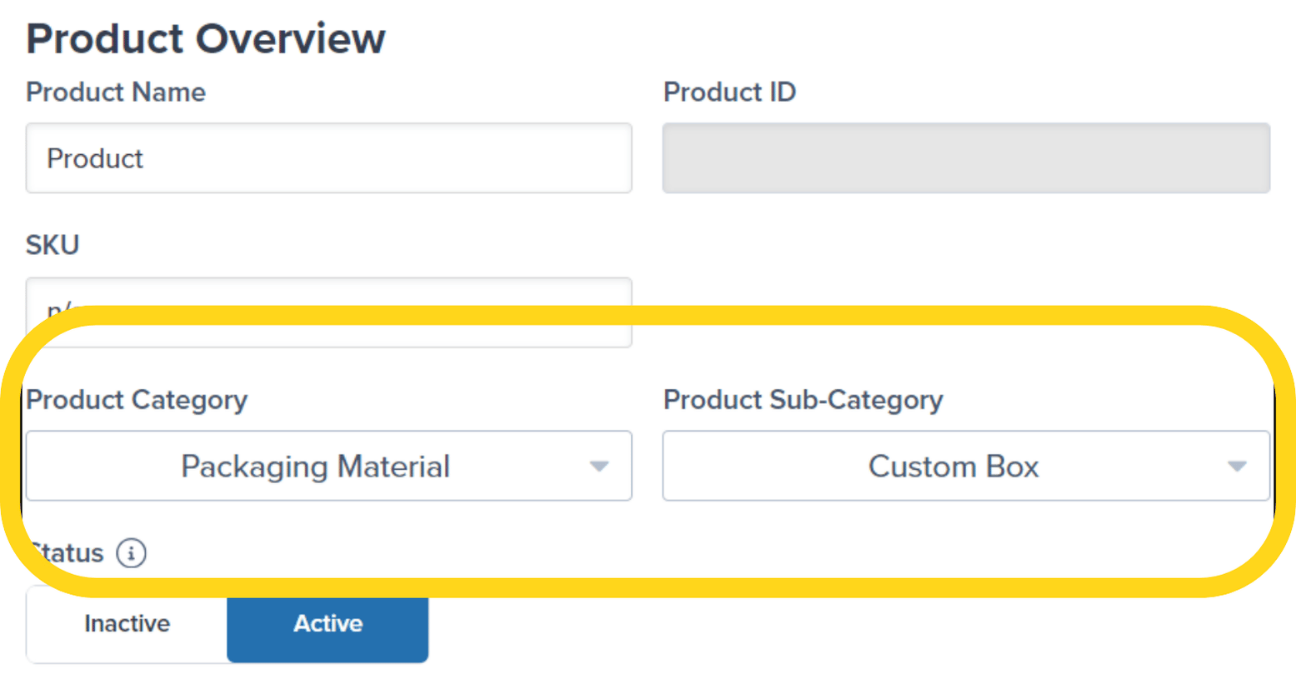
 Use the drop-down options to select between **Products** and **Packaging Material**.
* Selecting **Packaging Material** will show only SKUs that have a Product Category of Packaging Material on the product details page in the Jetpack dashboard
* All sub-categories related to the Packaging Material Product Category will appear under this view
Use the drop-down options to select between **Products** and **Packaging Material**.
* Selecting **Packaging Material** will show only SKUs that have a Product Category of Packaging Material on the product details page in the Jetpack dashboard
* All sub-categories related to the Packaging Material Product Category will appear under this view
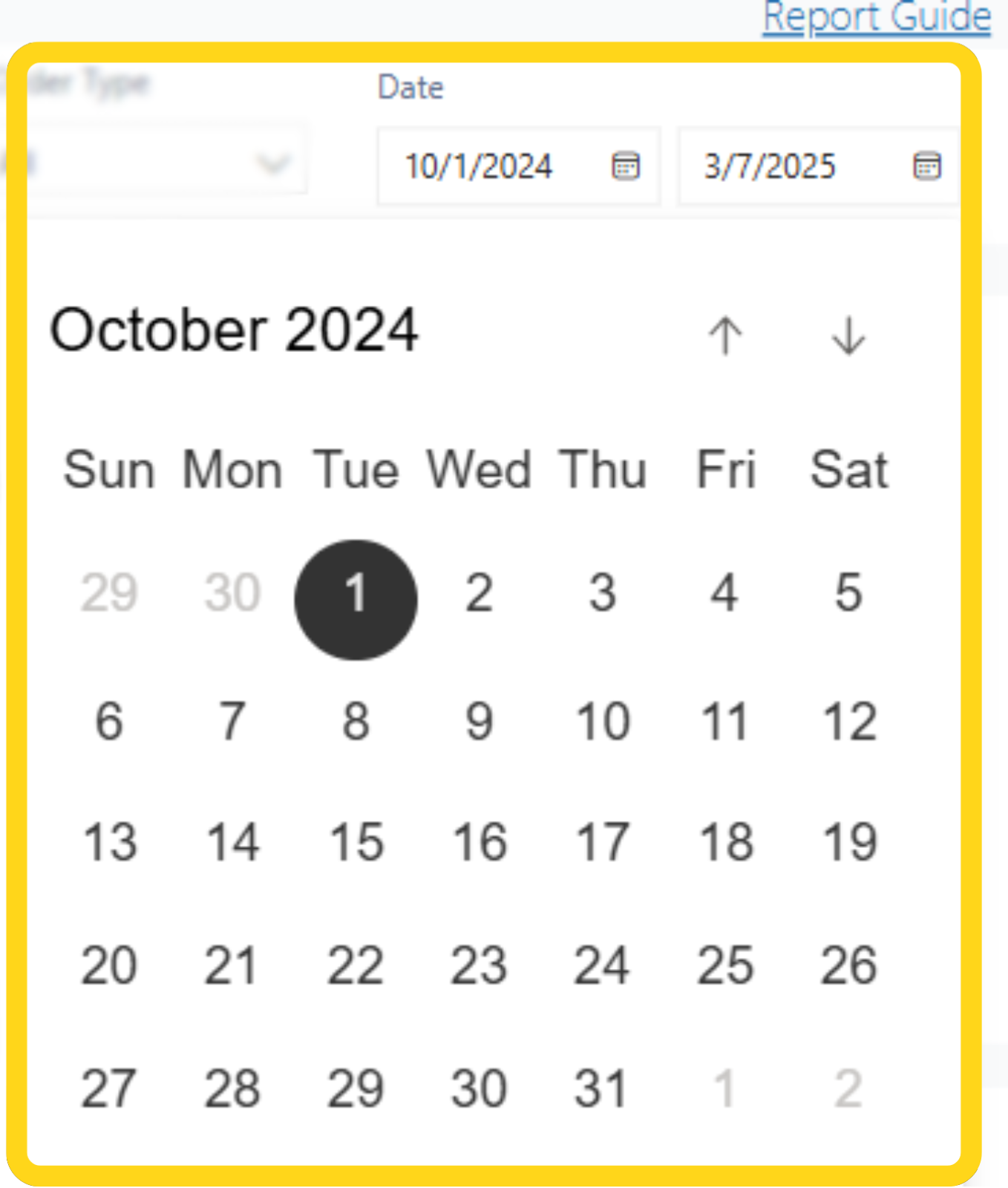
 Click the calendar icon to select the date range for your data.
* You can access the last 90 days of data
Click the calendar icon to select the date range for your data.
* You can access the last 90 days of data
 ***
## Exporting Reports
You can export all sub-reports on the Inventory Replenishment page to analyze data outside the dashboard.
From the Inventory Replenishment page, locate and hover over the sub-report you wish to download.
Click the 3 horizontal dots. Additional menu options will appear.
***
## Exporting Reports
You can export all sub-reports on the Inventory Replenishment page to analyze data outside the dashboard.
From the Inventory Replenishment page, locate and hover over the sub-report you wish to download.
Click the 3 horizontal dots. Additional menu options will appear.
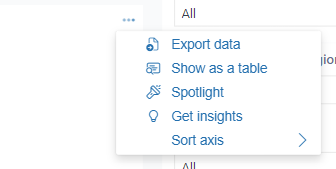 Select **Export data**. A pop-up window will appear.
Choose the format option of your choice:
* **Data with current layout**
* **Summarized data**
* **Underlying data**
Some options may be disabled or not compatible with the data you are trying to export.
Select **Export data**. A pop-up window will appear.
Choose the format option of your choice:
* **Data with current layout**
* **Summarized data**
* **Underlying data**
Some options may be disabled or not compatible with the data you are trying to export.
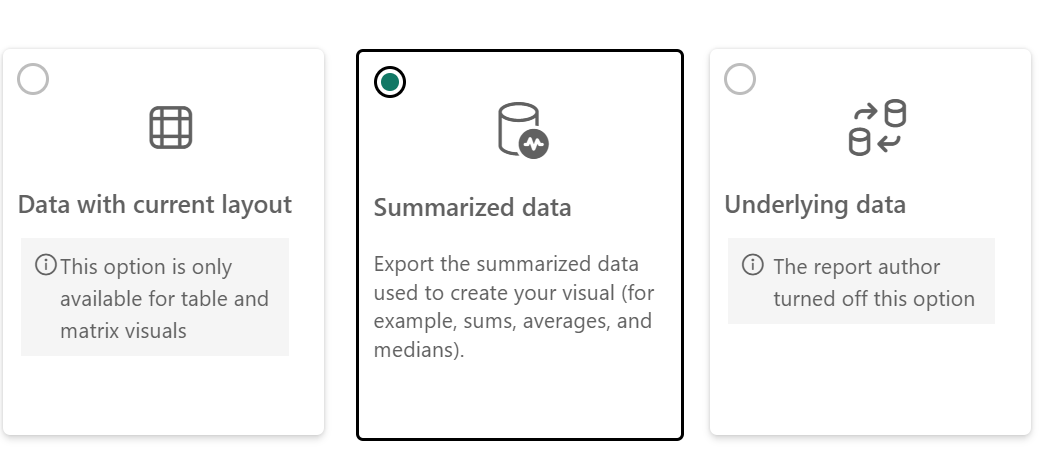 Click the **Export** button. A progress bar will appear.
Once the download is completed, the file will automatically be downloaded to your computer.
Click the **Export** button. A progress bar will appear.
Once the download is completed, the file will automatically be downloaded to your computer.
 ***
## Inventory Replenishment Report FAQs
Products will only have a SKU forecast if more than 100 units of the product were shipped in D2C (also referred to as B2C) orders in the last 14 days.
Additionally, after a product hasn't shipped in 3 months, the SKU will be considered inactive in Jetpack's forecasting model.
**Note**: The product will be considered active automatically once it has shipped 100 units in 14 days.
The Inventory Replenishment page will not provide replenishment recommendations if the product is not forecasted to have movement over the next 12 months, or if there is enough inventory on-hand and inbound (via WROs) to meet demand.
Common reasons for discrepancies include the following:
* **Different Refresh Schedules**: The Inventory Replenishment page refreshes once daily, while other pages in the Jetpack dashboard (like the Inventory Status page) update as inventory has movement.
* **WRO Processing Timing**: Units will appear under a product's Incoming inventory (on pages like the Inventory Status page) until the WRO is processed by the hub or destination fulfillment center. This causes a slight delay in the units being available to fulfill the forecasted demand.
You will be able to review the Inventory Replenishment reports with your custom inputs (such as order lead time) the following Monday morning (CST) from when you provided the updated information.
***
## Let's Dive Deeper
Overview of all available reports and analytics tools
View current inventory levels across your fulfillment network
Track how quickly your inventory is moving
Learn how MultiHub IQ distributes and rebalances your inventory
Set up your replenishment workflow and schedules
Identify SKUs causing exception orders
***
## Inventory Replenishment Report FAQs
Products will only have a SKU forecast if more than 100 units of the product were shipped in D2C (also referred to as B2C) orders in the last 14 days.
Additionally, after a product hasn't shipped in 3 months, the SKU will be considered inactive in Jetpack's forecasting model.
**Note**: The product will be considered active automatically once it has shipped 100 units in 14 days.
The Inventory Replenishment page will not provide replenishment recommendations if the product is not forecasted to have movement over the next 12 months, or if there is enough inventory on-hand and inbound (via WROs) to meet demand.
Common reasons for discrepancies include the following:
* **Different Refresh Schedules**: The Inventory Replenishment page refreshes once daily, while other pages in the Jetpack dashboard (like the Inventory Status page) update as inventory has movement.
* **WRO Processing Timing**: Units will appear under a product's Incoming inventory (on pages like the Inventory Status page) until the WRO is processed by the hub or destination fulfillment center. This causes a slight delay in the units being available to fulfill the forecasted demand.
You will be able to review the Inventory Replenishment reports with your custom inputs (such as order lead time) the following Monday morning (CST) from when you provided the updated information.
***
## Let's Dive Deeper
Overview of all available reports and analytics tools
View current inventory levels across your fulfillment network
Track how quickly your inventory is moving
Learn how MultiHub IQ distributes and rebalances your inventory
Set up your replenishment workflow and schedules
Identify SKUs causing exception orders

Questions? Contact Jetpack Care.
If you have any questions or run into issues, you can always contact Jetpack Care for help. Our team is always here to assist via Slack, phone, or email!