> ## Documentation Index
> Fetch the complete documentation index at: https://help.jetpack3pl.com/llms.txt
> Use this file to discover all available pages before exploring further.
# Setting Returns Preferences
> Configure how Jetpack processes returned products with Return and Return to Sender preferences, including Restock, Dispose, and Quarantine options for each product in your catalog.
Return and Return to Sender (RTS) orders are requests for Jetpack to process returned products when they arrive at a fulfillment center—whether returned by the customer or due to a delivery failure. The action Jetpack takes depends on each product's configured Return and RTS Preferences. Jetpack does not handle refunds or exchanges; we simply process the inventory according to your Returns Preferences. Properly configuring these settings ensures returned inventory is handled according to your business needs.
## Return Types
A return is a request for Jetpack to receive and perform actions to inventory that gets sent back to our fulfillment center either by your customer or due to a delivery failure (based on what you set in your dashboard for the product's Returns Preferences). There are two types of returns:
### Return to Sender (RTS)
A return that results from a carrier delivery failure and is sent back to Jetpack by the carrier. You will be charged a fee equivalent to the original cost of the shipping label.
**How RTS orders are created:**
* Return orders are only automatically created in the Jetpack dashboard with a Return Type of "Return to Sender" when the original order is physically received back to a Jetpack fulfillment center and there is a RTS scan present on the carrier tracking page
* If a Jetpack fulfillment center physically receives back the original shipment it fulfilled, but the carrier tracking doesn't have an RTS scan, then Jetpack will automatically create a return with a Return Type of "Regular" on your behalf (as long as a return order doesn't already exist in the Jetpack dashboard)
* Once an RTS order is received, it will be restocked by default, unless a different RTS Return Action has been defined in your Jetpack dashboard (such as Dispose/Quarantine)
***
### Customer-Initiated Returns
A return that is sent back to Jetpack by your customer and created by you in the Jetpack dashboard. We charge a flat \$3 fee for customer-initiated returns.
**Important requirements:**
* The return must be created in your Jetpack dashboard (either manually or automatically using a supported integration) before your customer physically sends it back to our fulfillment center to ensure it is processed within our returns SLA
* Once a customer-initiated return order is received, it will be restocked by default unless a different Return Action (such as Dispose/Quarantine) has been defined in your Jetpack dashboard
***
## Return and Return to Sender Preferences
Every product in the Jetpack dashboard includes the following Return Preferences:
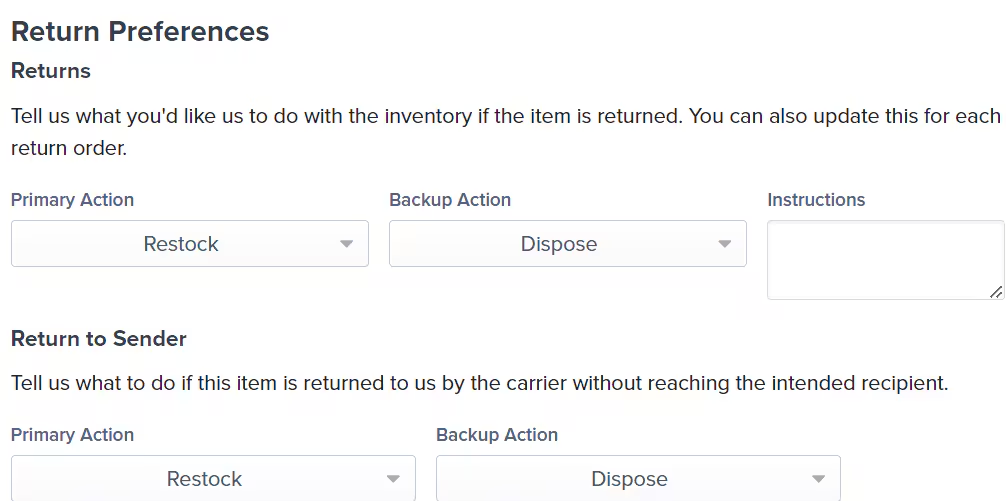
* **Returns** - Includes a Return Action, Backup Action, and Instructions
* **Return to Sender** - Includes a Return to Sender Action and a Return to Sender Backup Action
**Default Settings:**
If you do not configure or update these settings, Jetpack will default to **Restock** as the primary Return Action and **Dispose** as the Backup Action for both Returns and Return to Sender.
We recommend updating your Return and Return to Sender preferences for each product in your Jetpack dashboard, either individually or in bulk. Jetpack is not responsible for products that are returned and disposed of if these preferences are not configured for each product.
***
## Return Preferences Options
When configuring Return and Return to Sender preferences in your Jetpack dashboard, you can choose from the following options:
| Option | What Happens | Key Considerations |
| -------------- | ------------------------------------------------------------------------------------------------------------------------------------------ | --------------------------------------------------------------------------------------------------------------------------------------------------------------------------------------------------------------------------------------------------------------------------------------------------------------------------------------------------------------------------------------------------------------------------------------------------------------------------------------------------------------------------------------------------------------------------------------------------------------------------------------- |
| **Restock** | Jetpack's Operations team will inspect the returned product based on the inspection steps (up to 3) you provide in your Jetpack dashboard. |
**Pass inspection:** Product will be restocked for future orders
**Fail inspection:** Backup Action (Dispose or Quarantine) will be followed
**Unclear/unsupported instructions:** Backup Action will be followed
**Note:** Complicated or detailed inspection steps may result in higher returns processing fees
|
| **Dispose** | The returned product will be discarded and cannot be recovered. |
**Permanent action:** Product cannot be recovered once disposed
**Alternative:** Consider using Quarantine option if you want to avoid disposal when Restock can't be followed
|
| **Quarantine** | The returned product will be stored in your company's quarantine location within the fulfillment center. |
**Your responsibility:** You are responsible for the removal of quarantined inventory
**Storage fees:** You will be charged applicable storage fees until you remove the units using a B2C, B2B, or disposal work order
**Removal method:** Create a B2C/B2B order to ship units back to your company or to another address for sorting/inspection
**International restriction:** Quarantined items cannot be shipped outside the country of the fulfillment center
**Storage location:** All quarantined products are stored together in a location separate from non-returned units
|
***
## Actions NOT Performed When Processing Returns
Jetpack's Operations team does not perform the following actions when processing returns:
* **Plugging in or testing electronic devices**
* **Disassembling products** (e.g., unscrewing, removing batteries)
* **Re-kitting products within the return**
* If a kitted product is likely to be returned un-kitted, consider using the Dispose or Quarantine option
* Example: If Products A and B are bundled together but customers do not return them in the original packaging, they are considered de-kitted. Jetpack cannot re-kit or store them with kitted products.
* **Serial scanning of products**
* **Logging data in third-party documents** (e.g., spreadsheets, external software)
* **Sorting returned products by lot numbers or expiration dates**
* **Taking photos of returned products**
***
## Configuring Return and Return to Sender Preferences
To set up Return and RTS preferences for your products:
From the Jetpack dashboard:
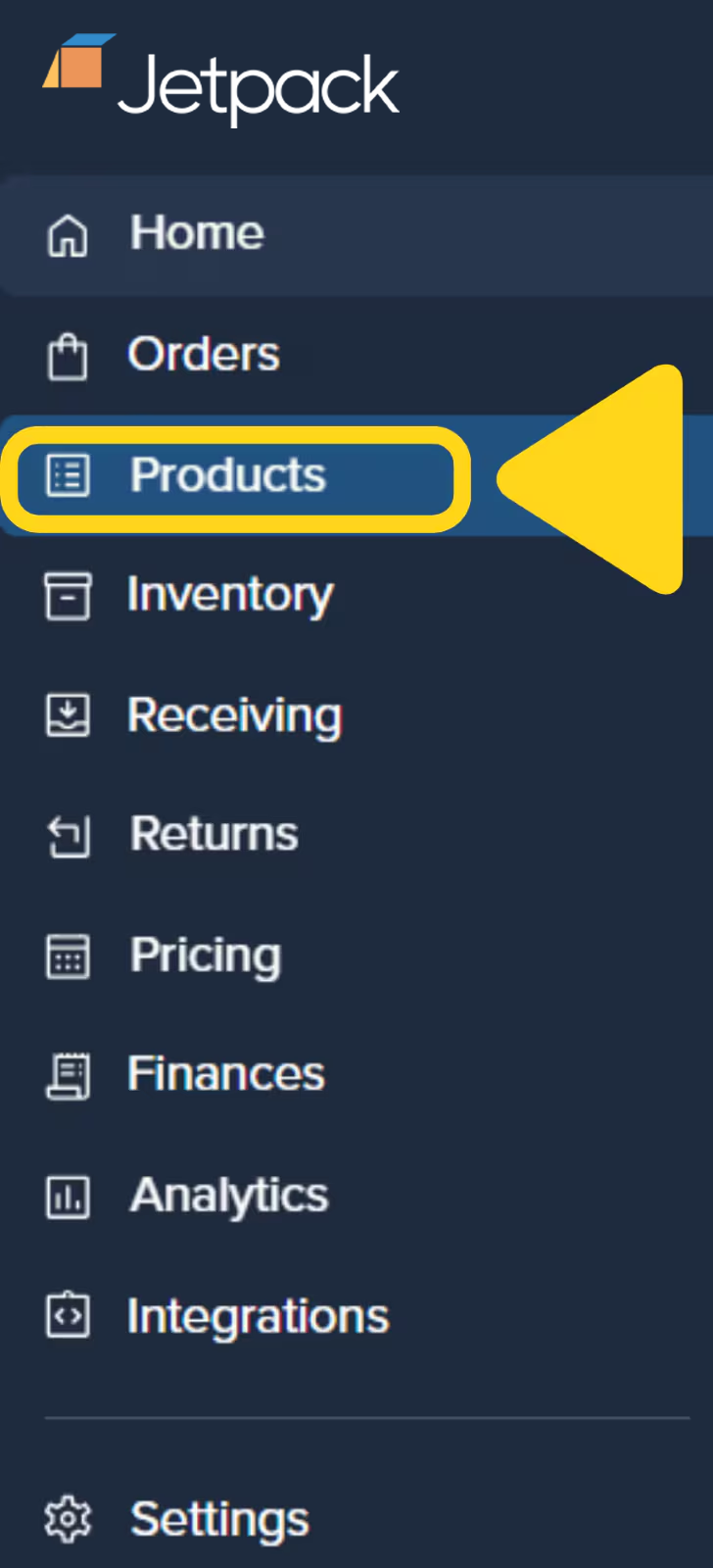
Click **Products** on the left-hand navigation bar.
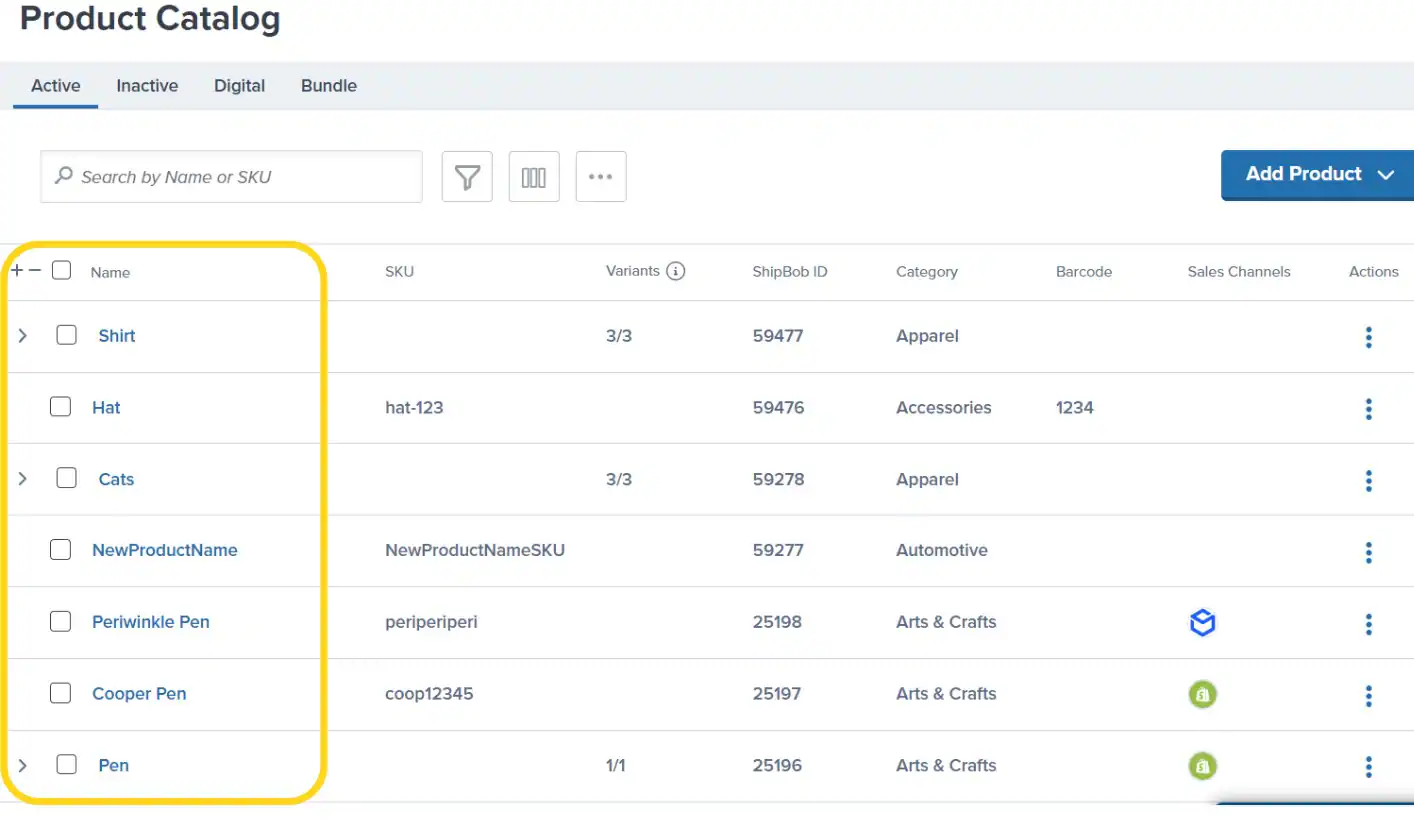
Use the search bar or apply filters (e.g., Active, Inactive, Digital) to locate the product. Click the product's **name** (hyperlinked) to open the Product Details page.
On the Product Details page, scroll down to find the **Return Preferences** section.
Use the drop-down menus under **Return Action** and **Backup Action** to specify what Jetpack's Operations team should do when receiving a returned product.
* If you select **Restock** as the Return Action, you can provide **Inspection Instructions** in the text box to guide Jetpack's team on what to check before restocking the product
* If the product fails the inspection or Jetpack is unable to follow your instructions (e.g., they are unclear or not supported), the Backup Action (Dispose or Quarantine) will be followed
Use the drop-down menus under **Return to Sender Action** and **Return to Sender Backup Action** to specify what to do if a product is returned due to a delivery failure.
* The Return to Sender Backup Action will appear after selecting a Primary Action and is blank by default
* If Restock is selected, Inspection Instructions are not required, as the product was never delivered to the customer
* The RTS order will still be inspected by Jetpack's team. If the product passes inspection, it will be restocked for future orders. If it fails, the Backup Action (Dispose or Quarantine) will be followed
Click **Save** in the Unsaved Changes bar to update your settings.
***
## Creating Returns
Customer-initiated returns can be created in 3 ways:
1. **Manually on the Orders page or Returns page** in the Jetpack dashboard
2. **Automatically through a Jetpack-supported returns platform integration** (AfterShip or Loop)
3. **Through the Jetpack API** (reach out and we'll connect you with the appropriate details)
For detailed instructions on creating return orders, see [Creating a Return Order](/fulfillment/returns/creating-return-order).
***
## Important Notes When Creating Returns
When creating a return order in the Jetpack dashboard, keep the following requirements in mind:
| Requirement | Details |
| ----------------------------------------- | ------------------------------------------------------------------------------------------------------------------------------------------------------------------------------------------------------------------------------------------------------------------------------------------------------------------------------------------------------------------------------------------------------------------------------------------------------------------------------------------------------------------------------------------------------------------------------------------------------------------------------------------------------------------------------------------------------- |
| **Inventory ID requirements** |
Always add the Inventory ID associated with the physical product that is being returned from the order
If the products were part of a bundle, include the Inventory ID of the products that make up the bundle, not the bundle parent's Inventory ID
|
| **DG/HAZMAT restrictions** |
Purchasing return labels through Jetpack for shipping back DG/HAZMAT products is not currently supported
If your customer is returning DG/HAZMAT products, you must use the Prepaid Label option when creating your return order
|
| **Lot products** |
While lot products may be returned by your customers, we do not support restocking the product(s) based on their lot number and expiration date
For customer-returned lot products, you can choose Quarantine or Dispose as the Returns Action
For lot products returned to sender (RTS) by a carrier, you can choose Restock, Quarantine, or Dispose as the Return To Sender Action
|
| **One return per package** |
We require one return order to be created per package (e.g., each box, bubble mailer, or poly mailer) that is being returned
If your customer must send separate packages, you should create a return in your dashboard for each package
|
| **Reference ID/RMA and tracking** |
You must create a unique Reference ID/RMA and include a tracking number in the Jetpack dashboard
These two numbers allow Jetpack to identify your return and associate it with your account
The Reference ID/RMA must be physically written or printed on the external packaging of the return package by your customer
**Important:** Failure to include the Reference ID/RMA on external packaging will result in product disposal
|
| **Ship In Own Container (SIOC) products** |
Jetpack does not remove shipping labels attached to the external packaging of SIOC products
We recommend setting your Return/RTS Preferences as Dispose or Quarantine for SIOC products
If you choose to quarantine these products, you can submit a B2B order to have them sent back to a location of your choice
You can send the product(s) back to Jetpack using our WRO process after removing old shipping labels
**Note:** All quarantined products will be stored together in a storage location (bin, shelf, or pallet) that's separate from non-returned units of their same SKU(s). Warehouse storage fees apply to quarantined inventory.
|
***
## Items Not Eligible for Return
The items below are not eligible to be returned to a Jetpack fulfillment center:
* Any hazardous materials (e.g., fertilizers, aerosols, batteries)
* Any food products (will be disposed of upon receipt)
* Intimate apparel, toys, or any intimacy-related goods
* Syringes or medical supplies that include testing/sample kits
* Medical supplies used for the collection of fluids
* Medicine (e.g., vitamins and supplements)
***
## Returns FAQs
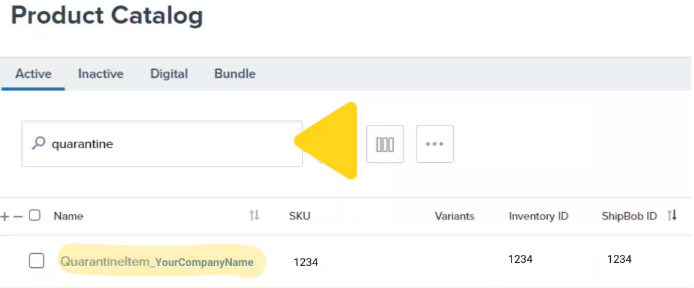
All quarantined products are grouped under a single inventory ID, which appears as **Quarantine\_CompanyName** or **QuarantineItem\_CompanyName** in your Jetpack dashboard.
Click **Products** on the left-hand navigation bar. You will be redirected to the Product Catalog.
Input **"quarantine"** in the search bar. Your quarantined SKU will populate.
No, Jetpack cannot restock inventory stored under your company's quarantine SKU, as all quarantined units are mixed under one inventory ID.
If you need these units, create a B2C or B2B order to ship them to your company or another address (e.g., for inspection or sorting by a third party). Quarantined units cannot be shipped outside the country of the fulfillment center where they are stored, as a custom invoice cannot be provided for these orders.
To identify products stored under your quarantine SKU, review the **Last Action Taken** under the **Return Details** section of your recent returns.
Return shipping labels are priced based on the shipping zone and carrier rates from UPS and USPS ground services only.
In some cases, your return label fees might be higher than the original fulfillment cost if we cannot utilize other low-cost carriers (e.g., regional carriers).
You can use your own label purchased from a carrier of your choice. After you have a label, we recommend uploading the tracking number of the label to the return generated in your Jetpack dashboard. Ensuring you have the correct tracking number will help us process your return faster.
Yes, but remember that returns must be sent to the same fulfillment center that ships your products.
***
## Let's Dive Deeper
Back to the main shipping preferences guide
Submit return orders in the Jetpack dashboard
Monitor the status of your returns
Manage returned inventory after processing
Understand Jetpack's returns philosophy
Configure product-level settings
Questions? Contact Jetpack Care.
If you have any questions or run into issues, you can always contact Jetpack Care for help. Our team is always here to assist via Slack, phone, or email!