> ## Documentation Index
> Fetch the complete documentation index at: https://help.jetpack3pl.com/llms.txt
> Use this file to discover all available pages before exploring further.
# Packaging Preferences
> Configure packaging preferences for your products, including standard packaging, Ship In Own Container (SIOC), and custom packaging options to ensure proper fulfillment and consistent pricing.
Setting packaging preferences for each product you ship with Jetpack ensures orders are fulfilled correctly and pricing remains consistent. Failure to update this information may cause orders to be placed on hold or result in shipping and pricing inconsistencies. Jetpack offers standard non-branded packaging, Ship In Own Container (SIOC) options, and custom packaging solutions to fit your business needs.
## Packaging Preferences Overview
Set preferences for each product you are actively shipping with Jetpack. You can configure packaging at the individual product level or update preferences in bulk using Jetpack's Excel template.
**Bulk Updates:**
Learn how to [update packaging preferences in bulk](/fulfillment/managing-products/more-tools/bulk-updating-product-details) using Jetpack's product template.
***
## Setting Packaging Requirements for Products
Every product in your Jetpack catalog should have packaging requirements configured to ensure proper fulfillment and accurate pricing. These settings tell Jetpack's Operations team which type of packaging to use when shipping your products.
### Accessing Product Packaging Settings
From the Jetpack dashboard:
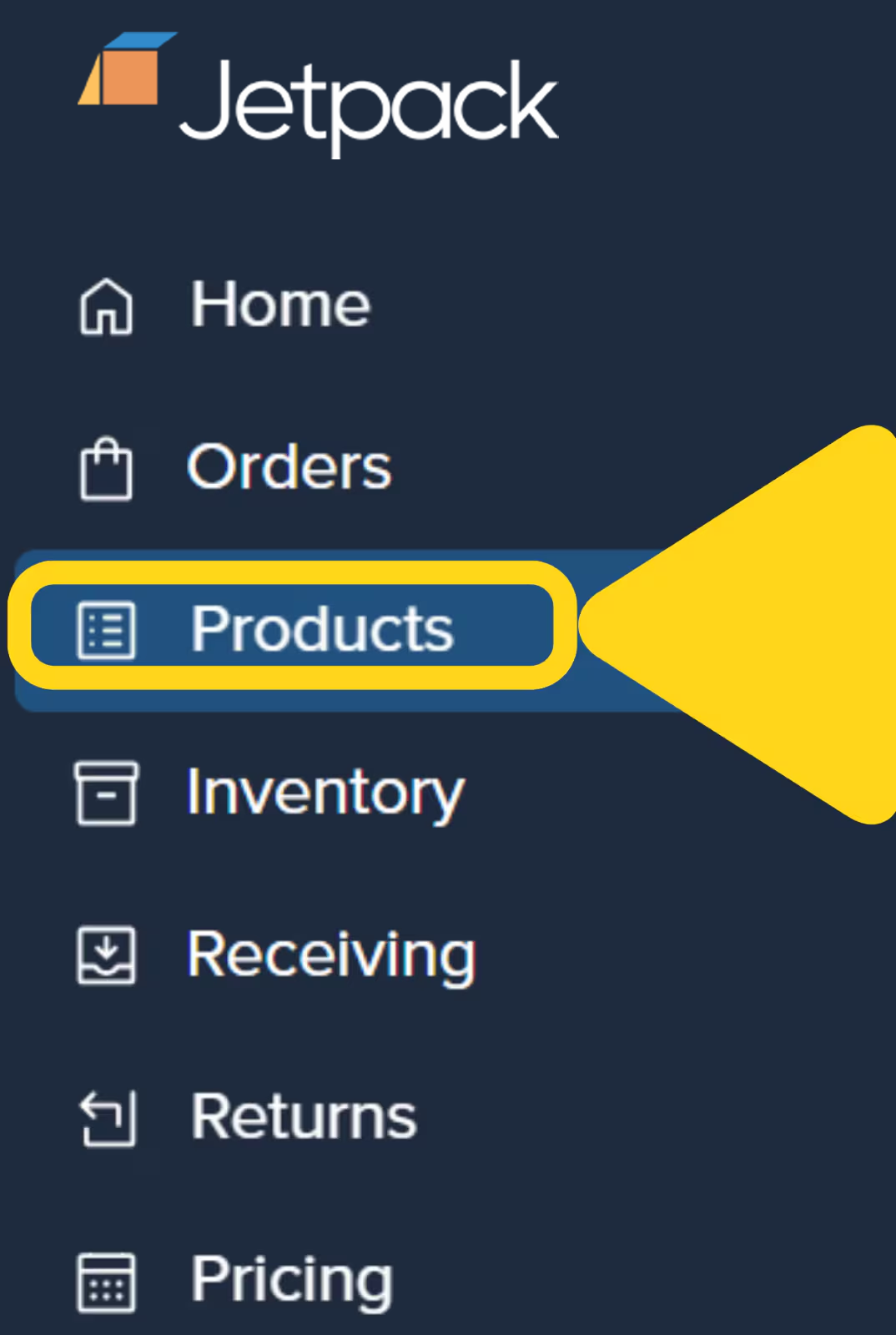 You will be redirected to the Product Catalog page. Use the search bar or filters to locate the product.
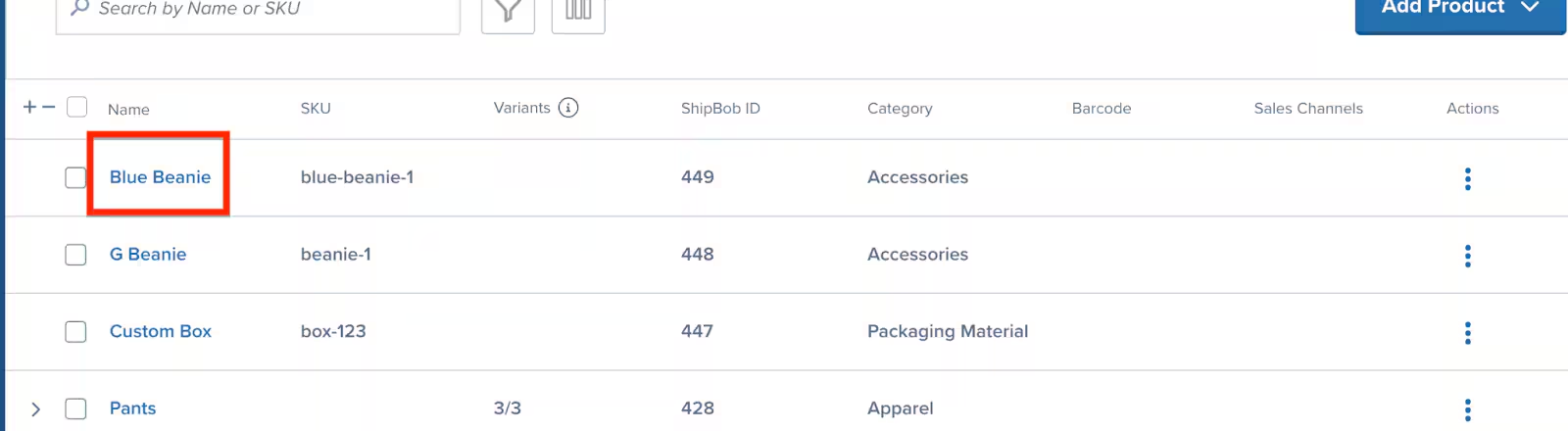 Click the product's **Name** (hyperlinked) to open the Product Details page.
***
### Configuring Packaging Requirements
On the Product Details page:
Click the product's **Name** (hyperlinked) to open the Product Details page.
***
### Configuring Packaging Requirements
On the Product Details page:
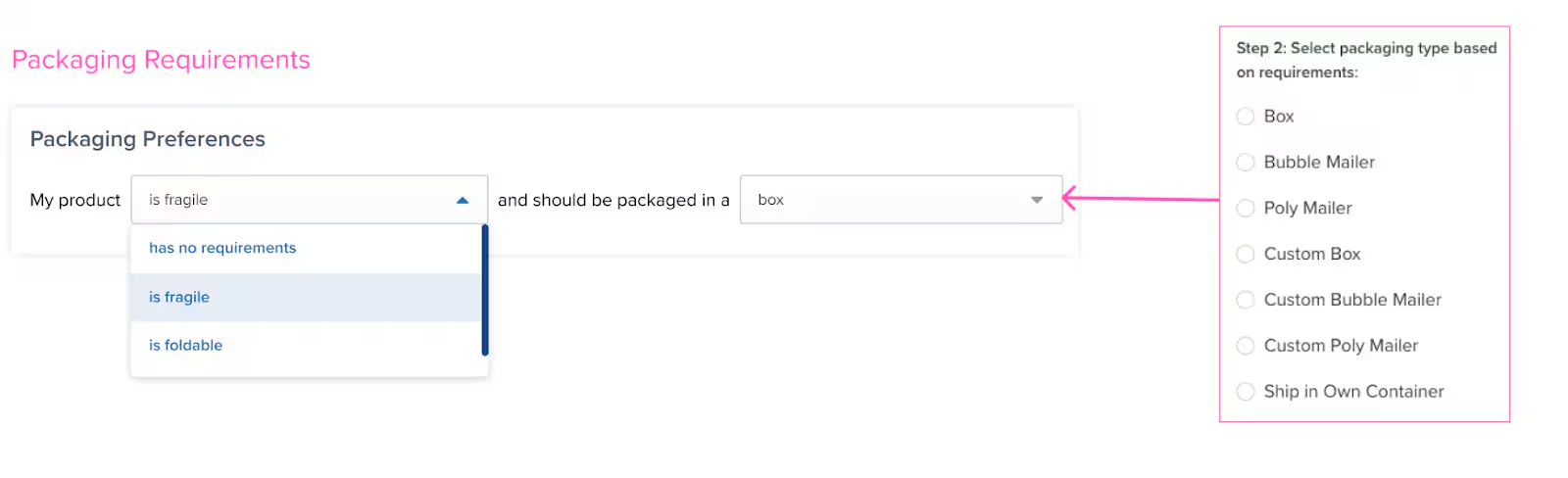 Use the first drop-down menu to select the packaging type:
* **Box** - For products requiring rigid protection
* **Poly Mailer** - For soft goods and non-fragile items
* **Bubble Mailer** - For items needing cushioned protection
* **Poster Tube** - For rolled items like posters or prints
* **Book Fold** - For flat items requiring edge protection
* **Ship In Own Container (SIOC)** - For products already packaged in shippable containers
If using custom packaging, use the second drop-down menu to specify your custom packaging SKU.
Click **Save** to apply your changes.
Products without configured packaging requirements may cause orders to be placed on hold while Jetpack's Operations team determines appropriate packaging. Configure these settings for all active products to ensure smooth fulfillment.
***
## Packaging Type Options
Jetpack offers three packaging options to meet different product and business needs:
## Standard Packaging
Jetpack provides standard, non-branded packaging materials, including boxes, bubble mailers, poly mailers, poster tubes, and book folds, as part of your custom pricing plan.
In the dimension tables below, the weight column indicates how much the container/packaging itself weighs before your product(s) are added.
Standard box dimensions are available in all Jetpack fulfillment centers. The weight indicated is for the empty container.
**Important notes:**
* The 20 x 20 x 20 in (50.8 x 50.8 x 50.8 cm) box is designated for B2C shipments only (not supported for B2B)
* Orders weighing over 50 lbs (22 kg) may be split into multiple shipments as a safety measure
| Length | Width | Height | Weight |
| ---------------- | ---------------- | ---------------- | ------------------ |
| 6 in (15.24 cm) | 5 in (12.7 cm) | 4 in (10.16 cm) | 2.4 oz (0.06 kg) |
| 10 in (25.4 cm) | 8 in (20.32 cm) | 3 in (7.62 cm) | 4.65 oz (0.13 kg) |
| 10 in (25.4 cm) | 6 in (15.24 cm) | 5 in (12.7 cm) | 5.22 oz (0.14 kg) |
| 14 in (35.56 cm) | 12 in (30.48 cm) | 3 in (7.62 cm) | 10.56 oz (0.29 kg) |
| 12 in (30.48 cm) | 9 in (22.86 cm) | 5 in (12.7 cm) | 8.24 oz (0.23 kg) |
| 15 in (38.1 cm) | 11 in (27.94 cm) | 4 in (10.16 cm) | 10.75 oz (0.30 kg) |
| 13 in (33.02 cm) | 10 in (25.4 cm) | 8 in (20.32 cm) | 11.36 oz (0.32 kg) |
| 17 in (43.18 cm) | 13 in (33.02 cm) | 7 in (17.78 cm) | 15.14 oz (0.43 kg) |
| 12 in (30.48 cm) | 12 in (30.48 cm) | 12 in (30.48 cm) | 14.7 oz (0.42 kg) |
| 15 in (38.1 cm) | 13 in (33.02 cm) | 10 in (25.4 cm) | 15.87 oz (0.45 kg) |
| 18 in (45.72 cm) | 16 in (40.64 cm) | 8 in (20.32 cm) | 23.25 oz (0.66 kg) |
| 26 in (66.04 cm) | 20 in (50.8 cm) | 10 in (25.4 cm) | 35.94 oz (1.02 kg) |
| 20 in (50.8 cm) | 20 in (50.8 cm) | 20 in (50.8 cm) | 39.96 oz (1.05 kg) |
Use the first drop-down menu to select the packaging type:
* **Box** - For products requiring rigid protection
* **Poly Mailer** - For soft goods and non-fragile items
* **Bubble Mailer** - For items needing cushioned protection
* **Poster Tube** - For rolled items like posters or prints
* **Book Fold** - For flat items requiring edge protection
* **Ship In Own Container (SIOC)** - For products already packaged in shippable containers
If using custom packaging, use the second drop-down menu to specify your custom packaging SKU.
Click **Save** to apply your changes.
Products without configured packaging requirements may cause orders to be placed on hold while Jetpack's Operations team determines appropriate packaging. Configure these settings for all active products to ensure smooth fulfillment.
***
## Packaging Type Options
Jetpack offers three packaging options to meet different product and business needs:
## Standard Packaging
Jetpack provides standard, non-branded packaging materials, including boxes, bubble mailers, poly mailers, poster tubes, and book folds, as part of your custom pricing plan.
In the dimension tables below, the weight column indicates how much the container/packaging itself weighs before your product(s) are added.
Standard box dimensions are available in all Jetpack fulfillment centers. The weight indicated is for the empty container.
**Important notes:**
* The 20 x 20 x 20 in (50.8 x 50.8 x 50.8 cm) box is designated for B2C shipments only (not supported for B2B)
* Orders weighing over 50 lbs (22 kg) may be split into multiple shipments as a safety measure
| Length | Width | Height | Weight |
| ---------------- | ---------------- | ---------------- | ------------------ |
| 6 in (15.24 cm) | 5 in (12.7 cm) | 4 in (10.16 cm) | 2.4 oz (0.06 kg) |
| 10 in (25.4 cm) | 8 in (20.32 cm) | 3 in (7.62 cm) | 4.65 oz (0.13 kg) |
| 10 in (25.4 cm) | 6 in (15.24 cm) | 5 in (12.7 cm) | 5.22 oz (0.14 kg) |
| 14 in (35.56 cm) | 12 in (30.48 cm) | 3 in (7.62 cm) | 10.56 oz (0.29 kg) |
| 12 in (30.48 cm) | 9 in (22.86 cm) | 5 in (12.7 cm) | 8.24 oz (0.23 kg) |
| 15 in (38.1 cm) | 11 in (27.94 cm) | 4 in (10.16 cm) | 10.75 oz (0.30 kg) |
| 13 in (33.02 cm) | 10 in (25.4 cm) | 8 in (20.32 cm) | 11.36 oz (0.32 kg) |
| 17 in (43.18 cm) | 13 in (33.02 cm) | 7 in (17.78 cm) | 15.14 oz (0.43 kg) |
| 12 in (30.48 cm) | 12 in (30.48 cm) | 12 in (30.48 cm) | 14.7 oz (0.42 kg) |
| 15 in (38.1 cm) | 13 in (33.02 cm) | 10 in (25.4 cm) | 15.87 oz (0.45 kg) |
| 18 in (45.72 cm) | 16 in (40.64 cm) | 8 in (20.32 cm) | 23.25 oz (0.66 kg) |
| 26 in (66.04 cm) | 20 in (50.8 cm) | 10 in (25.4 cm) | 35.94 oz (1.02 kg) |
| 20 in (50.8 cm) | 20 in (50.8 cm) | 20 in (50.8 cm) | 39.96 oz (1.05 kg) |
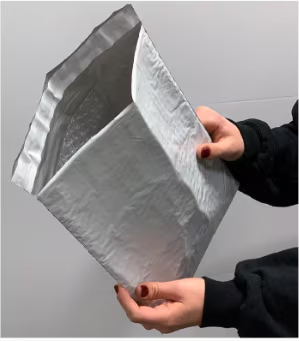
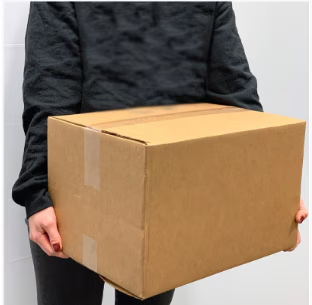 Bubble mailers are available in standard sizes and include bubble wrap padding on the inside.
| Length | Width | Height | Weight |
| ---------------- | --------------- | -------------- | ------------------ |
| 10 in (25.4 cm) | 6 in (15.24 cm) | 1 in (2.54 cm) | 0.37 oz (0.01 kg) |
| 12 in (30.48 cm) | 9 in (22.86 cm) | 1 in (2.54 cm) | 0.55 oz (0.02 kg) |
| 15 in (38.1 cm) | 10 in (25.4 cm) | 1 in (2.54 cm) | 0.84 oz (0.023 kg) |
| 20 in (50.8 cm) | 15 in (38.1 cm) | 1 in (2.54 cm) | 1.36 oz (0.038 kg) |
Bubble mailers are available in standard sizes and include bubble wrap padding on the inside.
| Length | Width | Height | Weight |
| ---------------- | --------------- | -------------- | ------------------ |
| 10 in (25.4 cm) | 6 in (15.24 cm) | 1 in (2.54 cm) | 0.37 oz (0.01 kg) |
| 12 in (30.48 cm) | 9 in (22.86 cm) | 1 in (2.54 cm) | 0.55 oz (0.02 kg) |
| 15 in (38.1 cm) | 10 in (25.4 cm) | 1 in (2.54 cm) | 0.84 oz (0.023 kg) |
| 20 in (50.8 cm) | 15 in (38.1 cm) | 1 in (2.54 cm) | 1.36 oz (0.038 kg) |
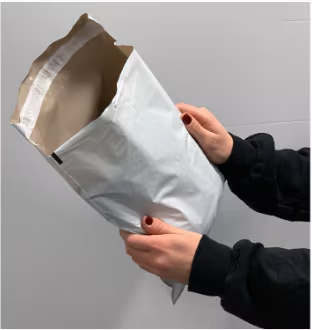
 Standard poly mailers are offered without internal bubble wrap padding in the following sizes:
| Length | Width | Height | Weight |
| ---------------- | ---------------- | -------------- | ------------------ |
| 12 in (30.48 cm) | 9 in (22.86 cm) | 1 in (2.54 cm) | 0.40 oz (0.011 kg) |
| 17 in (43.18 cm) | 14 in (35.56 cm) | 1 in (2.54 cm) | 0.88 oz (0.025 kg) |
| 20 in (50.8 cm) | 15 in (38.1 cm) | 1 in (2.54 cm) | 1.36 oz (0.038 kg) |
Standard poly mailers are offered without internal bubble wrap padding in the following sizes:
| Length | Width | Height | Weight |
| ---------------- | ---------------- | -------------- | ------------------ |
| 12 in (30.48 cm) | 9 in (22.86 cm) | 1 in (2.54 cm) | 0.40 oz (0.011 kg) |
| 17 in (43.18 cm) | 14 in (35.56 cm) | 1 in (2.54 cm) | 0.88 oz (0.025 kg) |
| 20 in (50.8 cm) | 15 in (38.1 cm) | 1 in (2.54 cm) | 1.36 oz (0.038 kg) |
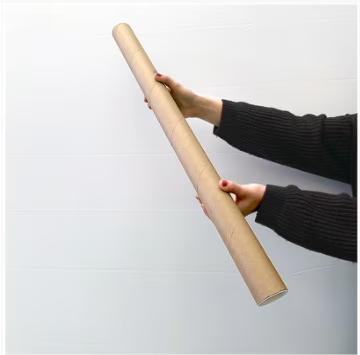
 Poster tubes are available in the following dimensions:
| Length | Width | Height | Weight |
| ---------------- | -------------- | -------------- | ----------------- |
| 24 in (60.96 cm) | 2 in (5.08 cm) | 2 in (5.08 cm) | 4.64 oz (0.13 kg) |
| 36 in (91.44 cm) | 3 in (7.62 cm) | 3 in (7.62 cm) | 12 oz (0.34 kg) |
Poster tubes are available in the following dimensions:
| Length | Width | Height | Weight |
| ---------------- | -------------- | -------------- | ----------------- |
| 24 in (60.96 cm) | 2 in (5.08 cm) | 2 in (5.08 cm) | 4.64 oz (0.13 kg) |
| 36 in (91.44 cm) | 3 in (7.62 cm) | 3 in (7.62 cm) | 12 oz (0.34 kg) |
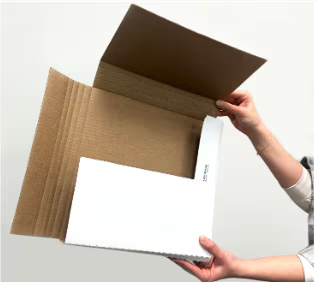
 Book folds are available in standard dimensions. The weight column depicts how much the container/packaging itself weighs before your product(s) are added.
| Length | Width | Height | Weight |
| ---------------- | ---------------- | -------------- | ----------------- |
| 14 in (35.56 cm) | 11 in (27.94 cm) | 1 in (2.54 cm) | 5.92 oz (0.17 kg) |
Book folds are available in standard dimensions. The weight column depicts how much the container/packaging itself weighs before your product(s) are added.
| Length | Width | Height | Weight |
| ---------------- | ---------------- | -------------- | ----------------- |
| 14 in (35.56 cm) | 11 in (27.94 cm) | 1 in (2.54 cm) | 5.92 oz (0.17 kg) |
 ***
## Fulfillment Center Location-Specific Packaging
Some Jetpack fulfillment centers offer additional packaging materials beyond the standard options.
Moreno Valley fulfillment centers offer boxes in the additional sizes below:
| Length | Width | Height | Weight |
| ---------------- | ---------------- | --------------- | ------------------ |
| 6 in (15.24 cm) | 6 in (15.24 cm) | 2 in (5.08 cm) | 3.04 oz (0.08 kg) |
| 8 in (20.32 cm) | 6 in (15.24 cm) | 5 in (12.7 cm) | 4.80 oz (0.14 kg) |
| 12 in (30.48 cm) | 6 in (15.24 cm) | 4 in (10.16 cm) | 9.25 oz (0.26 kg) |
| 14 in (35.56 cm) | 12 in (30.48 cm) | 8 in (20.32 cm) | 11.36 oz (0.32 kg) |
## Ship In Own Container (SIOC)
SIOC packaging allows products to be shipped in the original packaging received at Jetpack.
**How SIOC works:**
* If an order includes multiple items (SIOC or standard packaging items), all products will ship in the most optimal standard box as determined by the Jetpack box algorithm
* SIOC packaging must have at least one side measuring 6 x 4 in (15.24 x 10.16 cm) to accommodate a shipping label
* Packaging containing hazardous material markings requires prior written approval from Jetpack
* The total fulfillment cost for a SIOC shipment is based on the outer box dimensions, rounded up to the nearest inch
Email Jetpack Care to discuss auto-split options if you do not want multiple items to be combined.
## Custom Packaging
Custom packaging is available for products that do not fit standard packaging options.
### Custom Packaging Overview
Jetpack offers standard, non-branded packaging materials such as boxes, bubble mailers, poly mailers, poster tubes, and book folds for your orders. If you prefer branded packaging or need materials that better fit larger products, you can supply your own custom packaging materials (e.g., custom boxes, poly mailers, dunnage). Custom packaging is also available for items like marketing inserts, Prop 65 labels, and specialized packing solutions.
***
### Custom Packaging Requirements and Limitations
When using custom packaging, please keep the following points in mind:
**Order splitting:**
* If your product(s) are too large for standard packaging and custom packaging isn't provided, Jetpack's Operations team will try to split your order to fit the available materials
* If splitting is not possible, your product(s) cannot be shipped until the proper custom packaging is provided
**Size restrictions:**
* Custom mailers larger than 18 inches in length or wider than 14 inches are not accepted due to expensive carrier surcharges
* All custom packaging (boxes and mailers) must have at least one flat side with a minimum space of 6 inches by 4 inches for the shipping label
**Material & process limitations:**
* Custom tape is not accepted as part of the packing process
* Custom boxes may only display hazardous material markings if prior written approval from Jetpack is provided
* Marketing inserts requiring more than eight folds must be processed through an approved kitting order request
* Crinkle paper is not accepted due to difficulties in standardizing pick quantities
**Fulfillment & storage considerations:**
* Fulfillment costs for orders using custom packaging are based on the outer dimensions of the box (rounded up to the nearest inch as determined by Jetpack's Cubiscan machines)
* When purchasing custom packaging from an external vendor, verify the external dimensions rather than internal ones, which may differ by up to 0.5 inches
* Custom packaging requires its own storage location and will incur storage fees
* Each size or variation must be managed as a separate SKU
***
## Fulfillment Center Location-Specific Packaging
Some Jetpack fulfillment centers offer additional packaging materials beyond the standard options.
Moreno Valley fulfillment centers offer boxes in the additional sizes below:
| Length | Width | Height | Weight |
| ---------------- | ---------------- | --------------- | ------------------ |
| 6 in (15.24 cm) | 6 in (15.24 cm) | 2 in (5.08 cm) | 3.04 oz (0.08 kg) |
| 8 in (20.32 cm) | 6 in (15.24 cm) | 5 in (12.7 cm) | 4.80 oz (0.14 kg) |
| 12 in (30.48 cm) | 6 in (15.24 cm) | 4 in (10.16 cm) | 9.25 oz (0.26 kg) |
| 14 in (35.56 cm) | 12 in (30.48 cm) | 8 in (20.32 cm) | 11.36 oz (0.32 kg) |
## Ship In Own Container (SIOC)
SIOC packaging allows products to be shipped in the original packaging received at Jetpack.
**How SIOC works:**
* If an order includes multiple items (SIOC or standard packaging items), all products will ship in the most optimal standard box as determined by the Jetpack box algorithm
* SIOC packaging must have at least one side measuring 6 x 4 in (15.24 x 10.16 cm) to accommodate a shipping label
* Packaging containing hazardous material markings requires prior written approval from Jetpack
* The total fulfillment cost for a SIOC shipment is based on the outer box dimensions, rounded up to the nearest inch
Email Jetpack Care to discuss auto-split options if you do not want multiple items to be combined.
## Custom Packaging
Custom packaging is available for products that do not fit standard packaging options.
### Custom Packaging Overview
Jetpack offers standard, non-branded packaging materials such as boxes, bubble mailers, poly mailers, poster tubes, and book folds for your orders. If you prefer branded packaging or need materials that better fit larger products, you can supply your own custom packaging materials (e.g., custom boxes, poly mailers, dunnage). Custom packaging is also available for items like marketing inserts, Prop 65 labels, and specialized packing solutions.
***
### Custom Packaging Requirements and Limitations
When using custom packaging, please keep the following points in mind:
**Order splitting:**
* If your product(s) are too large for standard packaging and custom packaging isn't provided, Jetpack's Operations team will try to split your order to fit the available materials
* If splitting is not possible, your product(s) cannot be shipped until the proper custom packaging is provided
**Size restrictions:**
* Custom mailers larger than 18 inches in length or wider than 14 inches are not accepted due to expensive carrier surcharges
* All custom packaging (boxes and mailers) must have at least one flat side with a minimum space of 6 inches by 4 inches for the shipping label
**Material & process limitations:**
* Custom tape is not accepted as part of the packing process
* Custom boxes may only display hazardous material markings if prior written approval from Jetpack is provided
* Marketing inserts requiring more than eight folds must be processed through an approved kitting order request
* Crinkle paper is not accepted due to difficulties in standardizing pick quantities
**Fulfillment & storage considerations:**
* Fulfillment costs for orders using custom packaging are based on the outer dimensions of the box (rounded up to the nearest inch as determined by Jetpack's Cubiscan machines)
* When purchasing custom packaging from an external vendor, verify the external dimensions rather than internal ones, which may differ by up to 0.5 inches
* Custom packaging requires its own storage location and will incur storage fees
* Each size or variation must be managed as a separate SKU
 ***
### Creating a Product for Custom Packaging
Custom packaging materials must be created as individual SKUs in your Jetpack dashboard.
From the Jetpack dashboard:
1. Create a SKU for each custom packaging material
* Example: A 6 x 5 x 4 inch black branded box would be its own SKU
2. Configure the Packaging Requirements for each custom packaging/material in the Product Catalog
For detailed instructions on creating products, see [Manually Adding Products](/fulfillment/managing-products/adding-products).
***
### Configuring a Product as Custom Packaging
To designate a product as custom packaging, dunnage, label, or marketing insert:
From the Jetpack dashboard:
On the Product Catalog page, locate the product you want to configure (using the search bar or scrolling through the list). Click the product's **Name** (hyperlinked) to open the product details page.
Under the Product Details tab, click the **Packaging for Product Category** section.
***
### Creating a Product for Custom Packaging
Custom packaging materials must be created as individual SKUs in your Jetpack dashboard.
From the Jetpack dashboard:
1. Create a SKU for each custom packaging material
* Example: A 6 x 5 x 4 inch black branded box would be its own SKU
2. Configure the Packaging Requirements for each custom packaging/material in the Product Catalog
For detailed instructions on creating products, see [Manually Adding Products](/fulfillment/managing-products/adding-products).
***
### Configuring a Product as Custom Packaging
To designate a product as custom packaging, dunnage, label, or marketing insert:
From the Jetpack dashboard:
On the Product Catalog page, locate the product you want to configure (using the search bar or scrolling through the list). Click the product's **Name** (hyperlinked) to open the product details page.
Under the Product Details tab, click the **Packaging for Product Category** section.
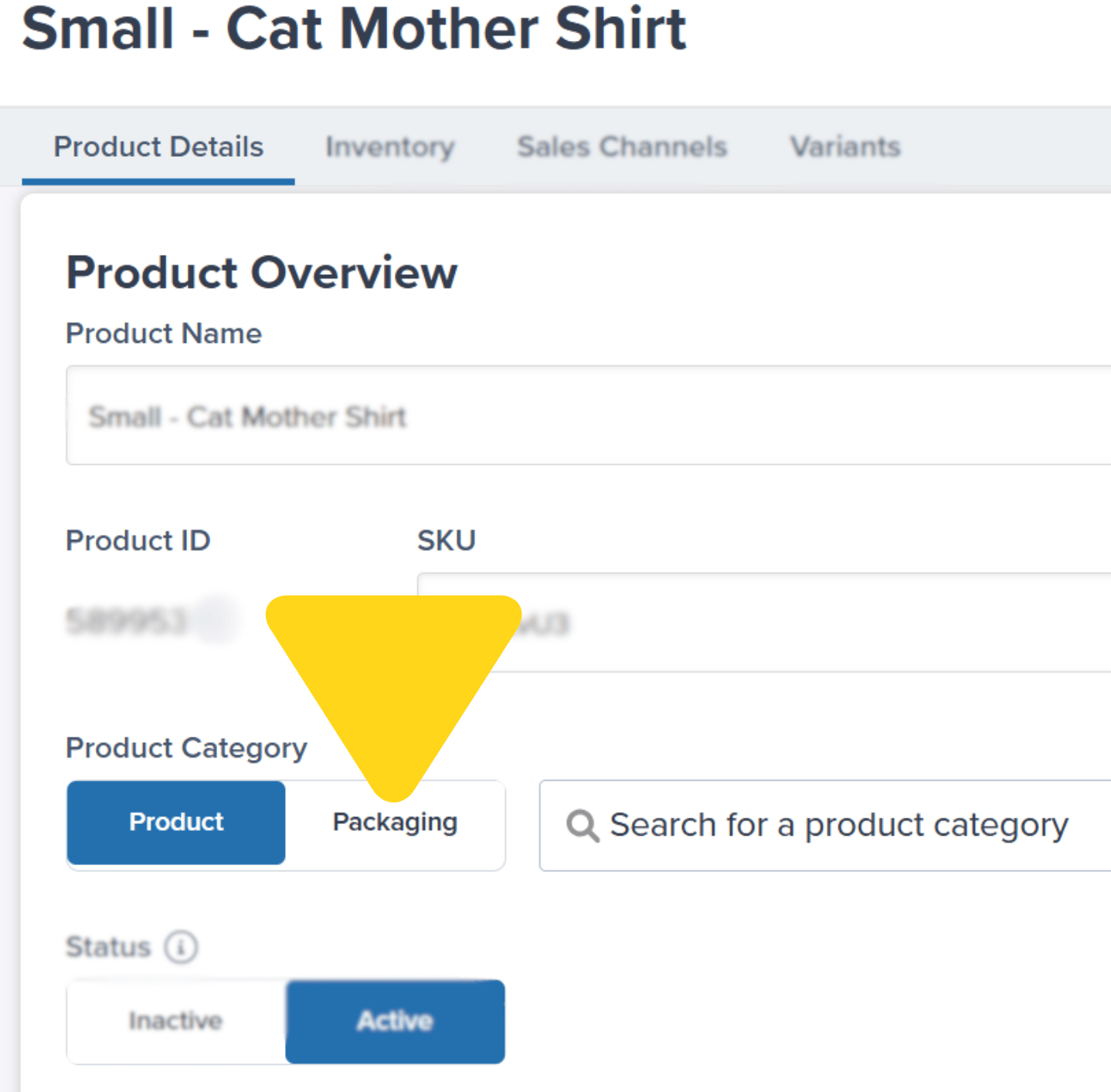 From the drop-down options, select one of the following as applicable:
* Custom Box
* Custom Bubble Mailer
* Custom Poly Mailer
* Custom Dunnage
* Marketing Insert
* Prop 65 Label
Click the **Save** button to confirm your selection.
Continue with the steps below for updating products that should be shipped in your custom packaging.
***
### Adding Custom Packaging Requirements to a Product
To configure a product to ship in custom packaging:
From the Jetpack dashboard:
Click **Products** on the left-hand navigation bar. You will be redirected to the Product Catalog page. Locate and click the product's **Name** (hyperlinked) that should be shipped in custom packaging.
Click into the **Product Details** tab to edit the packaging requirements.
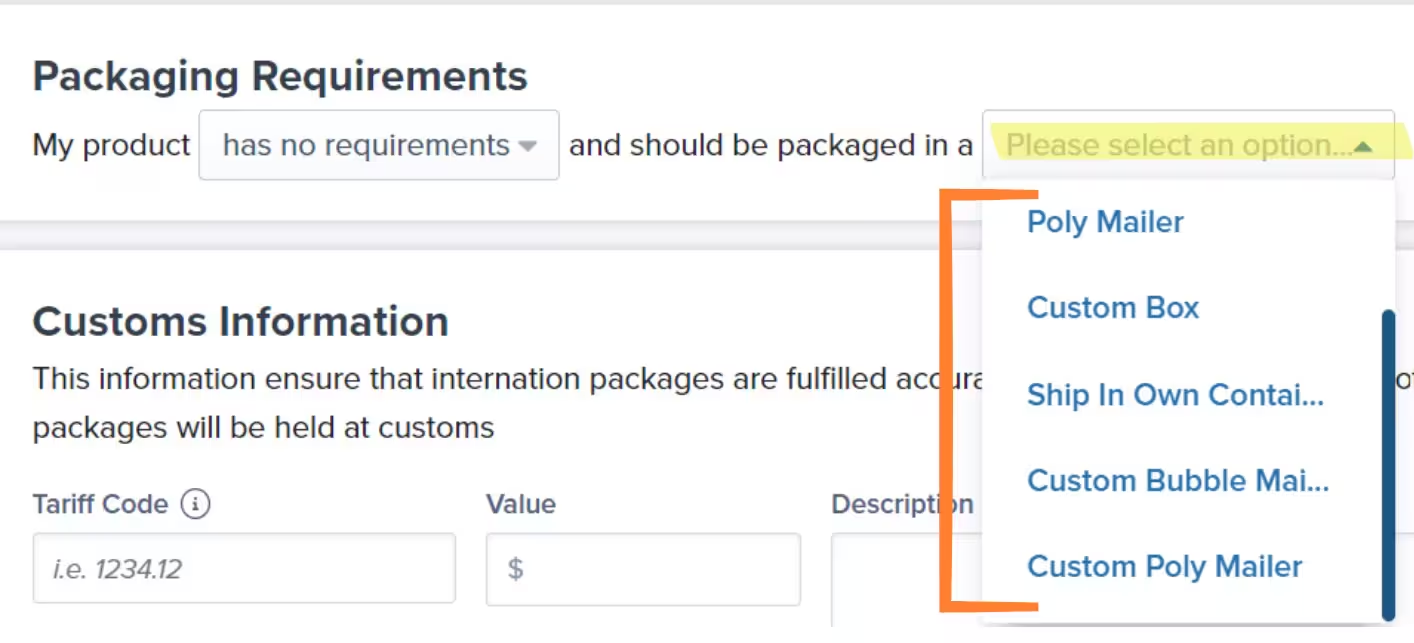
Use the second drop-down menu under **Packaging Requirements** to specify whether the product should be shipped in custom packaging.
From the drop-down options, select one of the following as applicable:
* Custom Box
* Custom Bubble Mailer
* Custom Poly Mailer
* Custom Dunnage
* Marketing Insert
* Prop 65 Label
Click the **Save** button to confirm your selection.
Continue with the steps below for updating products that should be shipped in your custom packaging.
***
### Adding Custom Packaging Requirements to a Product
To configure a product to ship in custom packaging:
From the Jetpack dashboard:
Click **Products** on the left-hand navigation bar. You will be redirected to the Product Catalog page. Locate and click the product's **Name** (hyperlinked) that should be shipped in custom packaging.
Click into the **Product Details** tab to edit the packaging requirements.
Use the second drop-down menu under **Packaging Requirements** to specify whether the product should be shipped in custom packaging.
 Click **Save**.
***
### Next Steps for Orders with Custom Packaging
To ensure your orders are packaged in your custom packaging materials:
1. Create a Warehouse Receiving Order (WRO) to ship your custom packaging/materials to Jetpack fulfillment centers
2. Set up bundles or request a Jetpack rule to automatically add the custom packaging SKUs to the appropriate orders
**Note:** If custom packaging or materials are out of stock, orders will move into Exception status. You can then edit order details to remove the custom packaging items, moving the orders into Processing. In such cases, Jetpack will ship orders using the standard packaging until the custom materials are replenished.
For more information on creating WROs, see [Creating a Warehouse Receiving Order](/fulfillment/sending-inventory/creating-wro).
***
## Box Selection Algorithm
The box selection algorithm uses the dimensions and packaging preferences of each product in an order to determine the most suitable package type and size. This ensures consistent fulfillment pricing by selecting the same packaging for identical product combinations, unless product dimensions or packaging settings have been updated.
**How it works:**
* Product dimensions and weights are measured using Jetpack's Cubiscan machines and uploaded by our Operations team
* Packaging preferences are set at the product level in the Jetpack dashboard
* Certain rules in the algorithm override product-level packaging preferences
* Example: If an order contains fragile products, the algorithm will recommend boxes with extra dunnage, regardless of other packaging settings
### What Happens if the Box Selection Algorithm Fails
The box selection algorithm can fail for the following reasons:
* The order contains products that are too large for available standard packaging sizes
* The algorithm returns a recommended package type and size that is too small for the product combination
In such cases, the final packaging decision is made at the discretion of Jetpack's Operations team. They may also need to split the order into multiple shipments to accommodate the products.
### Verifying the Use of the Box Selection Algorithm
If the algorithm's recommendation is used to pack your order, you will see the **Package Verified** icon (a blue box with a green check mark) under the Shipment Breakdown tile on the order details page.
### Improving the Algorithm's Recommendations
Since product dimensions are captured via Cubiscan, you only need to update your product's packaging requirements in the Jetpack dashboard. Updates can be done individually on the product details page or in bulk using Jetpack's Excel template.
For bulk updates, see [Bulk Updating Product Details](/fulfillment/managing-products/more-tools/bulk-updating-product-details).
***
## Standard Packaging FAQs
Yes. You can request samples of standard packaging materials at a cost. These samples are stored as SKUs under your company's inventory in the relevant Jetpack fulfillment center.
Submit a paid request to Jetpack Care to have the desired packaging types moved to your inventory. Include the packaging type (e.g., box, bubble mailer, poly mailer), dimensions, and quantity required. Refer to the example below for a sample request:
**Example Request:**
"I'd like to send samples of Jetpack's standard packaging to my inventory so I can send them to myself. Before I submit a manual order, can you please help add the following packaging types and sizes to my inventory:
* 10 x 8 x 3 inch box (5 units)
* 12 x 9 inch bubble mailer (5 units)
* 17 x 14 inch poly mailer (5 units)"
Submit a manual B2B or B2C order to have the standard packaging SKU(s) shipped. Orders of 25 units or more should be submitted as a B2B order. Ensure you send all units on hand to avoid ongoing storage costs.
You will be charged the following fees to ship the packaging to your desired location:
* **Paid Request Fee:** Charged at an hourly rate for moving the packaging to your inventory
* **B2B/B2C Fulfillment Fees:** Vary depending on the type of order. Check your Jetpack dashboard for local currency rates
* **Warehousing Storage Fees:** Incurred while the samples are stored as SKUs. Each packaging type/size must be stored under a unique SKU for accurate inventory management
For further details on fees, see [General Pricing](/fulfillment/billing-invoicing/general-pricing).
To ensure the most delicate product is properly protected during shipping, Jetpack will use the most protective packaging material (as long as all items in the order fit within the optimal package).
***
## Let's Dive Deeper
Back to the main shipping preferences guide
Brand your packing slips
Add personalized gift messages
Bundle products together for kitting
Use branded packaging materials
Special handling for delicate products
Click **Save**.
***
### Next Steps for Orders with Custom Packaging
To ensure your orders are packaged in your custom packaging materials:
1. Create a Warehouse Receiving Order (WRO) to ship your custom packaging/materials to Jetpack fulfillment centers
2. Set up bundles or request a Jetpack rule to automatically add the custom packaging SKUs to the appropriate orders
**Note:** If custom packaging or materials are out of stock, orders will move into Exception status. You can then edit order details to remove the custom packaging items, moving the orders into Processing. In such cases, Jetpack will ship orders using the standard packaging until the custom materials are replenished.
For more information on creating WROs, see [Creating a Warehouse Receiving Order](/fulfillment/sending-inventory/creating-wro).
***
## Box Selection Algorithm
The box selection algorithm uses the dimensions and packaging preferences of each product in an order to determine the most suitable package type and size. This ensures consistent fulfillment pricing by selecting the same packaging for identical product combinations, unless product dimensions or packaging settings have been updated.
**How it works:**
* Product dimensions and weights are measured using Jetpack's Cubiscan machines and uploaded by our Operations team
* Packaging preferences are set at the product level in the Jetpack dashboard
* Certain rules in the algorithm override product-level packaging preferences
* Example: If an order contains fragile products, the algorithm will recommend boxes with extra dunnage, regardless of other packaging settings
### What Happens if the Box Selection Algorithm Fails
The box selection algorithm can fail for the following reasons:
* The order contains products that are too large for available standard packaging sizes
* The algorithm returns a recommended package type and size that is too small for the product combination
In such cases, the final packaging decision is made at the discretion of Jetpack's Operations team. They may also need to split the order into multiple shipments to accommodate the products.
### Verifying the Use of the Box Selection Algorithm
If the algorithm's recommendation is used to pack your order, you will see the **Package Verified** icon (a blue box with a green check mark) under the Shipment Breakdown tile on the order details page.
### Improving the Algorithm's Recommendations
Since product dimensions are captured via Cubiscan, you only need to update your product's packaging requirements in the Jetpack dashboard. Updates can be done individually on the product details page or in bulk using Jetpack's Excel template.
For bulk updates, see [Bulk Updating Product Details](/fulfillment/managing-products/more-tools/bulk-updating-product-details).
***
## Standard Packaging FAQs
Yes. You can request samples of standard packaging materials at a cost. These samples are stored as SKUs under your company's inventory in the relevant Jetpack fulfillment center.
Submit a paid request to Jetpack Care to have the desired packaging types moved to your inventory. Include the packaging type (e.g., box, bubble mailer, poly mailer), dimensions, and quantity required. Refer to the example below for a sample request:
**Example Request:**
"I'd like to send samples of Jetpack's standard packaging to my inventory so I can send them to myself. Before I submit a manual order, can you please help add the following packaging types and sizes to my inventory:
* 10 x 8 x 3 inch box (5 units)
* 12 x 9 inch bubble mailer (5 units)
* 17 x 14 inch poly mailer (5 units)"
Submit a manual B2B or B2C order to have the standard packaging SKU(s) shipped. Orders of 25 units or more should be submitted as a B2B order. Ensure you send all units on hand to avoid ongoing storage costs.
You will be charged the following fees to ship the packaging to your desired location:
* **Paid Request Fee:** Charged at an hourly rate for moving the packaging to your inventory
* **B2B/B2C Fulfillment Fees:** Vary depending on the type of order. Check your Jetpack dashboard for local currency rates
* **Warehousing Storage Fees:** Incurred while the samples are stored as SKUs. Each packaging type/size must be stored under a unique SKU for accurate inventory management
For further details on fees, see [General Pricing](/fulfillment/billing-invoicing/general-pricing).
To ensure the most delicate product is properly protected during shipping, Jetpack will use the most protective packaging material (as long as all items in the order fit within the optimal package).
***
## Let's Dive Deeper
Back to the main shipping preferences guide
Brand your packing slips
Add personalized gift messages
Bundle products together for kitting
Use branded packaging materials
Special handling for delicate products

Questions? Contact Jetpack Care.
If you have any questions or run into issues, you can always contact Jetpack Care for help. Our team is always here to assist via Slack, phone, or email!